
The most significant improvement to this year’s Apple Watch Series 8 is the addition of a new wrist temperature sensor. It’s the first new health sensor to come to the Apple Watch since the Series 6 added support for detecting blood oxygen levels. It also joins car crash detection as one of only two features that distinguish the new Apple Watch from last year’s model.
However, Apple is only allowing the new temperature measuring capabilities to be used for two very specific areas of health monitoring, and there’s no indication that third-party developers will have any access to it. It’s an interesting contrast to Samsung’s Galaxy Watch 5, which also introduced a body temperature sensor that has yet to be used for anything — but for which Samsung has promised to work with developers to build third-party solutions.
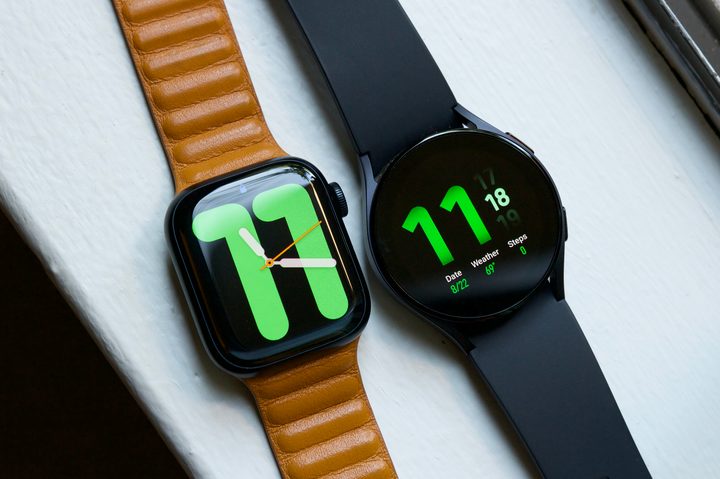
While the applications for the new temperature sensor are pretty narrow at this point, there’s some hope that Apple could expand the sensor’s capabilities in future WatchOS updates or at least create an API that third-party apps can take advantage of. Still, it’s critical to understand the limitations of the technology that hold it back from being a full-fledged thermometer.
Sensing body temperature
When we first heard reports of Apple’s work on a temperature sensor for the Apple Watch, many hoped that it would be sophisticated enough to power a broad array of health applications. The idea of being able to take your body temperature on your wrist opened up numerous possibilities, from monitoring general health and wellness to detecting early signs of infection.
However, it quickly became apparent that the human body doesn’t work in a way that’s conducive to a wrist-based temperature sensor. There’s a reason why medical professionals take your temperature in the mouth, ear, or less comfortable parts of the body. To get a good reading on one’s core body temperature, you need to be reasonably close to the body’s core.
Since the Apple Watch is worn on your wrist, it rules out the possibility of a temperature sensor that can reliably tell if you have a fever. There’s simply no way to get an objectively accurate temperature reading from a bodily extremity.
This is also why Apple has avoided calling the new feature a “body” temperature sensor. In most of Apple’s documentation, you’ll see it referred to either as a “wrist temperature sensor” or merely a “temperature sensor.” It doesn’t measure your true body temperature but rather just the temperature at your wrist.
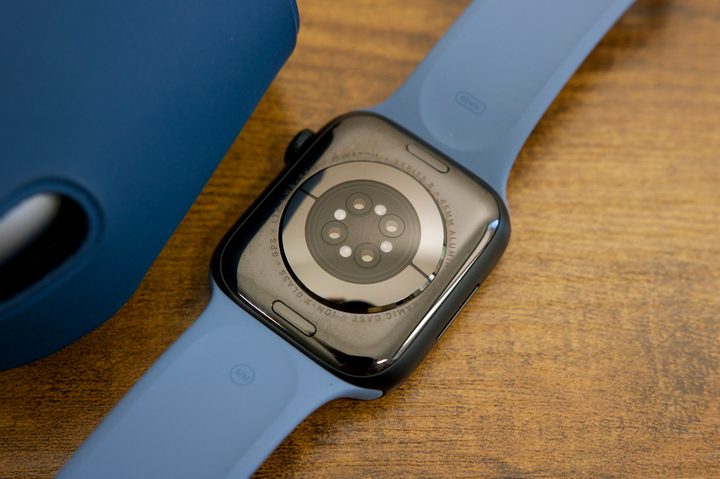
To accomplish this, the Apple Watch Series 8 and Ultra incorporate two separate temperature sensors, one located on the back crystal and another just under the display.
Cycle tracking
Still, it turns out this is enough to power some valuable features. The Apple Watch may not be able to determine your temperature in absolute degrees, but it can establish a baseline “normal” temperature and then record when that rises above or falls below normal. This lends itself to a feature that’s especially useful for many women.
When Apple introduced the original Apple Watch and its HealthKit framework in 2014, it was widely criticized for omitting any features related to women’s reproductive health. Apple’s Health app could track the most obscure vitamin and mineral intakes, yet it had no place for women to record their menstrual periods.
Apple quickly addressed that the following year with iOS 9 and WatchOS 2, and by the time WatchOS 6 arrived in 2019, the company had made an even more serious commitment to women’s health with a dedicated Cycle Tracking app.
The new app was quite valuable for women who wanted somewhere to record information related to their menstrual cycles. However, it was still an entirely manual process. Women had to specifically enter stats like basal body temperature or the results of an ovulation test. From there, it could predict fertility windows and provide other health insights, but it was only as reliable as the data you put into it.
The temperature sensor on the Apple Watch Series 8 (and Apple Watch Ultra) takes away much of that guesswork. There’s a measurable change in a woman’s body temperature after ovulation, and the new sensor on the Apple Watch can detect this to provide a retrospective estimate of when ovulation occurred — without the need to take manual temperature readings and punch them into the Cycle Tracking app.
It’s a promising feature for anybody who is trying to conceive a child or simply wants more insight into their menstrual cycles. However, don’t expect it to work right out of the box; your Apple Watch needs time to get to know you first.
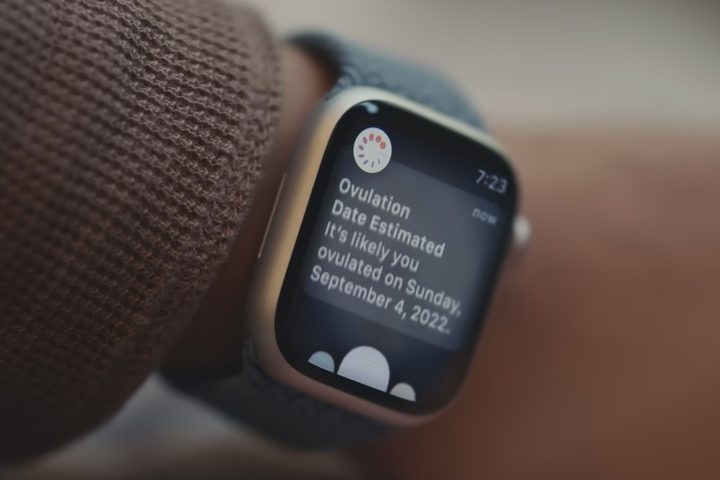
Since the temperature sensor can only detect differences, the Apple Watch must first establish a firm baseline to determine your normal temperature and when changes typically occur. This means one needs to wear the Apple Watch consistently for at least two menstrual cycles to gather the necessary wrist temperature data.
Further, to mitigate against false readings from everyday activities, wrist temperature data is only recorded while you’re sleeping. This means you’ll need to wear your Apple Watch to bed every night with Sleep Focus enabled for at least two months before you’ll get an ovulation estimate. It also helps if you’ve already been accurately logging your periods in the Cycle Tracking app to give the Apple Watch a hint as to when ovulation is more likely to occur.
Since the Apple Watch was released less than a month ago, it’s still too early to tell how well this will work under real-world conditions. Hopefully, we’ll start seeing some hands-on reviews in the near future. In the meantime, Apple notes that Cycle Tracking shouldn’t be used as a form of birth control or as a way to diagnose a health condition without seeing a medical professional.
Sleep tracking
With Apple’s emphasis on the temperature sensor for predicting women’s periods and fertility, it’s easy to dismiss the new feature as entirely useless for people who don’t have ovaries.
However, it turns out that the Apple Watch records your wrist temperature data irrespective of whether you’ve set up Cycle Tracking, and it’s happy to offer that data up as part of your nightly sleep tracking results.
If you regularly wear your Apple Watch to bed for sleep tracking, the Series 8 (or Ultra) will measure your wrist temperature while you sleep, taking readings every five seconds to provide an aggregate temperature for the night. After five nights of at least four hours of sleep each night, you’ll be able to see a chart showing how much your temperature fluctuates from night to night.
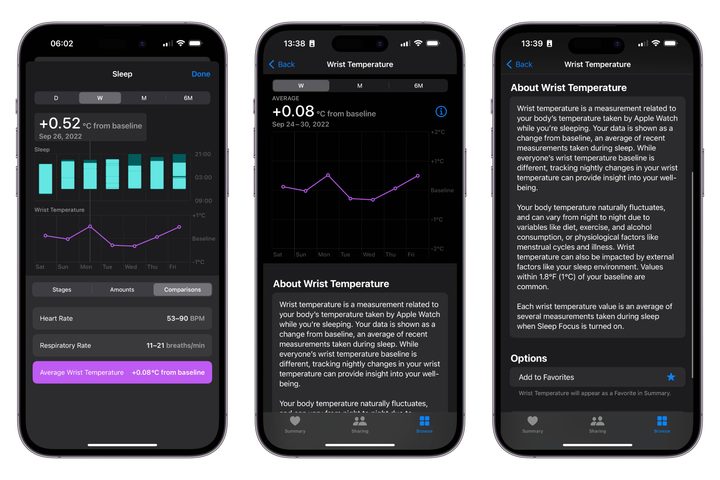
Your Wrist Temperature data can be found in the iPhone Health app under Body Measurements. It also shows up in the comparisons section of your sleep tracking data. For the first five days of wearing your Apple Watch to bed, you’ll see only a note indicating more data is required, but once it has enough data, you’ll get a retroactive estimate that includes those first five days.
Apple doesn’t offer much insight into how to interpret this data, suggesting only that it can “provide insight into your well-being.” Nevertheless, it’s an interesting metric for those who like to track every detail of their health. It could also prove helpful to your doctor in diagnosing a specific problem or medical condition. While Apple notes that fluctuations of up to 1.8 degrees are common, more extreme variations could be a sign that you need to see your doctor.


