  1. Home
  2. Phones
  3. Mobile
  4. News

Digital Trends may earn a commission when you buy through links on our site. Why trust us?

Google overhauls its Family Link app for easier parental controls

Add as a preferred source on Google

Google’s Family Link app has been a great resource for parents looking to keep an eye on what their children are up to with their devices. Now, it’s getting even better thanks to an app overhaul that puts the focus on safety and communication. While the Google Family Link app has previously been praised for its solid parental control settings, the redesign adds plenty of new features that make it easier than ever for parents to monitor smart device usage while keeping children informed about the parental control settings in place.

In addition to a design update that sorts the app into three main tabs (Highlights, Controls, and Location), there’s also a laundry list of new features coming to Family Link. Since safety is a huge part of what makes the app appealing, features such as notification alerts when a device arrives at a specific destination (like school or a friend’s house) and the ability to see an individual device’s battery life are new additions that give parents peace of mind when their kids leave the house.
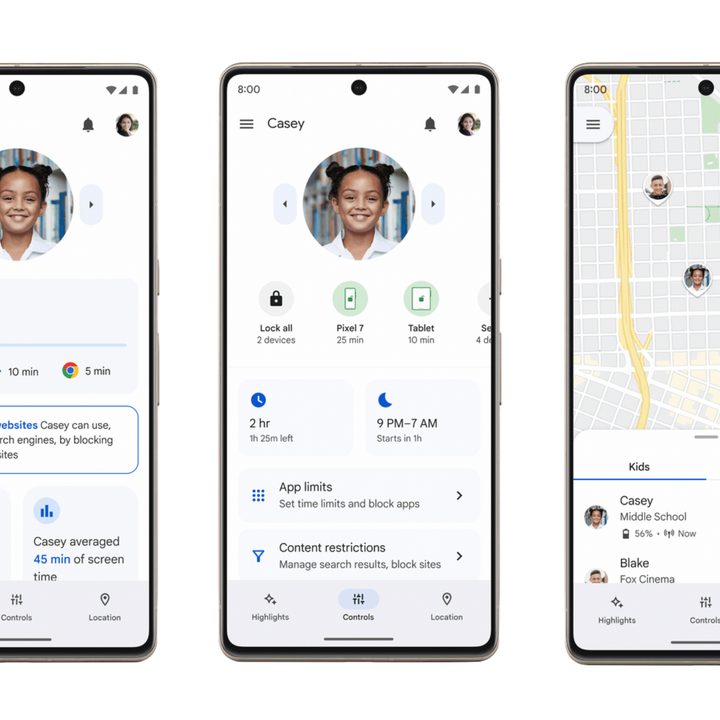
Google Family Link app.
Google

Other new features include the ability to set “Today Only” screen time restrictions that don’t impact other scheduled device limitations. There are also resources from Common Sense Media, ConnectSafely, and the Family Online Safety Institute that can help inform users about online safety, as well as a web browser version of the app that allows parents to access all of Google Family Link’s features from a computer.

Recommended Videos

The new features aren’t just for parents, however, as one is devoted to providing transparency to children’s accounts in a family. With the update, children’s accounts will be told more clearly about the settings their parents have put in place, allowing them to navigate the spaces within the set limits without the hassle of frequently knocking against walls.

The update upgrades the Family Link app to the Material You design aesthetic that so many other first-party Google apps have been adopting. The overhaul update begins its rollout today, October 18, and is expected to be completed in the coming weeks. If you’re anxious to see the new design and features, make sure auto-updates are on for the app and check the Play Store.

Peter Hunt Szpytek
A podcast host and journalist, Peter covers mobile news with Digital Trends and gaming news, reviews, and guides for sites…
Audible just launched a rewards program that pays you back for listening every day
Audible Rewards is now live in the US as a free loyalty program for Standard and Premium members
audible-rewards-program

If you already spend a good chunk of your day listening to audiobooks, Audible wants to start rewarding you for it. The company has launched Audible Rewards, a new program that turns your everyday listening habits into perks, discounts, and exclusive goodies.

It is free to join through the Audible app, website, or Amazon.com, and it is available to both Standard and Premium plan members in the US starting today across iOS, Android, and web.

Read more
Android will now warn you if someone is using AI to fake your contact’s voice on a call
Google's fake call detection is the first time a phone platform has built a real-time cryptographic defense against AI voice cloning scams.
Android fake call detection featured.

Yes, advancements in AI help people from different walks of life, but they have some cons. One of the most exploited con has been AI voice cloning. Over the years, it has reached the point where most people can no longer tell a deepfake voice from a real one. 

Scammers already know this, and they’ve been spoofing users’ contacts, cloning their voice, and committing financial frauds for quite some time. Android's new fake call detection is designed to stop that exact scenario before it costs you.

Read more
The Vivo X300 Ultra is making all camera phones look bad, and here’s why
Vivo X300 Ultra isn't the camera you need, but deserve
Vivo X300 Ultra

For years, smartphone brands have promised “DSLR-like” photography. Most improved image processing, added bigger sensors, or stacked more cameras onto the back. But the Vivo X300 Ultra takes a very different approach - it does not just want to mimic a camera, it wants to behave like one.

From external telephoto lenses and physical camera controls to filter support and tripod mounting, Vivo’s latest Ultra flagship feels closer to a modular photography system than a traditional smartphone. The company is no longer simply chasing better smartphone photos; it is targeting creators who would normally carry a mirrorless camera in their bag.

Read more