
I switched to a nearly 42-inch gaming monitor, and I thought I would hate it. But it’s been close to a month, and the Asus ROG PG42UQ is still sitting on my desk. It’s a 41.5-inch OLED monitor, offering a juiced-up version of LG’s wildly popular C2 OLED, and it could mark a trend toward larger formats in the best gaming monitors (especially as we stare down displays like LG’s OLED Flex).
Outside of OLED, there are now several 42-inch (-ish) monitors on the market, including Aorus’ FV43U and Acer’s Predator CG7. It’s not the form factor for everyone, but for a select group, it strikes the perfect balance between productivity and immersion.
It’s smaller than you think

Forty-two inches seems unmanageable, and given certain circumstances, it can be. But it’s not as bad as you might suspect. I switched from a 27-inch Samsung Odyssey G7 to the Asus ROG PG42UQ, and it feels like I have even more space on my desk now.
That’s mainly because most monitor stands are much larger than they need to be, including the one on the Odyssey G7. The stand has to run up the back of the display and extend further out in front to support where the stand and monitor connect. Some displays have tried to solve this issue, like the Sony InZone M9, but the point remains that traditional monitor stands force you to pull the display closer due to the stand connecting to the back of the display.
Forty-two inches sounds a lot bigger than it actually is.
Not the ROG PG42UQ, though. The two legs are wide, so they only extend a few inches in front of the monitor, and the chunky back support only extends a couple inches behind. The PG42UQ takes up more horizontal and vertical space, but it actually takes up less space in depth.
You’re giving up the adjustment of a traditional monitor stand, but Asus still manages about 10 degrees of tilt. And frankly, height adjustment isn’t an issue with a 42-inch screen.
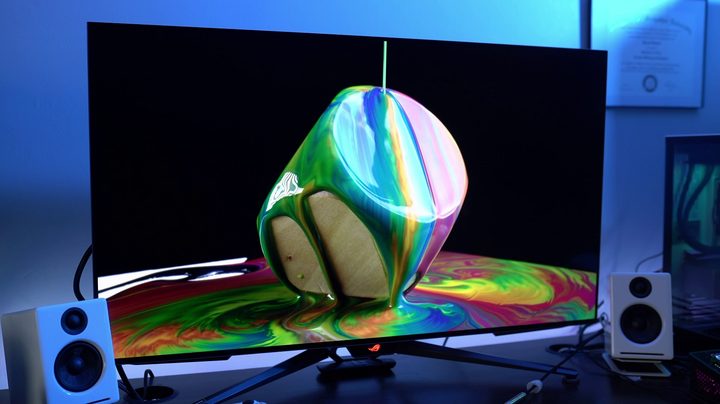
Depth is solved, but what about height and width? Forty-two inches sounds a lot bigger than it actually is. Horizontally, it’s about eight inches larger than a 32-inch monitor like the Gigabyte M32U and 11 inches larger than a 28-inch monitor like the Acer Predator X28. Contrast that with the LG’s 48-inch UltraGear OLED monitor, which is about 17 inches wider than a 28-inch monitor and 14 inches larger than a 32-inch monitor.
The vertical element is even more interesting. I use a 27-inch Gigabyte M27Q as a secondary screen, and it sits 23.5 inches off my desk with a monitor arm. The PG42UQ, due to how low the stand sits, is a mere half-inch taller. The 32-inch Odyssey Neo G8 also nears 24 inches on its stand.
The PG42UQ (and by extension LG’s 42-inch C2 OLED TV) is undoubtedly wider than a standard-sized monitor, but not as much as you would expect. Meanwhile, it takes up less space in depth and is only slightly taller depending on what monitor you’re comparing it to. In short, it’s manageable. I won’t lie and say a 42-inch monitor is small, but it’s much closer to 32 inches than it is to 48 inches (and a far cry from the 55-inch Samsung ARK).
Controller gaming

An often overlooked aspect of PC gaming is that playing games built for a controller on a tiny monitor doesn’t feel right. Games like Elden Ring, Spider-Man Miles Morales, God of War — the list goes on — are meant to be played with a controller, and it’s never felt right to me to hang over my desk with a controller while playing them.
Of all games, I found the advantage of the PG42UQ while playing Sonic Frontiers. I normally wouldn’t play that type of game at my PC, but I was able to lean back my chair with a controller, get some distance between my eyes and the screen, and become immersed as if I was sitting on a couch playing on a console.
I knew that the PG42UQ would excel with this type of game. I was mainly worried about playing with a keyboard and mouse, but after dozens of hours, I haven’t had any issues. The PG42UQ is only a couple of inches wider than an ultrawide 21:9 monitor like the Alienware 34 QD-OLED. You get that same immersive experience that you find with ultrawide monitors where the screen takes up your peripheral vision. That’s with the monitor about 29 inches away from my face, too, which is well within the range for a 27-inch or 32-inch display.
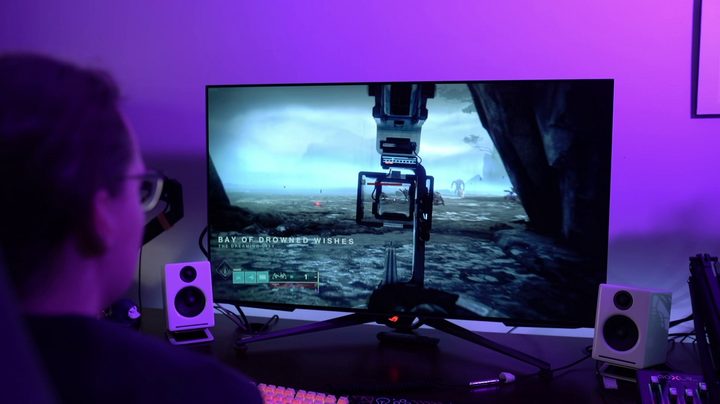
I’ve played games on the PG42UQ for around a month, including everything from Destiny 2 and Warhammer 40,000 Darktide to Sonic Frontiers and Hollow Knight and have yet to find a title that felt out of place. Strategy games like Civilization VI and Cities: Skylines are especially high points, giving you a sprawling overview of the map while you play.
Without issues? No
This format isn’t without its issues. Working on a 42-inch monitor has been an adjustment, not because of the size of the screen, but because of how Windows handles scaling. Out of the box, Windows will default to 300% scaling, which results in windows being cut off when you have two side-by-side and some websites reverting to versions where you can’t see the sidebars.
It’s easy to fix by just turning down the scaling in Windows, but then you’re dealing with text that’s difficult to read on such a large screen. The sweet spot for me is 175% scaling in Windows, but I still much prefer working on a smaller monitor where windows and text are properly sized.
Pixel density can also be a problem. If you’re watching videos and playing games at 4K, you’re still getting a density of 106 pixels per inch (PPI), which is well within an acceptable range. If you’re watching a YouTube video in 1080p or need to turn down your resolution, good luck. At 1080p, the display drops to 53 PPI and reveals just how much of a lower resolution 1080p is compared to 4K.
Not for everyone, perfect for some

A 42-inch monitor like Asus’ ROG PG42UQ doesn’t make sense for everyone. This and other 42-inch displays like the LG C2 OLED are gaming displays first and foremost, and they only make sense if you want the immersive experience of a TV on your desk.
Fortunately, with smaller OLED gaming monitors coming soon, you won’t have to resort to something this large to benefit from OLED.
I used the PG42UQ, but it’s far from the only display this size. I’ve mentioned the 42-inch LG C2 OLED because it actually uses the same panel that’s in the PG42UQ (and it’s much cheaper). If you’re worried about the potential for OLED burn-in (I haven’t had any issues), check out Aorus’ 43-inch FV43U, which is a similar size and pretty cheap considering how large it is.
Although I could see a use case for something like a 48-inch LG CX as a monitor, I wouldn’t use that display myself. Much to my surprise, I’m still using the PG42UQ. I’ve had some issues working on it, but the monitor still balances the eclectic way I use my PC in a way that smaller or larger displays just can’t. If you’ve been looking for something a little bigger without going off the deep end with a TV, give a 42-inch monitor a shot. It might be the perfect size for you.


