
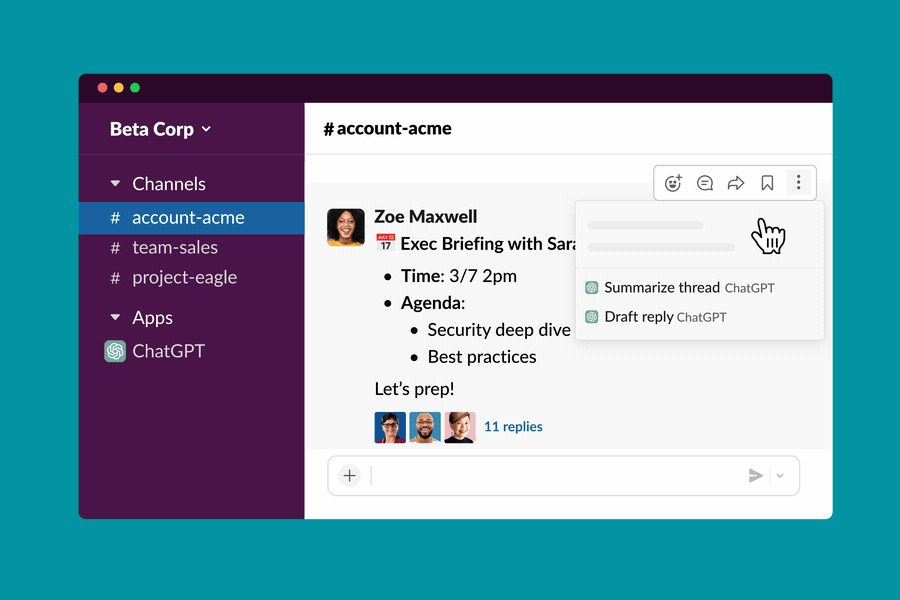
The OpenAI ChatGPT chatbot is now available within the Slack communications platform, making it easier to ask the helpful tool questions or to retrieve information for you. It's in beta, for now, so you'll need to join the waitlist, but if you're already on it, or just want to get ready for when you're given approval, here's how to use ChatGPT on Slack.
How to sign up for ChatGPT on Slack
Since Slack's ChatGPT application is still in development, it's still considered a beta feature, so you'll have to sign up for the waitlist. Once given approval, you can then start using it within your own Slack workspace.
Step 1: Sign up for the ChatGPT app for Slack waitlist, here.
Step 2: You'll have a better chance of being accepted if you're part of a larger organization, or have some specific use in mind, but personal use is fine too.

How to summarize conversations with ChatGPT on Slack
One of the most useful functions of ChatGPT on Slack is in summarizing conversations, so you can get up to speed with what's been discussed quickly and easily.
Step 1: Open your Slack app or the Slack web app, and select the workspace you want to access. Log in if necessary.
Step 2: Select the channel from the left-hand menu that you want to summarize, and then find the specific conversation thread, if needed.
Step 3: Hover over the conversation so that the reaction menu appears, then select the three-dot menu icon for more options.
Step 4: Select Summarize thread ChatGPT. ChatGPT will then give you a custom-written response that summarizes what has been said in the conversation so far.
How to draft responses with ChatGPT for Slack
ChatGPT can also be used to draft responses to questions or queries you receive.
Step 1: Open your Slack app or the Slack web app, and select the workspace you want to access. Login if necessary.
Step 2: Select the channel or person from the left-hand menu who you received a question from.
Step 3: Hover over the conversation so that the reaction menu appears, then select the three-dot menu icon for more options.
Step 4: Select Draft reply ChatGPT and ChatGPT will create a response for you. You can then edit it and send it when ready.
How to ask ChatGPT questions in Slack
ChatGPT's conversational chatbot is also built into the Slack app, and can answer all the same questions as the Bing and Edge integration.
Step 1: Open your Slack app or the Slack web app, and select the workspace you want to access. Log in if necessary.
Step 2: From the left-hand menu, select the ChatGPT application.
Step 3: Write your question as if you were talking to one of your colleagues, then send the message and wait for the response. It should come fairly quickly.


