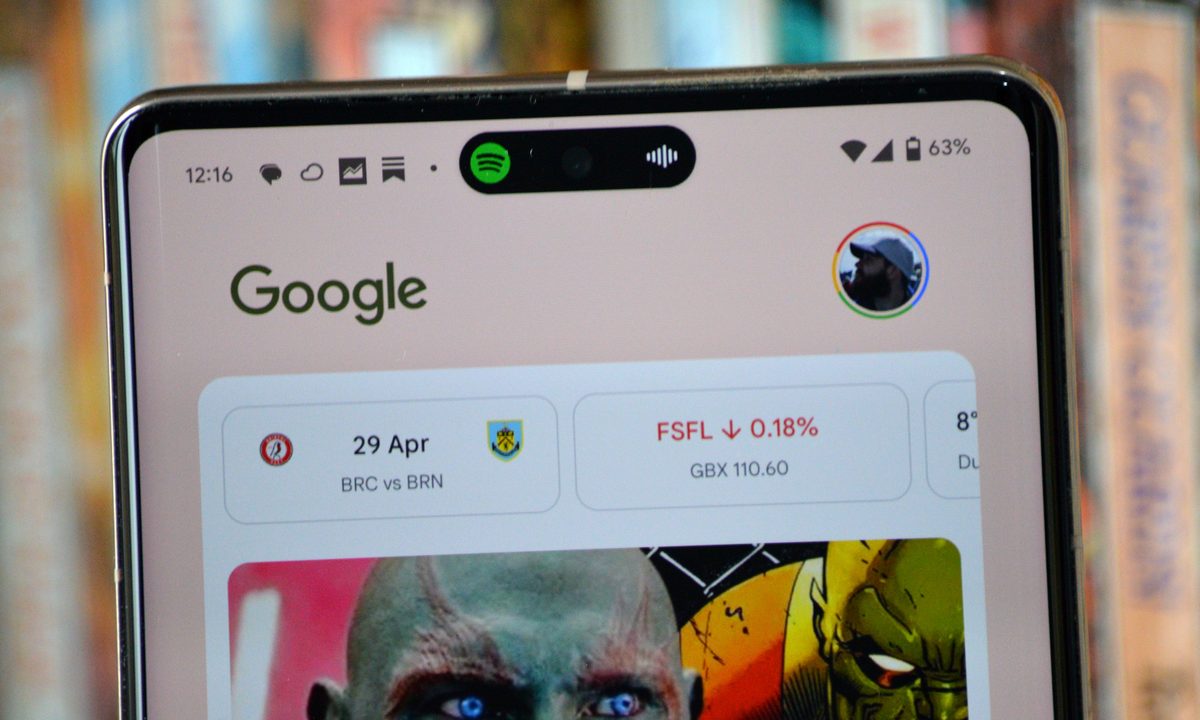
The iPhone 14 Pro's launch brought a number of changes and additions to Apple's smartphone range and one of the coolest is the Dynamic Island — a section of the screen around the selfie camera's hole-punch cutout that expands and changes to deliver notifications, show music tracks playing, and even show you how far away your Uber is.
It's a versatile feature with a lot of potential, even if that potential hasn't been met yet, and it's only available on the Apple iPhone 14 Pro and iPhone 14 Pro Max.
Well, for about five minutes, that is. It's unlikely to come as any surprise that Android apps were able to mimic this feature quickly after the iPhone 14 Pro's announcement, and the most prominent of these apps is DynamicSpot. Launching just weeks after Dynamic Island was revealed, DynamicSpot offers similar functionality to Apple's headline feature, with a wide range of customizable options and app support.
Here's how to use DynamicSpot to get the iPhone's Dynamic Island on your Android phone.

How to download and install DynamicSpot
This may seem obvious, but you'll need to download and install the app before you can begin.
Step 1: Head to DynamicSpot on the Google Play Store.
Step 2: Select Install. Wait for the download to finish, then find it in your app list and open it.
How to add the Dynamic Island to your Android phone
Setting up the app is easy, as it provides you with a guide to get going, but we'll lay out the process below, so you're aware of what needs to be done and why.
Step 1: Open the app and select Next to get started.


Step 2: You'll be presented with a list of instructions to follow to set the app up. First, choose Select apps to choose which apps can trigger DynamicSpot. Spotify, YouTube Music, Audible, and other music or multimedia apps are a good place to start, but you could also include messaging apps too. Select the apps you want, then choose the back button in the top-left to continue.
Step 3: Select Notification access, and then choose DynamicSpot from the list and toggle on Allow notification access > Allow. This gives the app the ability to display your notifications.
Step 4: Now select Draw on screen > Next > DynamicSpot, and toggle on Use DynamicSpot > Allow. This allows the app to draw DynamicSpot over other apps.
Step 5: Select Done and then Allow to let the app run in the background.
That's it; you're set up and ready to roll. To test it out, boot up one of the apps you selected and give it a whirl. We tested it out by playing a song on Spotify and then going back to the home screen. DynamicSpot opened up as a small pill at the top of the screen a moment later. Tap it once to reopen Spotify, or long-press it to access quick controls to pause, play, skip, or rewind your content.


How to customize DynamicSpot
We've installed this app on a Pixel 3a XL and a Pixel 7 Pro, and the app works fine with or without a hole-punch camera cutout. However, you may find the island doesn't sit perfectly on top of your phone's camera cutout — and that can be very annoying indeed. Thankfully, you can change that by opening the DynamicSpot app, choosing Position, and moving the sliders to fine-tune the pill's position.
It's also worth exploring more of these settings, as there's a lot you can customize. You can change the pill into a notch, change the background color, or add an additional popup that gives quick access to certain apps. A lot of these options are hidden behind a single payment, but it only costs $5, with sales prices also available from time to time.