
Any time I discuss the latest Switch game with my friends, I usually hear the same critique: “I wish I could remap the controls.” Major Switch exclusives like The Legend of Zelda: Tears of the Kingdom and Metroid Dread are seriously lacking in control customization, which can be frustrating if your brain has a specific idea of what a gamepad layout is.
There’s a fairly good excuse as to why those games don’t include controller customization options, though. It’s because of a system-level controller remap option tucked deep away in the Nintendo Switch’s settings menu. If you didn’t know that existed (as few of my friends seem to), get ready for a solution to all your control issues that’s been hiding in plain sight all this time.
To find that option, you’ll need to pop into the Settings menu and scroll down to Controllers and Sensors. Click Change Button Mapping from there and you’ll find that you can completely change the button layout for each individual Joy-Con or Pro controller currently connected to the system.
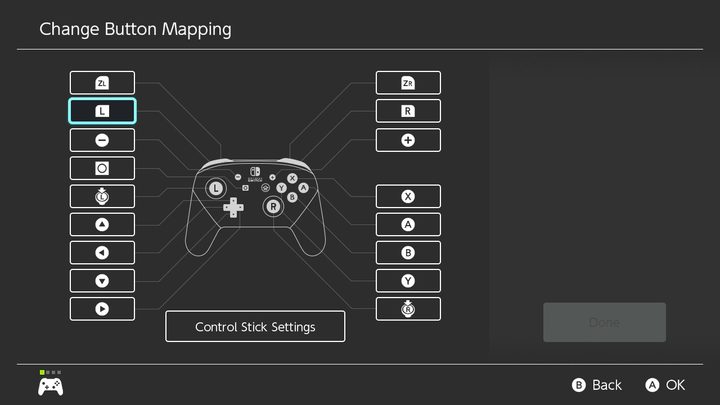
Every single button on a Joy-Con can be changed, even down to the console’s home button or the SL/SR bumpers that appear on detached Joy-cons. You can even change what happens when you click in a joystick, setting a button to that for easy access. My personal favorite, though, is the ability to remap the screenshot button and even disable it entirely. It’s a godsend if you’re trying to prevent your kid from accidentally taking a million photos when playing Mario Party.
That tool is perhaps most useful for anyone who uses Xbox controllers regularly, or gamepads that follow its layout. The most annoying thing about the multi-platform ecosystem is how the ABXY layout changes from controller to controller. The Switch’s A button is the Xbox’s B button, and the Xbox’s Y button is the Switch’s X button. I still get mixed up from time to time, but the Switch’s remapping tool lets you fix that problem easily by simply swapping all its face buttons (or you could remap them on Xbox instead).
Once you’re done tinkering, you can save and load different presets in the Button Mapping menu. It’s a quick tool that will let you create different profiles that you can customize to fit whatever you’re playing.
If you’ve ever found yourself struggling to keep the Switch’s buttons straight, I recommend popping in and experimenting. Even if you don’t plan to get super creative with it, something as simple as changing what happens when you press joysticks in can make a big difference in a fast-paced game like Metroid Dread that leaves those buttons unused. It’ll make your aging Switch feel brand new — even if it won’t fill the Pro-sized hole in your heart.


