Tired of hearing about AI? Well, get ready. Google is now adding generative AI built right into its Chrome web browser.
In a new announcement, the company revealed that Chrome is set to receive three new additions that will leverage artificial intelligence to simplify tab organization, enable personalized theming, and, most significantly, even assist users in drafting content on the web anywhere an empty text field exists.
AI-powered writing assistance
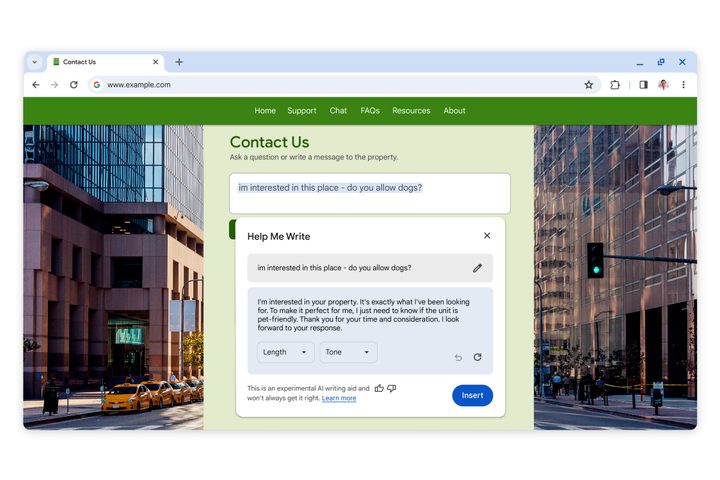
If you find it challenging to express yourself with confidence on the internet, this feature could be the solution you’ve been looking for. Next month’s Chrome update will be introducing an experimental AI-powered feature that has been designed to assist users in crafting well-written content anywhere on the internet.
The feature will be easy to access by just right-clicking on a text box or field on any site and selecting Help me write. Simply input a few words, and Chrome’s AI should jumpstart the writing process. This could be a great way to draft articulate emails, RSVPs, or make formal inquiries online.
Having AI-generated text at your fingertips without leaving the site you are on is a surefire to fill the internet with AI writing. Integrating AI-generated text into Microsoft Word or Google Docs is one thing — offering it at any empty text field across the web takes things to a whole new level.
Smart tabs and themes

This one’s a bit milder, but Chrome will also begin using AI to help better manage tabs. Chrome currently offers the ability to manage multiple tabs by organizing them into groups, which can feel cumbersome sometimes. Recognizing the manual effort involved in creating tab groups, the smart tab organization feature will now use AI to automatically suggest and generate tab groups based on your open tabs.
Whether you’re researching for an essay or browsing multiple stores for the best deals, simply right-click on a tab and select Organize Similar Tabs to Chrome, which will do the heavy lifting. Google says that this feature can even suggest names and emojis for these new groups, ensuring you can effortlessly locate them when needed.

Lastly, you can personalize your browser using AI, too. Building on last year’s introduction of generative AI wallpapers on Android 14 for Pixel devices, Chrome now allows users to create custom themes without needing AI expertise.
You can head to the Customize Chrome side panel, click Change theme, and then Create with AI. Choose a subject, mood, visual style, and color, and Chrome will generate a unique theme tailored to your preferences.
Keep an eye out for these features, as they are set to launch on Macs and Windows PCs in the U.S. over the next few days. To get access, users must sign into Chrome, select Settings from the three-dot menu, and navigate to the Experimental AI page. It is important to note that these features are experimental; thus, they will be disabled for enterprise and educational accounts at the moment.