

Arguably the best thing about the AMD Ryzen 7 7800X3D is its affordability. It’s the best gaming processor in the world (even better than the 14900KS) and yet you can buy it for around $350, so why ruin that affordability with an expensive motherboard? While there is an argument to be made that you’ll maximize its performance with a top-tier board, that’s not a necessity and, in fact, you can get most of what you need with a more modest buy.
Instead of paying through the nose, get this great motherboard and use the money you save to get something else. Like a faster graphics card, or a bigger SSD.
Note: Whatever motherboard you buy, update the UEFI/BIOS as soon as you receive it, just in case your particular board is susceptible to some of the power bugs that were a problem around the launch of the 7800X3D.
The best: MSI Mag B650 Tomahawk Wi-Fi
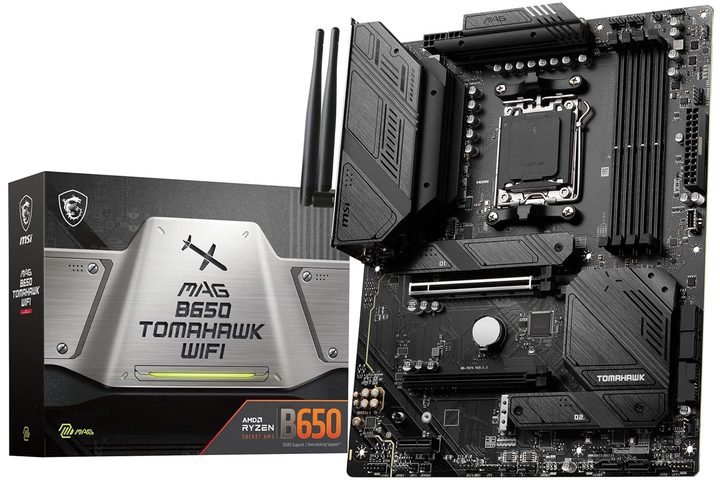
This motherboard represents a fantastic value for a Ryzen 7 7800X3D-based gaming PC. It has top-tier features, impressive specifications, and its price tag is around $200, meaning you can bundle it into a sub-$1,000 gaming build if you’re careful, or save yourself enough money to get a beefier GPU to really boost your frame rates.
Yes, it’s based on AMD’s B650 chipset, which is a midrange option, but you aren’t missing out on much. You lose support for PCIExpress 5, which is a bummer if you’re looking for max storage speed, but PCIE 4 is more than enough for modern graphics cards and high-end storage. There’s little need for PCIe 5 outside of very particular scenarios. You don’t even need it for DirectStorage games — PCIe 4 is plenty fast enough.
You also lose out on a few USB ports and PCIe lanes, but are you really going to miss those? Probably not. What you get instead is a more affordable motherboard that can still allow your 7800X3D to run at its peak performance, along with a lower thermal design power (TDP) for the board — so a cooler and quieter build, overall. There are also four RAM slots, a handful of high-speed PCIexpress ports, and in the case of this particular motherboard, impressive voltage regulation modules (VRMs).
I know it’s a matter of personal taste, but I think this board looks pretty slick too. The all-black design, passive low-profile chipset and SSD heat sinks, and armored PCI Express slot all look great.
Its an ATX board, so you’ll need the space in your PC for it, but with all the heat sinks being relatively low profile, you shouldn’t run into any clearance issues with large CPU coolers or GPUs. Even two front-mounted M.2 slots come with their own stealthy heat spreaders.
The VRMs themselves are built with a 14+2+1 phase design, which is plenty for the standard performance boost overdrive (PBO) that you’ll probably be using with the 7800X3D. There isn’t a ton of overclocking potential with it, so this board is more than suited to just plug and play while you enjoy your CPUs fantastic performance.
Best for overclocking: Asrock B650e Taichi
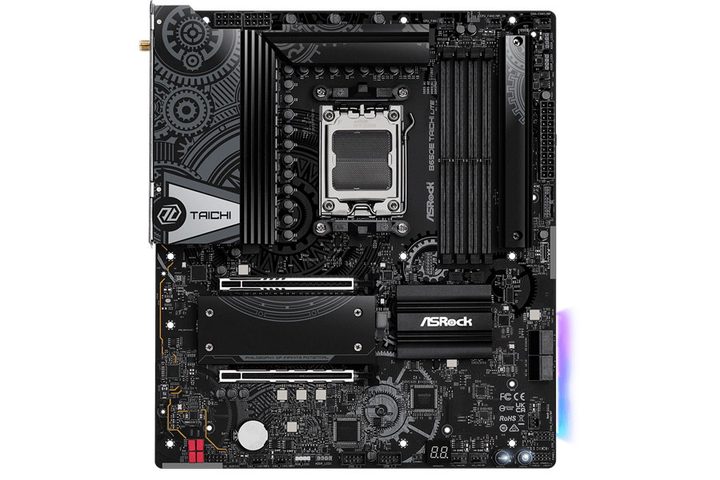
So you want to overclock the 7800X3D, huh? Not satisfied with its already incredible power and don’t mind making it less efficient? Fair enough. You’re an enthusiast. We get it. You still don’t need to buy a top spec motherboard though.
The Asrock B650E Taichi Lite is a great midrange board at a somewhat affordable price that offers strong VRMs for overclocking, but just as importantly, it has the ability to adjust eCLK frequencies. This is one of the best ways to enhance the performance of the 7800X3D, and not all boards support it. This one does, and along with memory overclocking, you should be able to eke out a little more performance from your already stellar gaming CPU.
It offers an overbuilt 24+2+1 phase power design for its VRMs, so it should offer excellent stability during your overclocking adventures, and with a robust but attractive heat sink, you needn’t fear that they’ll overheat. It has full support for PCI Express 5.0 for graphics, and is rated for DDR5 memory speeds up to 7,600MHz — perfect if you’re overclocking your memory too.
It supports USB4, and comes with 2.5 Gigabit Ethernet and Wi-Fi 6E built in, along with Bluetooth 5.3. It’s an altogether more impressive motherboard than our best pick, but it does come at a higher price tag. If you’re willing to pay it, it’s a fantastic pairing with the 7800X3D.
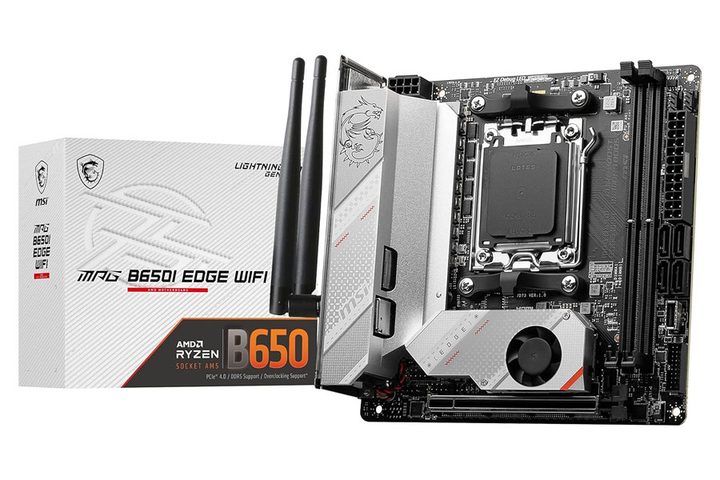
Best ITX: MSI MPG B650I EDGE WIFI
Building in a small PC? I wish the skin on your hands well as they scrape along every exposed piece of metal in there. But jokes about ITX clearance issues aside, the 7800X3D is an incredible processor for a compact gaming PC. It barely pulls 50 watts during gaming, so it’s the absolute best tool for the job when you absolutely need to keep power draw and temperatures low. But what board to pair with it?
Again, while there are some amazing ITX motherboards out there sporting the latest and greatest features, I’m more of a fan of just getting what you need from a motherboard and not much more. That’s why I like the MSI MPG B650I EDGE WIFI. It’s a compact ITX board with a lot going for it, as it ditches many of the drawbacks of classic ITX builds while offering a clever design and some impressive features.
It’s fully compatible with the 7800X3D and AMD’s newer 8000-series APUs if you ever wanted to go without a graphics card for casual gaming. It supports a reasonable VRM with an 8+2+1 phase power design, so you shouldn’t have any trouble boosting your 7800X3D to its stock limits, though this isn’t the board for more extreme overclocking.
It does, however, manage to cram four RAM slots on there, so you can fully saturate your board with additional memory as it ages. It supports 2.5 Gigabit Ethernet right out of the box, and has dual antennas for robust Wi-Fi 6e support. There’s no USB4 or PCIe 5, but it does have a USB 3.2 Gen 2×2 port for the front and another for the back, with each offering up to 20Gbps if you need it.
There’s a bit of a chunky VRM heat sink on this one, so the only real potential problem to watch out for is whether you’ll have cooler clearance issues. But in an ITX build, you’re probably opting for an all-in-one (AIO) anyway, so that’s unlikely to be a real issue.


