

When Microsoft went to launch its new Copilot+ PCs, it needed an AI feature that could showcase the power of the new NPU and AI models. That feature is Recall.
On one hand, it’s a privacy nightmare wrapped in a glorified search bar. On the other, it could represent the biggest change to the way we use PCs in years.
What is Recall?

At its simplest, Recall is a way of searching through your past activity on your PC. You can see all the apps and websites you’ve used, and there’s a timeline that lets you scroll back.
What makes it unique, of course, is the AI component that can take your natural language prompts and requests. Say you’re trying to remember a detail from a conversation you had, but don’t know what app it was in. With Recall, you could just type in a natural question, and with full access to everything you’ve done on your PC, it can dig through every app, conversation, and website to find what you’re looking for — even if there isn’t an exact match.
Recall lists the results as either a “close match” or a “related match” — also breaking them down by “text matches” and “visual matches.” One example given by Microsoft is if you search for “goat cheese pizza,” you might get results that include other Italian dishes as well.
Another of the examples Microsoft gave was to remember a quote from a Teams message and paste it in to a text box in the slide of your PowerPoint presentation. Or more simply, Recall could fix the problem of never knowing where you saved a particular file. Recall would be able to find it without you needing to know the exact file name or folder.
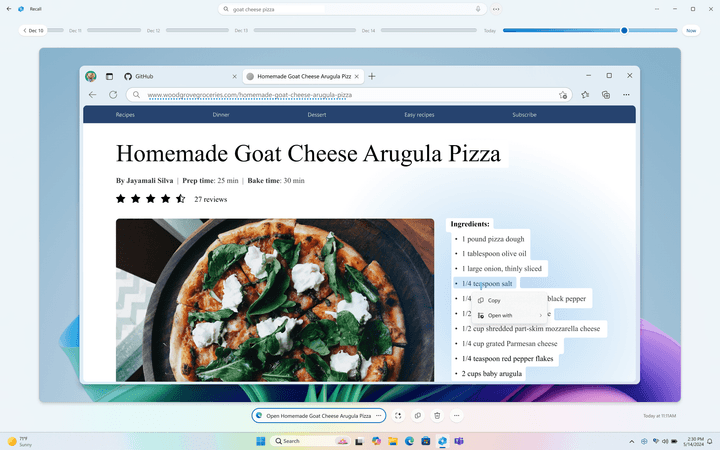
Once you find what you’re looking for, you can interact with those elements all within Recall. The program is smart enough to give you different options based on the type of content, whether that’s a photo, text, or website.
Recall will be accessible right from the taskbar, as well as by using the Windows Key+J keyboard short.
Why are people so upset about it?
Microsoft is using small language models that run in the background at all times — persistent AI that’s always watching. It’s taking snapshots every five seconds of what you do and showing it to the models running on the PC’s NPU. That means that by default, your PC is aware of every single thing you do on it, and can recontextualize that behavior through AI. That means every website you visit, every video you watch, every word you type, and every DM you send will be tracked. From a privacy and security angle, it’s not hard to imagine why that makes some people feel comfortable.
Beyond that, some serious security and privacy concerns have come to light, mostly through the cybersecurity researcher Kevin Beaumont. Since the concerns have been raised, Microsoft has since pulled back in a number of ways on its implementation of Recall. First, the company made the feature opt-in rather than on by default. Microsoft also changed it to be locked by Windows Hello. But as the problems considered to build, Microsoft finally announced that Recall would be pulled from the first wave of Copilot+ PCs.
https://twitter.com/GossiTheDog/status/1798812975735996772
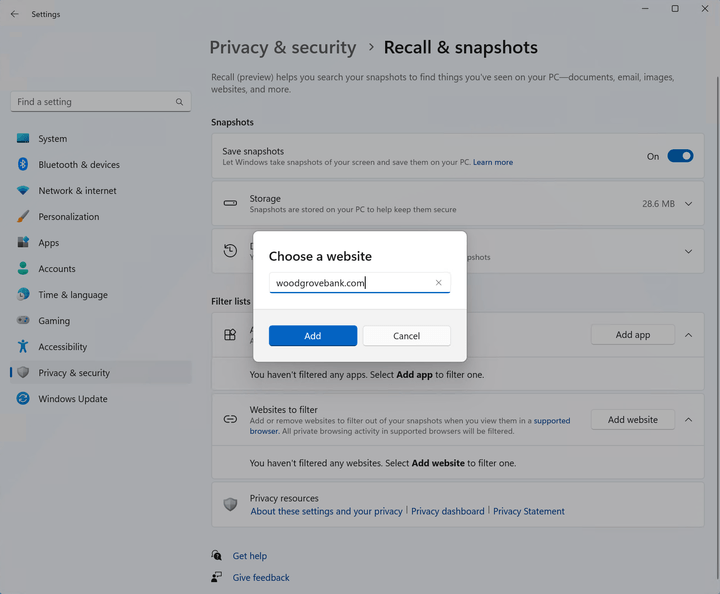
Once it does become available, it sounds like it will likely be fully opt-in. That means you can disable and edit everything Recall has access to. So, you can filter out certain apps or websites, delete parts of your data, or turn it off entirely. You can also set a storage limit so that older snapshots are deleted first. This will most likely be something that happens at setup, but it can also be tweaked in the settings later.
More than that, Microsoft has stated that because Recall uses the NPU, the AI functions entirely on-device. That means your data never gets sent out to the cloud and is never shared directly with Microsoft. The company has promised that the data isn’t used to train the models either. Despite all of that, because of the sensitivity of the data, not everyone is going to feel comfortable taking Microsoft’s word for it.
The other thing people are upset about has to do with compatibility, which gets into what devices will have access to the new feature.
What devices can use it?

Not yours, unfortunately. That is — not unless you are going to be among the first to buy one of the new Copilot+ PCs. Even next-gen AMD and Intel devices that are part of the “Copilot+” brand won’t get Recall at launch.
And even so, Microsoft has already removed Recall from the first wave of Snapdragon X PCs in response to the security criticisms. It will launch at some point through an update, but we don’t yet know when.
That said, these still look like they’re going to be some pretty impressive laptops — certainly heads and tails above the currently available models. They’re the first ARM Windows PCs worth buying, and in a lot of ways, even appear to go toe-to-toe with modern MacBooks. Microsoft claims the NPU inside, capable of 40 TOPS at very low wattages, is what makes Recall possible. Rather than tapping your CPU or GPU, Recall is completely offloaded to the NPU in the background.
Now, you might be wondering why your GPU can’t handle the job. I’ll be honest — Microsoft doesn’t have a great answer for that. At least not beyond the fact that it might hurt your battery life. But as the headlining AI feature of Copilot+, it’s not about to just open it up to all PCs.
That being said, the NPU certainly seems like it’s here to stay, and you can expect performance capabilities to ramp up on it over the next few years. Who knows — maybe Recall really does need that efficient NPU to do the job. Either way, it’ll likely be limited to a select few users for the next few months.


