  1. Home
  2. Computing
  3. News

All the new ways the Vision Pro just got so much better

Add as a preferred source on Google
Promotional logo for WWDC 2023.
This story is part of our complete Apple WWDC coverage
Updated less than 23 hours ago

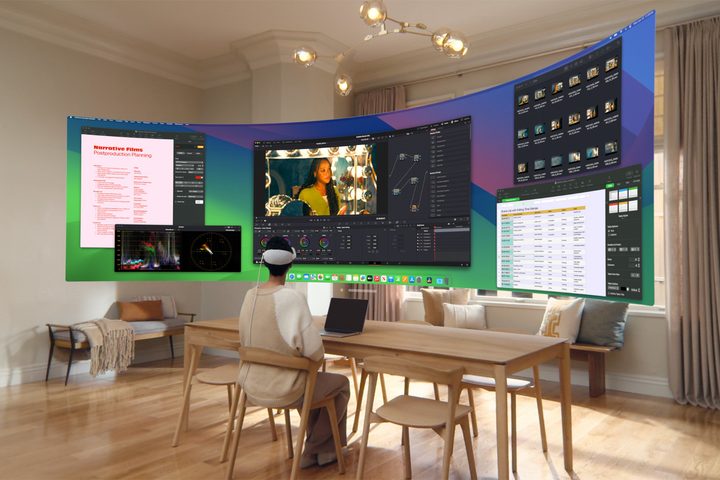
A person looks at a large Mac Virtual Display while wearing an Apple Vision Pro.
A person looks at a large Mac Virtual Display while wearing an Apple Vision Pro. Apple

At the WWDC 2024 event, the biggest news was Apple Intelligence bringing AI power to the iPhone and Mac, but the tech giant hasn’t forgotten about the Vision Pro.

Recommended Videos

VisionOS 2 is coming this fall and brings some great new features and refinements. A few stood out as particularly interesting, like the ability to convert regular pictures into spatial photos, and the new Train Mode, an expansion of Travel Mode that lets you use your Vision Pro on planes, trains, and subways.

Apple also showed off a much wider Virtual Display. With an ultrawide floating screen, your Mac connection should become much more useful, with enough room for multiple windows.

Apple TV support will be improved with up to five simultaneous screens. While that has limited value for movies and series, it’s a great addition if you follow sports or news. VisionOS 2 also brings AirPlay support, so you can stream from an iPhone, iPad, or Mac to your Vision Pro headset.

Web videos will gain a free-floating mode, and Apple removed limits on window size and position. You can position them further away, change the size, and even place them above you when lying down.

An Apple keyboard appears to flot in a Vision Pro immersive environment.
An Apple keyboard appears to float in a Vision Pro immersive environment. Apple

Your Vision Pro will also get better Bluetooth accessory support. Apple skimmed over these important upgrades, but your keyboard will soon be visible even in immersive environments, appearing within the space just like your hands. VisionOS 2 also enables Bluetooth mouse support, a surprising omission in the launch version.

It will be easier to share your Vision Pro with others this fall since visionOS 2 allows your headset to remember guests for up to 30 days. Currently, a guest user must go through setup every time they borrow your Vision Pro.

A new pinch gesture, with an upward-facing palm, makes it easier to access your Home View. A downward pinch opens the Control Center.

These are all great additions that expand the usefulness of the Vision Pro, addressing some common customer complaints about what seemed like arbitrary restrictions. Of course, we want to use a mouse, see bigger Mac windows, and use the Vision Pro while commuting.

Apple still doesn’t have a solution for long-term comfort while wearing the Vision Pro, and it’s still ridiculously expensive, but it’s nice to see ongoing software improvements to what remains one of the best VR headsets you can buy.

Alan Truly
Alan Truly is a Writer at Digital Trends, covering computers, laptops, hardware, software, and accessories that stand out as…
Ugreen’s portable monitor is utterly sharp, sleek, and costs a pretty penny
Computer, Electronics, Pc

Portable monitors have become the Swiss Army knives of modern tech. They travel with remote workers, expand cramped laptop screens, and occasionally double as gaming displays in hotel rooms. Most of them also follow a familiar formula: a basic Full HD panel, a foldable cover, and a price that stays comfortably under $250. Ugreen clearly looked at that formula and decided to ignore it.

The company's new AP16 portable monitor has officially landed in the U.S., bringing a feature list that feels more like a premium desktop display than something designed to slip into a backpack. The catch is that it costs $350, placing it well above many rivals.

Read more
Windows 11 adds a neat upgrade that enables simultaneous streaming for two audio devices
Microsoft’s new Shared Audio feature lets two people listen from one Windows 11 PC, but hardware support is still limited.
A laptop sits on a desk with a Windows 11 wallpaper.

Microsoft’s previewing Shared Audio for Windows 11, a feature that lets one eligible PC send the same sound to a pair of wireless accessories.

It’s built for common laptop moments, like watching a movie on a plane, sharing music while studying, or listening together without handing over one set of earbuds. You’ll need Bluetooth LE Audio gear since older Bluetooth headphones don’t have the broadcast support this feature uses.

Read more
Microsoft Edge is about to get more frequent updates, but don’t expect more features
Starting with Edge 152 on August 27, Microsoft is cutting its release cycle in half, with smaller but more frequent updates for Stable channel users.
Microsoft Edge illustration official

Microsoft is accelerating updates to its Edge browser, switching from a monthly release schedule to a biweekly one. The change takes effect with Edge 152, due on August 27, and puts the browser on the same cadence as Google Chrome.

More updates, not more features

Read more