Microsoft’s previewing Shared Audio for Windows 11, a feature that lets one eligible PC send the same sound to a pair of wireless accessories.
It’s built for common laptop moments, like watching a movie on a plane, sharing music while studying, or listening together without handing over one set of earbuds. You’ll need Bluetooth LE Audio gear since older Bluetooth headphones don’t have the broadcast support this feature uses.
For now, Microsoft says Shared Audio is available in preview on select Copilot+ PCs with compatible audio hardware and drivers. Broader Windows 11 PC support is planned, but Microsoft hasn’t given a general release date.
How shared listening works
Shared Audio uses Bluetooth LE Audio to send one stream from the PC to both output devices. Windows 11 adds a Quick Settings tile where users can choose paired accessories and start the session from the same panel.
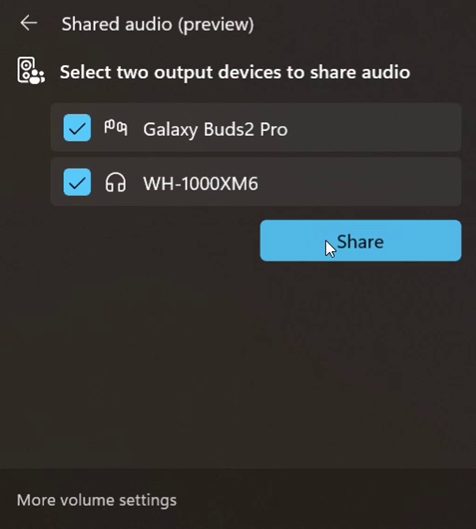
The preview interface shown by Microsoft has two connected devices selected in the Shared Audio window, with one control to begin sharing. That keeps the process closer to joining Wi-Fi than digging through old audio menus.
The accessory list already includes Samsung Galaxy Buds2 Pro, Galaxy Buds3, Galaxy Buds3 Pro, Sony WH-1000XM6, and recent LE Audio-capable hearing aids from ReSound and Beltone. Classic Bluetooth headphones won’t work here.
Which devices can use it
The PC side is the bigger filter. Microsoft lists several Surface Laptop and Surface Pro models with Qualcomm Snapdragon X chips as supported today, provided they have the required Bluetooth and audio driver updates.
More machines are in the preview path, including 12-inch Surface Pro models, Samsung Galaxy Book4 Edge, Galaxy Book5 360, Galaxy Book5 Pro, and Galaxy Book5 Pro 360. You shouldn’t expect the tile to appear on every Windows 11 laptop after a regular update.
There’s also a firmware step for headphones and earbuds. Microsoft recommends using the accessory maker’s app to confirm LE Audio is enabled and the latest firmware is installed. If listed gear doesn’t show up, removing and re-pairing it may help.
When users can try it
Shared Audio is still an Insider preview feature, so check eligibility before hunting for the setting. You’ll need a listed Windows 11 Copilot+ PC, the right Insider build, current drivers, and two LE Audio accessories.
When everything lines up, the Shared Audio tile should appear in Quick Settings. Microsoft has also been improving the preview with per-accessory volume sliders and a taskbar indicator while sharing is active.
Most users should wait for wider device support. People with the right hardware can try it now through the Insider path, and the Quick Settings tile is the clearest sign that the PC is ready.