


When it came out earlier this year, the Surface Laptop 7th Edition was a breath of fresh air. So much so that our computing editor adopted it as his “new daily carry” after reviewing the device.
And while we still highly recommend that laptop, there’s a new challenger in town. The Lenovo Yoga Slim 7i Aura Edition is one of the rare laptops comes with a 15-inch display that can match the Surface Laptop 7th Edition — and it also comes with the latest Intel chip. It’s the perfect foil to the Surface Laptop 7th Edition, and in some ways, might be an even better option.
Specs and configurations
| Lenovo Yoga Slim 7i Aura Edition | Microsoft Surface Laptop 7th Edition 15 | |
| Dimensions | 13.54 x 9.27 x 0.55 inches | 12.96 x 9.41 x 0.72 inches |
| Weight | 3.37 pounds | 3.67 pounds |
| Processor | Intel Core Ultra 7 256V Intel Core Ultra 7 258V |
Qualcomm Snapdragon X Elite (12-core) |
| Graphics | Intel Arc 130V Intel Arc 140V |
Qualcomm Adreno |
| RAM | 16GB 32GB |
16GB 32GB 64GB |
| Display | 15.3-inch 16:10 2.8K (2880 x 1800) IPS, 120Hz | 15.0-inch 3:2 2496 x 1664 IPS, 120Hz |
| Storage | 512TB SSD 1TB SSD |
256GB SSD 512GB SSD 1TB SSD |
| Touch | Yes | Yes |
| Ports | 2 x USB-C with Thunderbolt 4 1 x USB-A 3.2 Gen 2 1 x HDMI 2.1 1 x 3.5mm headphone jack |
2 x USB4 USB-C 1 x USB-A 3.1 1 x 3.5mm audio jack 1 x Surface Connect |
| Wireless | Wi-Fi 7 and Bluetooth 5.4 | Wi-Fi 7 and Bluetooth 5.4 |
| Webcam | 1080p with infrared camera for Windows 11 Hello | 1080p with infrared camera for Windows 11 Hello |
| Operating system | 70 watt-hour | Windows 11 |
| Battery | Windows 11 | 55 watt-hour |
| Price | Buy at Lenovo | Buy at Best Buy |
The Yoga Slim 7i Aura Edition starts at $1,280 for a Core Ultra 7 256V, 16GB of RAM, a 512GB SSD, and a 15.3-inch 2.8K IPS display (the only option). A larger 1TB SSD is a $42 upgrade, and going to a faster Core Ultra 7 258V, 32GB of RAM, and a 1TB SSD is $1,422.
By comparison, the 15-inch version of the Surface Laptop 7th Edition starts at $1,300, coming with a Snapdragon X Elite chipset, 16GB of RAM, a 256GB SSD, and a 15.0-inch 2496 x 1664 IPS display (also the only option). You can max out a high-end configuration with 64GB of RAM and a TB of storage for $2,500. The only way to get a cheaper Surface Laptop 7th Edition is to jump down to the smaller 13-inch model, which starts at $999.
That makes the Yoga Slim 7i a lot more attractive for price-conscious buyers.
Design

The Surface Laptop 7 didn’t change much from its previous generations, with just a few tweaks such as slightly thinner display bezels and corners that are more rounded. Those tweaks combine to take a very attractive, if minimalist, design and make it look slightly better. There are still four distinct colors, including Sapphire, Dune, Black, and Platinum, which compete more directly against the MacBook Air than a laptop like the Yoga Slim 7i Aura Edition that comes in a single dark gray color. The Lenovo is also minimalist, with rounded bezels edges that give it a slightly softer aesthetic. They’re both good-looking laptops.
They’re both also built extremely well. They’re all aluminum, to begin with, and they both feel solid. There’s no bending, flexing, or twisting anywhere, and they both exude quality. That’s not unusual among modern premium laptops, though, so it’s to be expected. You won’t choose either based on build quality alone.
Perhaps more important is their overall sizes. The Yoga Slim 7i has a slightly larger display and so is wider, but the Surface Laptop is deeper, thicker, and heavier. You’ll feel it a lot more when you’re carrying it around. The Yoga Slim 7i lives up to its name — it’s not quite as insanely thin as the MacBook Air 15, but meaningfully thinner than the Surface Laptop.
The Surface Laptop has a better keyboard, though. Both keyboards have large keycaps and comfortable key spacing, but the Surface Laptop’s switches are notably deeper and snappier. That makes it just a little more comfortable for long-term typing, although most users might not notice the difference. And the Surface Laptop’s haptic touchpad is a bit smaller than the Yoga Slim 7i’s mechanical version, but haptic touchpads are more responsive and customizable. Both laptops have touch-enabled displays, while the Surface Laptop’s display also supports Microsoft’s active pen.
Connectivity is close, with both having fast, modern ports and the Yoga Slim 7i differentiating itself with an additional HDMI connection. Both also have up-to-date wireless connectivity.
Finally, both also have equally sharp 1080p webcams with infrared cameras, and both support the full complement of Microsoft Copilot+ PC AI features.
Performance

Both laptops are among the first to introduce their respective chipsets. The Surface Laptop has the Qualcomm Snapdragon X chipset, which aims at both performance and efficiency, while the Yoga Slim 7i is one of the first with Intel’s Lunar Lake, a more efficiency-oriented option. The Snapdragon X Elite is a 12-core chipset graphics with performance in between Intel’s earlier U-Series and H-Series Meteor Lake chipsets, while the 17-watt Core Ultra 7 258V in the Yoga Slim 7i is closer to the 15-watt U-series offerings.
That’s apparent in our benchmarks, where the Surface Laptop is considerably faster than the Yoga Slim 7i in multi-core tasks, and the Lenovo is slightly faster in single-core performance.The Intel Arc 140V and Adreno integrated graphics are roughly the same speed, which is still considerably slower than even entry-level discrete GPUs.
Ultimately, the Surface Laptop will be faster than the Yoga Slim 7i for the most demanding productivity users, but neither machine is meant for creators or gamers.
| Geekbench 6 (single/multi) |
Cinebench 2024 (single/multi) |
3DMark Wild Life Extreme |
|
| Lenovo Yoga Slim 7i (Core Ultra 7 258V / Intel Arc 140V) |
2,485 / 10569 | 118 / 576 | 5,527 |
| Surface Laptop 7 15 (Snapdragon X Elite X1E-80-100 / Adreno) |
2,388 / 13,215 | 105 / 826 | 5,880 |
Display

Both laptops have similarly sized displays that are similarly sharp, and both are IPS displays. Both displays run at up to 120Hz, so they’re equal in terms of how smoothly they’ll run the Windows user interface.
According to our colorimeters, the Surface Laptop has wider colors that will be better for creators. Both displays are bright and accurate and have equally good contrast for IPS technology, and neither is as good as the OLED displays you’ll find in many competing laptops.
| Lenovo Yoga Slim 7i (IPS) |
Surface Laptop 7 15 (IPS) |
|
| Brightness (nits) |
532 | 561 |
| AdobeRGB gamut | 74% | 85% |
| sRGB gamut | 99% | 100% |
| DCI-P3 gamut | 74% | 95% |
| Accuracy (DeltaE, lower is better) |
0.93 | 1.27 |
| Contrast ratio | 1,470:1 | 1,440:1 |
Portability
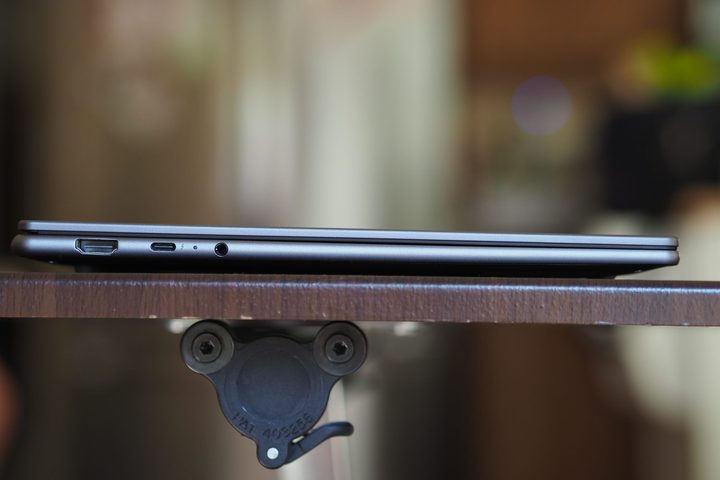
As mentioned above, the Yoga Slim 7i is a bit thinner and lighter than the Surface Laptop. They’re both reasonably portable for 15-inch machines, but you might notice Microsoft’s laptop in your backpack a little more.
But these two use chipsets that are aimed at efficiency. Both do well for Windows laptops, particularly in our web-browsing test, but the Surface Laptop lasts a lot longer looping our test video.
Ultimately, both will last you a full day’s work doing typical productivity tasks, and then some.
| Web | Video | |
| Lenovo Yoga Slim 7i (Core Ultra 7 258V) |
14 hours, 16 minutes | 17 hours, 31 minutes |
| Surface Laptop 7th Edition 15 (Snapdragon X Elite X1E-80-100) | 14 hours, 21 minutes | 22 hours, 39 minutes |
The Yoga Slim 7i is an attractively priced option
The Surface Laptop 15 is a strong competitor. It’s built well, looks great, and has a great keyboard and touchpad. Its Qualcomm chipset is slightly faster and, depending on the use, its battery life is better. The taller 3:2 aspect ratio really makes it stand out too. But the 15-inch model costs a pretty penny.
The Yoga Slim 7i is also a solidly built laptop that looks great and is thinner and lighter, and its keyboard and touchpad are still pretty good. It’s a little slower, but lasts as long when you’re pushing it harder. More importantly, though, it’s a lot less expensive. We still recommend the Surface Laptop 7th Edition as the more premium option, but the Yoga Slim 7i is solid as a cheaper alternative 15-inch laptop.


