  1. Home
  2. Computing
  3. News

Uber Eats Cart Assistant lets you shop faster with fewer taps

Cart Assistant can turn a list or photo into a basket in seconds.

Add as a preferred source on Google
Bag, Cutlery, Spoon
Uber Eats

Uber Eats is testing a new feature that tries to remove the most annoying part of ordering groceries, the endless searching and tapping. It’s called Cart Assistant, and it can take a typed list or an image and draft a basket for you inside the app.

It’s rolling out as a beta. You’ll see it as a purple icon on a grocery store storefront after you search for the store from the home screen.

Recommended Videos

Uber hasn’t said exactly which stores and cities get it first, or whether any devices are excluded. It frames the launch as a US release and an early step toward more agent-style help in Uber Eats, where the app handles setup and you handle decisions.

It turns notes into a basket

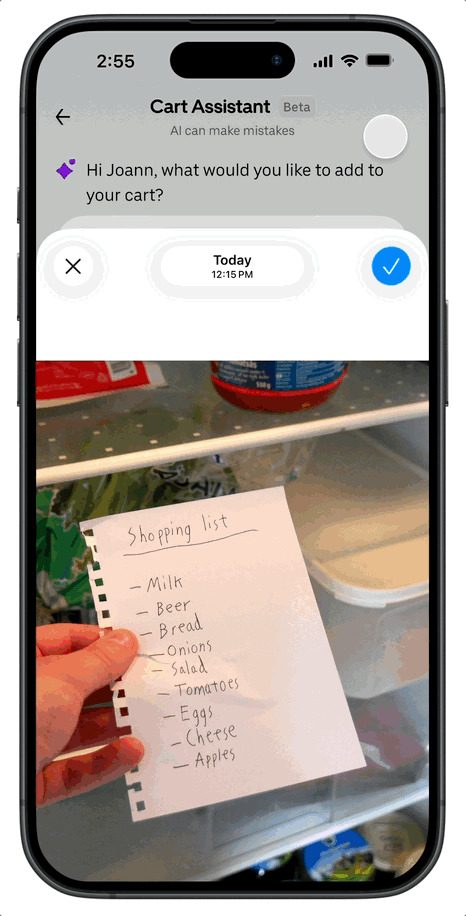
Cart Assistant is built for the moment you already know what you need. Paste in your grocery notes, or upload an image, including a photo of handwritten items or a screenshot of recipe ingredients, and the app translates that into shoppable picks.

As it drafts the basket, Uber says it checks store availability and surfaces store-level details like pricing and promotions. Then you can edit normally. Swap brands, adjust sizes, remove extras, or keep browsing before checkout.
Repeat orders get smarter

Uber says Cart Assistant uses your past orders to prioritize familiar staples, which should cut down the time it takes to restock the same basics each week. That’s the kind of AI that earns its keep, because it saves effort without changing how you shop.

It also hints at where Uber wants to go next. The company positions this beta as part of a broader move toward agentic AI, meaning the app can take on multi-step tasks and hand you a result you can still tweak.

Where it helps, and where it may not

You’ll notice Cart Assistant most on routine grocery runs, when you want a solid first draft and you’re happy to fine-tune the last details. It’s less about discovery and more about getting the boring part done.

There’s one catch Uber hasn’t addressed yet, image accuracy. How well it handles low light, cramped handwriting, or very specific branded ingredients will decide whether it feels like magic or like extra cleanup.

Treat it like a draft, not autopilot. If you spot the purple icon, try a short list first, then scale up once you trust its picks on sizes and brands.

Paulo Vargas
Paulo Vargas is an English major turned reporter turned technical writer, with a career that has always circled back to…
AI bots are a hit across the hotel biz, and if they feel creepy, you’re not alone: Study
Hotel booking chatbots are creeping out customers, but there's a simple fix that can make a difference.
Isometric Ai assistant and bubble speech, 3D illustration

If you have ever tried to book a hotel online and found yourself unsettled by the AI chatbot trying to help you, science has your back. New study from Texas A&M College of Agriculture and Life Sciences confirms that hotel booking chatbots are genuinely creeping people out, and it is actually hurting bookings.

What is giving hotel chatbots their creep factor?

Read more
Pope says AI must be disarmed and shouldn’t dominate humanity. We’re going the opposite way.
The Pope just dropped his first encyclical, and AI companies should probably read it.
Pope Leo XIV signing his first encyclical

Pope Leo XIV signed his first encyclical on May 15, the 135th anniversary of Pope Leo XIII's Rerum novarum. The document, Magnifica humanitas, was published on May 25 and addresses one of the defining challenges of our time: artificial intelligence and its impact on humanity.

The core message isn't anti-technology. The Pope is clear that technology is neither a threat nor inherently evil. However, he does say that technology is never neutral, because it takes on the values of those who build, fund, and control it. That's where things get interesting.

Read more
I built an offline Grammarly alternative and turned it into a Mac app without any coding
It lives in a browser tab. It's a Chrome extension. It's also a Mac app. Claude built it for me in all three flavors.
Grammarly alternative built using Claude.

I wrote this entire article while seated on an airplane experiencing unusually high turbulence. The software I used to spell-check and grammatically sanitize the draft was built at an airport. The language engine is running entirely on my Mac, fully offline, fixing all my typos and removing the double spaces while I mash the keyboard and sip a sugar-bomb coffee. 

Also, I don't know how to code. I didn't write a single line of code, and yet, the Mac software I am using right now looks classier and feels snappier than Grammarly ever did. Grammarly, if you don't know, is one of the most popular apps for spelling and grammar checking on the planet. So, how did I do it? I asked Claude. I narrated my wish, it asked my preferences, and in less than 30 minutes, I built myself a no-internet Grammarly replacement while also avoiding the "yet-another-subscription" curse.

Read more