
School might be very different this fall, but whether you’re be walking from class to class or using Zoom, one thing won’t be changing — you’ll need a laptop. And here we have some great deals for you from top brands like Apple and Microsoft. While the options have never been wider, the fact remains, there is nothing more convenient than being able to pack up your computer, toss it in your bag or under your arm, and move to the next location — whether that is your next class or just a quieter room in the house. These laptops have a variety of screen sizes, storage capacities, software choices, and above all, prices. Whether you need an affordable workhorse word processor for papers or a more impressive showpiece for finished design work, we have you covered with our list of the very best back-to-school laptop deals.
Today’s Best Back-to-School Laptop Deals
- HP Pavilion x360 14 — $400, was $500
- Dell XPS 13 — $850, was $950
- Microsoft Surface Laptop 3 — $879, was $1,000
- Apple MacBook Air — $950, was $1,000
HP Pavilion x360 14 — $400, was $500
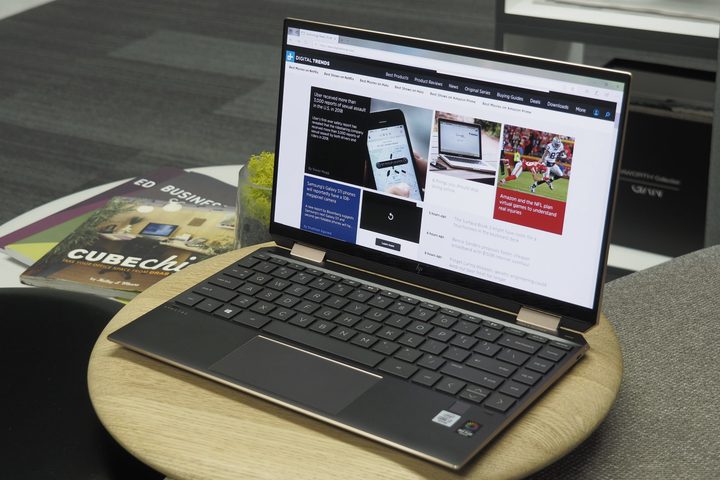
The HP Pavilion x360 14 is an affordable, worker bee of a laptop. The most salient feature is obviously HP’s legendarily responsive touchscreen, which gives you some of the convenience of a tablet, with all the power of a laptop. This one doesn’t exactly have a jet engine, but between the Intel Intel Core i3 Processor, the 8GB of memory, and the 128 GB of storage, it has plenty of heft. Especially in such light and lovely (not to mention thin) portable machine; it only weighs 3.55 pounds and measures 0.7 inches thin. Back to the screen. HP has built this Chromebook with a 360-degree geared hinge, so you can really work its positions. It’s loaded with Windows 10 and has a built-in HD webcam with dual array microphone for seamless Zoom calls. With a battery life is a very solid 12 hours, this is an easy, breezy laptop that will cover all your basic needs, without breaking the bank (especially with $100 off)
Related
Dell XPS 13 — $850, was $950
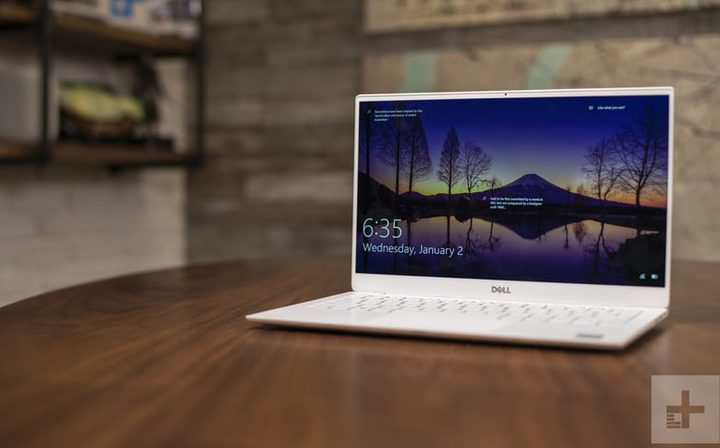
Compared to something like the HP Pavillion, the Dell XPS 13 is a big jump in price, but also in the quality of machine. First of all, there’s a 10th Generation Intel Core i5-10210U Processor (6MB Cache, up to 4.2 GHz), which means we’re dealing with a great deal of processing power. Especially in a compact, 13-inch screen with unbelievable InfinityEdge display (less border than ever, so you can enjoy your 8 million pixels in all their 4K Ultra HD glory). It also has Superior 400-nit brightness, which allows you to see the best images in any light, including the outdoors. It’s got Thunderbolt 3 multi-use Type-C ports for lightning fast charging and data transfer, responds to your voice up to 14 feet away, and get this: the battery lasts an amazing 19 hours. The Dell XPS 13 is the most powerful laptop money can buy in the 13-inch class, so if you’re looking for some might in miniature form, it could be for you.
Microsoft Surface Laptop 3 — $879, was $1,000
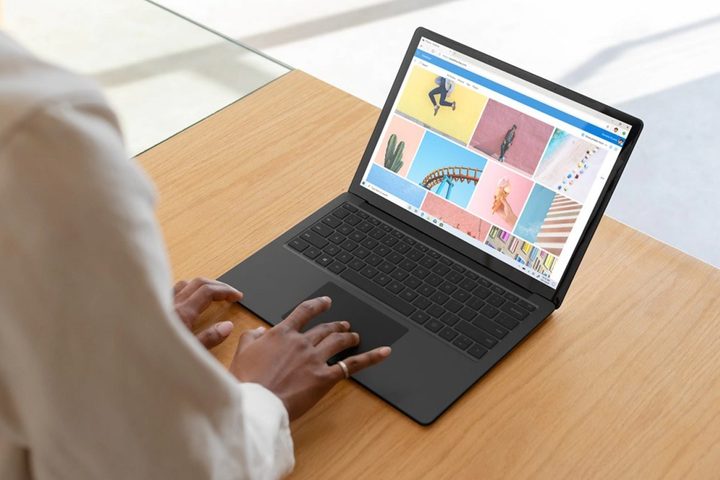
Even smaller and lighter (but you’ll pay for it) is the Microsoft Surface Laptop 3, a multitasker’s dream. It weighs less than three pounds (2.76 to be exact) and is 0.57 inches thick. And yet within that svelte form, there’s a 10th-generation Intel Core i5 processor that makes this Surface twice as fast as its predecessor (there’s also 8GB RAM and 128GB of storage). If you have a heavy-duty semester ahead and will be spending tons of time on your computer, this laptop has your comfort in mind, with its relaxing Alcantara material palm rest and a glass trackpad that’s 20% bigger. Moreover, there are Omnisonic speakers for great sound and USB-C port for charging convenience. With top-tier performance, this is the laptop for someone who prizes productivity.
Apple MacBook Air — $950, was $1,000

No fuss and beautiful, too. Apple’s legendary aesthetic doesn’t just make the MacBook Air beautiful, it corresponds to truly innovative and progressive workings inside, ideal for graphic designers, aspiring artists, and really anyone who doesn’t want to take risks with their laptop. These machines tend to be stress-free. Apple tends to get things right the first time. In terms of setup and software, we tend to find that Apple requires less fussing, fixing, and stress. They tend to be better on viruses, privacy, and malware, too. While they’re more expensive and not as customizable, they break less often than PCs, and upgrading the software tends to be a cinch. The guts measure up to other PCs in this price class: Intel Core i5, 8GB Memory, 128GB solid-state drive. But that’s not why you’re buying this MacBook. You want the ease and peace of mind of a MacBook, and we don’t blame you.
How to choose a laptop for school
Chances are, your laptop is the thing with which you’ll be spending the most time with at school, especially now. It’s a tool, a teacher, an entertainment system, a library; that’s a lot for one machine, so we want to help you choose the best one for you. Ask yourself what you’ll be using it for. If much of your work is going to be writing papers or crunching numbers, a simple, easy-to-use Chromebook or HP Pavillion might be all you need. These computers come with excellent cameras, processors, and screens, so while it might not have the level of clarity of a MacBook, you’re not going to notice when you’re chilling with Netflix. Now, if your work is most visual-intensive, like a design program or one that requires modeling, or video editing, you might need both more power, and attention to graphics capabilities, like a MacBook or even a MacBook Pro. Other things to consider are battery life (especially if you want to work from outside, or a cafe or public place where there aren’t always plugs), and things like storage. For example, if you primarily use Google Sheets and Docs, or cloud computing, you don’t need to spend a lot of money on a computer with hundreds of gigs of storage. Alternatively, if you’re a gamer, and that’s an important part of your leisure time at a school, you might need more room (and a faster processor).
Looking for something a bit different? We’ve rounded up all the best back-to-school sales.
Did any of these Chromebooks steal your heart? In case, it did. You can get one on a discount thanks to the Black Friday Chromebook deals that Amazon offers.


