  1. Home
  2. Apple
  3. Computing
  4. Giveaways
  5. s

Win a MacBook Air—start a free Setapp trial to enter

Add as a preferred source on Google

At Digital Trends, we’re fans of anything that makes our laptops simply better. The app design team Setapp makes exactly that.

Setapp is a reimagined app store that’s better in every way possible. A membership costs $9.99 per month, giving access to a curated suite of over 150 apps and Mac tools. It’s designed to cut through app store volume to provide a perfect, high-quality app for each step in your day’s workflow.

Setapp wants everyone to be more efficient and are giving away a new Mac (Retail value $1,100). Enter for a chance to win when you try Setapp for free now through September 6th. You pay absolutely nothing, just snoop around Setapp and the Mac could soon be yours.

Among our overall best laptops list, the Apple MacBook Air was declared by Digital Trends to be our favorite MacBook this year. The most popular Mac model, the MacBook Air features a 13.3-inch, 2560×1600-pixel hi-resolution Retina display, wrapped in a 100% recycled aluminum frame. The LED-backlit butterfly keyboard provides prime stability, while the classic Force Touch trackpad enables precision and uniform control, even when using Multi-Touch gestures.

Specs-wise, this MacBook Air boasts 8GB memory and 128GB SSD, while being powered by dual-core 8th Gen Intel i5 processors featuring Turbo Boost up to 3.6gHZ. Among the MacBook Air’s standouts are its security-focused features, like Touch ID for logging in and accessing documents. Apple’s T2 Security Chip allows for on-the-fly data encryption, and recognizes your voice through Siri audio commands.

How to win the MacBook Air
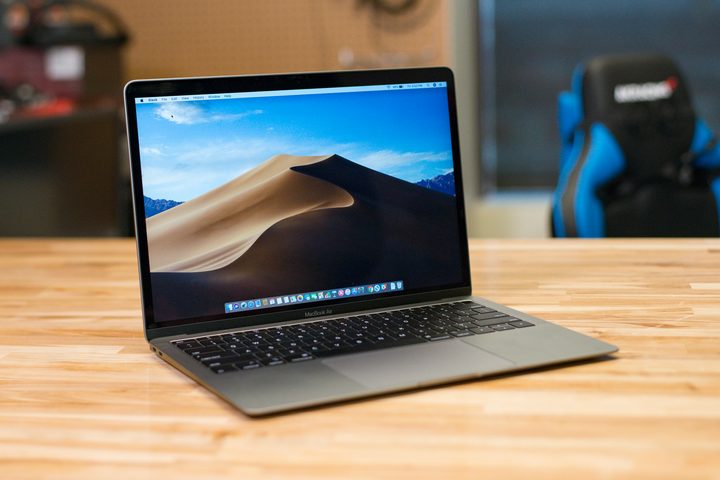
Macbook Air (2018) Review
Riley Young/Digital Trends

The MacBook Air is Apple’s most popular laptop for a reason, and it’s not hard to justify the normally $1,100 price tag. With Setapp’s ongoing giveaway, however, it can be yours for free just by signing up for Setapp’s free week trial. What’s more, Setapp and Macs are a match made in heaven, so the service is sure to spark your interest, even if you don’t end up winning that new Mac. Over 150+ curated app selections served up daily, and you get your first week free? That sounds like a pretty great deal to us, so head over to this link to get setup with Setapp, and enter to win your chance at a brand new MacBook Air courtesy of Setapp.

Note: Setapp will be choosing the winner of this giveaway, not Digital Trends.

DT Staff
Digital Trends has a simple mission: to help readers easily understand how tech affects the way they live. We are your…
How to change the default apps on a Mac
Apple's default apps are great, until they're not. Here's how to swap them out in seconds.
change default apps on Mac featured image

One of my favorite things about macOS is that it comes with default apps to handle your everyday tasks. You get Safari to browse the web, the Mail app to handle your emails, and the Preview app to open and view photos and PDFs.

But what if you want to use a third-party app you prefer over the default app? Thankfully, Apple makes it easy to change the default apps on your Mac. So, whether you want to use Google Chrome or Outlook, here’s how you can set them as the default on your Mac. 

Read more
What is WhatsApp? How to use the app, tips, tricks, and more
From setting it up to mastering hidden features, here is your complete guide to WhatsApp.
WhatsApp app store listing open on iPhone

There's no shortage of messaging apps out there. The past decade has given us more options than we know what to do with, largely because smartphones demanded something better than plain old SMS.

Both the App Store and the Play Store are packed with apps that promise to revolutionize the way we communicate. Most of them didn't make it. The truth is, a messaging app is only as good as the number of people using it, and most apps never cross that threshold.

Read more
How to restore deleted or missing contacts on your iPhone
Lost your iPhone contacts? Here's how to get them back in minutes!
iPhone in hand showing restore contacts page

At some point, we all stopped memorizing phone numbers. It happened gradually, and now most of us can barely recall two or three phone numbers off the top of our heads. So when your iPhone contacts vanish, whether after a software update or an accidental delete, it can feel like a minor crisis.

Thankfully, if you act fast, you can easily restore deleted contacts on your iPhone. So, before you start texting people asking for their numbers again, try these methods to get your contacts back. These methods will work on all latest iPhone models.

Read more