
Microsoft has just announced that its new AI, powered by ChatGPT, is coming to the Edge browser and Bing search engine. The addition of advanced AI will redefine the way these two Microsoft products work, and there are some major changes on the horizon.
The Microsoft-backed ChatGPT is a conversational AI that you can ask questions and get all sorts of answers from — even things like your astrological makeup. Microsoft is eager to to take that experience out of a website and into the browser, and there are a ton of features I’m itching to try out.
A reimagined search engine

With the new Bing, supported by Edge, Microsoft promises to deliver an improved version of the search experience we’ve all grown used to. You will still be able to see the regular results right where they used to be, but on the side of the screen, the AI will elaborate and summarize the answers for you.
Right now, if you search in Google, you only get a snippet from a website that seems to be the most relevant to your search query. For everything else, you need to click on various websites until you find the one that answers your question. Bing is going to change that by giving you the complete answer to your questions as opposed to just linking you to websites that may or may not help you.
Of course, I’m taking this with some skepticism, as should anyone twho will be using the tech while it’s still new. Some queries may not always provide accurate answers. However, Microsoft seems eager to avoid problems by adding complete lists of sources to its answers so that you can always dig a little deeper without wasting too much time.
Complex analysis tools

The new Edge update adds a chat functionality that lets you dig deeper into what this AI can really do. In the sidebar, you can request Edge to prepare a full summary of a file and then compare it to something else. I could see this being used for all kinds of comparisons, and it certainly seems like a handy tool for sharing the key takeaways from a long report.
You can tailor the responses to what you’re looking for. As seen in the photo above, the AI will prepare some follow-up questions or let you ask your own. Instead of digging through lengthy pages of reports, you can let Edge do all the legwork.
Microsoft showed off the feature tackling a financial report. Not only did it list the key parts of it in bite-sized chunks, but it also let the user compare it to a competitor’s report.
Digging deeper with the chat function
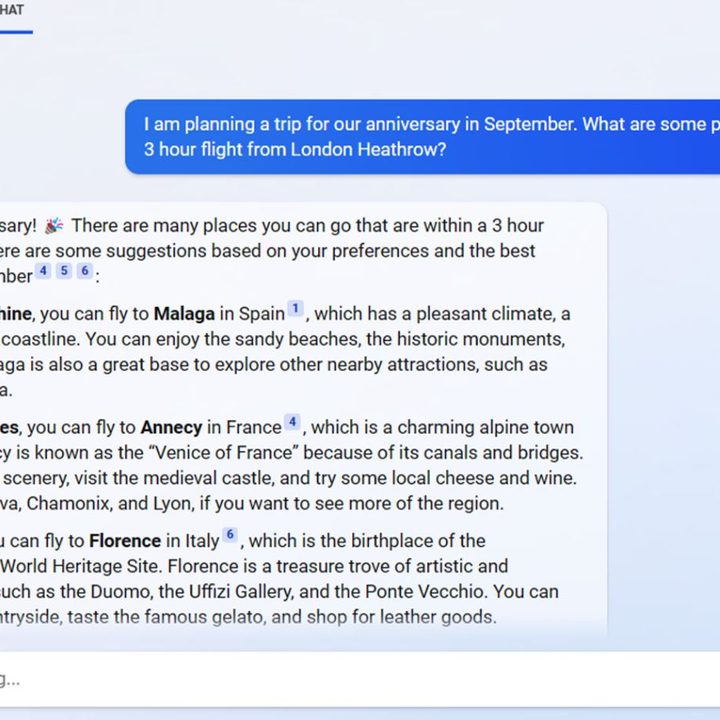
The chat functionality, which is built into Microsoft Edge and is present in Bing, is what really brings out the power of ChatGPT. The feature lets you continue on and find out more after your initial query. You can also ask it more complex questions than what you’d usually ask a search engine. Instead of searching for “vacation ideas in Europe” the user asked the AI a full-blown question and received various answers with complete sourcing.
Once your initial question has been answered, the search doesn’t have to end there. Much like with ChatGPT, you can keep on going, and the AI fully understands the context of your previous queries. Following the example from the screenshot, if you settle on a trip destination, you can then ask the AI to prepare a full itinerary for your trip and refine it with its help until you’re satisfied.
You don’t even need to open your email anymore if you want to share that itinerary and pass it on — simply ask Bing to mail it to your family and it will do that for you.
Content creation

When ChatGPT first became public, many people feared for their jobs. A lot of them still do. The AI’s ability to spin all kinds of content on all matter of subjects and make it sound natural is downright scary, and with a bit more refinement, it could replace many actual bloggers with AI-generated blog posts.
Needless to say, this new-and-improved Edge and Bing version of ChatGPT’s content creation will not put those fears to rest. Microsoft added a Compose tool to Edge that lets you create a blog post, email, or even just a paragraph of content based on your prompt. You can set the length and the tone and then go to town — use the whole thing or simply rely on it as a basis for your own writing.
In the example above, the Compose tool is being used to prepare a LinkedIn blog post. LinkedIn content often has a specific kind of tone, and although we don’t know the final result of the query, I can bet the AI was able to mimic it closely.
This tool could be a great way to speed up some dull daily tasks like sending emails. However, in many cases, it may not be ideal for short-form writing — you’ll spend as much time crafting the prompt as you would writing the email yourself.
Programming helper
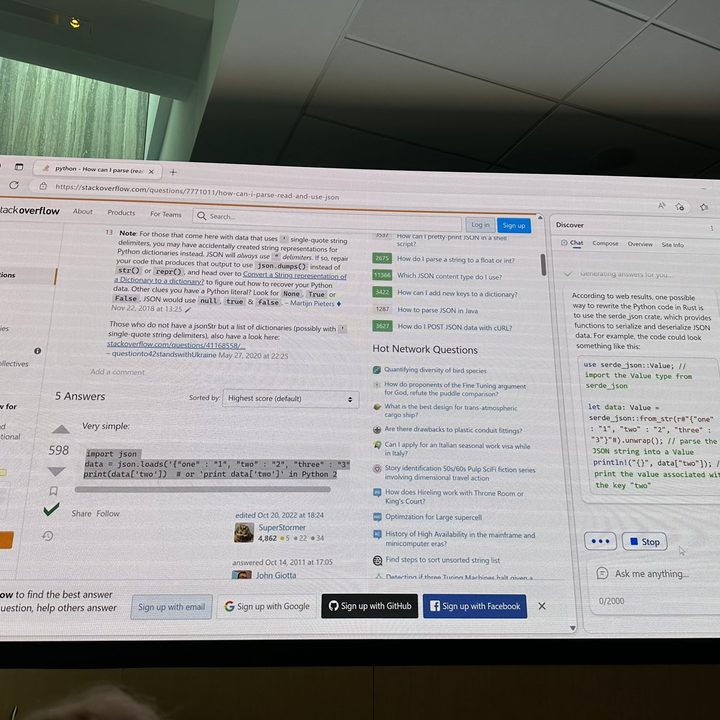
The new chat function in Microsoft Edge can do more than just share cooking recipes or prepare trip itineraries. Microsoft actually showed off the tool successfully translating a snippet of code from one programming language to another.
If the tool proves to be functioning well, it could be a great addition to GitHub and other similar programming resources. Many things can be achieved in multiple programming languages, so Microsoft’s AI could speed up the process of looking through the Stack Overflow by yourself.
While this looks really fancy and useful, it still relies on results found on the web, which means that the code snippet could end up being useless. Programmers don’t need to worry — Microsoft won’t be replacing them anytime soon.


