

Windows 11 updates have a bit of a reputation, from slowing Intel’s newest desktop processors to breaking games. Despite the occasional hiccup, we still look forward with cautious optimism.
Despite the occasional rough patch, Microsoft continues to evolve the OS, and each update feels like a chance for a new beginning. While Microsoft hasn’t confirmed anything yet, the rumor mill is buzzing with what comes next, and I’m starting to feel excited. The talk of new features suggests fixes for long-standing annoyances, productivity boosts, and quality-of-life improvements worth waiting for.
What’s coming to Windows in 2025?
Windows 11 has a major update lined up for later this year, and while not much is certain just yet, I’ve scoured the news for what could be coming soon. Here are some of the things I’m most hoping to see in the next major Windows Update later this year.
1. New Start Menu design
A refreshed Start menu layout may be on the way in the upcoming update, and it looks like Microsoft is testing two new designs, according to Windows Central. The changes aim to give users more control over how apps are displayed, featuring cleaner grids and improved organization.
One possible layout would group apps into preset “buckets,” making them easier to locate at a glance.
2. New file sharing UI
Sharing files could soon get a lot easier. A redesigned interface spotted by phantomofearth in an X post lets you drag a file to the top of your screen to reveal a large, dynamic menu with sharing options.
You might be able to send files via apps like Phone Link, Outlook, and other apps. A subtle on-screen hint appears when you grab a file, guiding you where to drop it.
Regardless of whether you’re sharing with your contacts or opening in another app, this new system looks really smooth, so I’d like to see it make its way to the live version of Windows.
3. Broader support
Microsoft might be shifting focus to version 25H2, which is already in development (although it’s unclear whether that will be its name). Rumors indicate Microsoft is backporting platform changes for better support for the upcoming Snapdragon X2 chip.
Why is this a good thing? With these changes, devices with that chip can run Germanium-based Windows 11, which the current build is based on — and rumor has it that the new build will be the same.
The 25H2 build is rumored to be more stable than the current 24H2, although 24H2 is in a pretty good place now … it just wasn’t always that way.
4. Smaller taskbar icons
We might also see smaller taskbar icons in the next major Windows update. In Taskbar settings, you could see options for Never, Always, and When the taskbar is full.
This feature should sound familiar since it was once available in Windows 10, but was removed for some reason when Microsoft launched Windows 11. If you reduce the size of the icons, it won’t affect the overall taskbar size. However, you will see more app icons, which would be good if this were your style.
5. Color-coded battery icon
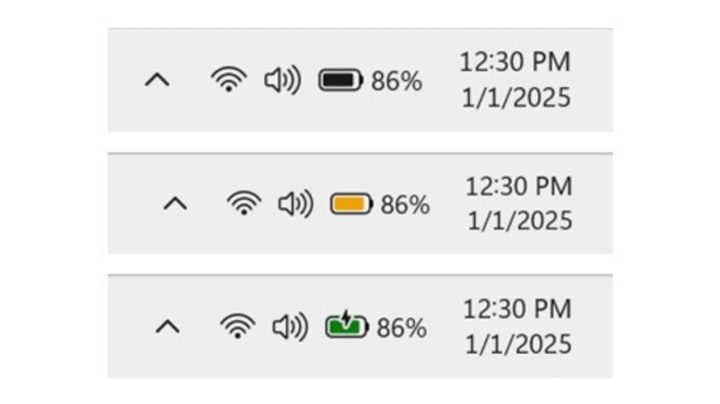
Microsoft is experimenting with a revamped battery icon that uses color to indicate charging status. This is to help you better understand whether you need to plug your PC in.
In a Windows Insider Blog post, Microsoft says the colored icons will indicate charging states, simplified overlays, and options to turn off battery percentage. Microsoft says that when the icon is green, your PC is charging and in a good state. A yellow battery icon means your PC is in energy-saving mode, and red indicates critically low battery power, which means that you should plug in your PC as soon as possible.
6. Lock screen customization
Windows 11 users might soon be able to customize the widgets they see on their lock screen. Until now, Microsoft decided which widgets you saw. Soon, you could have the option to add, remove, turn them off, or change how the widgets look. You might be able to change the position of the widgets and put your preferred ones first.
Small changes, big potential

When it comes to rumors, it’s essential to take them with a grain of salt. Microsoft hasn’t confirmed that these changes will soon be released to the general public. The features are still in testing, and the plans can shift at any time.
But, if some of these updates do make it through, users could see a better overall experience with additions such as knowing when it’s time to plug in your PC, customizing the lockscreen widgets, smaller Taskbar icons, a new file sharing UI, and the release of a new 25H2 version that promises stability to a wider range of devices.
Even if only a few of these features are implemented, they could bring a much-needed refresh for Windows 11 users. Until Microsoft makes things official, all we can do is monitor the Insider builds and hope the best features stick.


