
“Why you can trust Digital Trends – We have a 20-year history of testing, reviewing, and rating products, services and apps to help you make a sound buying decision. Find out more about how we test and score products.“


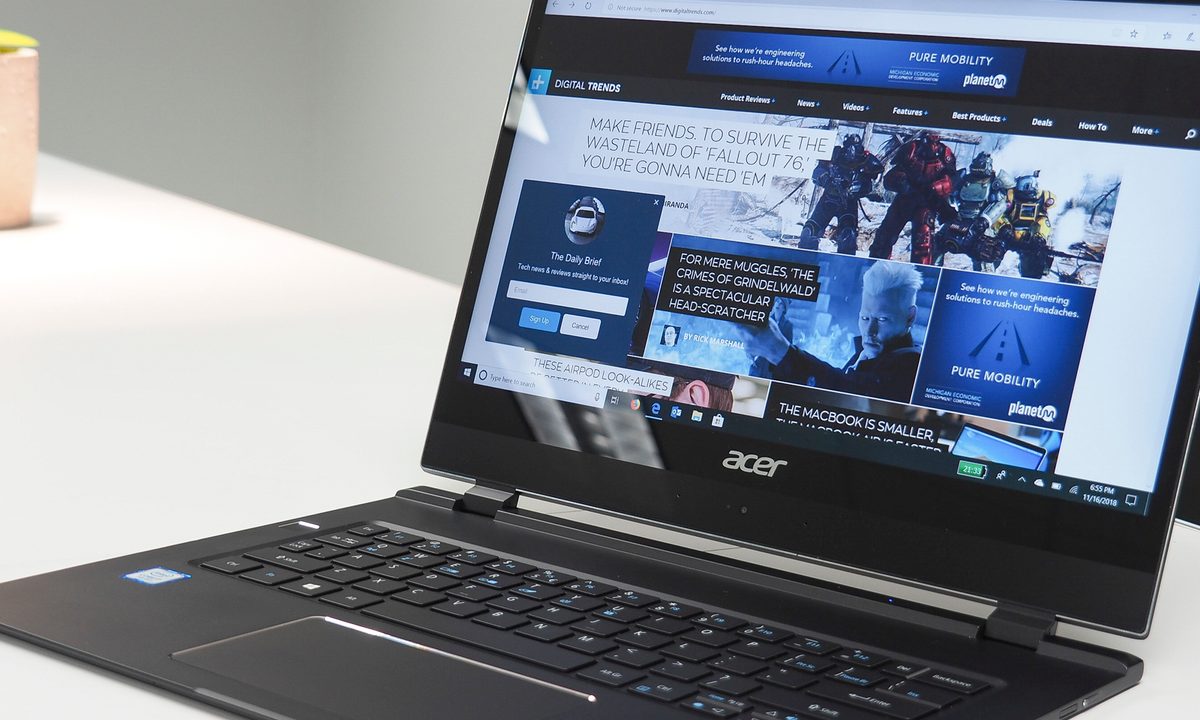
For just a little while, HP’s Spectre 13 was the “world’s thinnest touch laptop,” according to the company’s market materials. As with so many things in tech, that status didn’t last long, as Acer swept in with the new title-holder: The exceptionally thin Swift 7. Not only is the Swift 7 the thinnest touch laptop — it’s the thinnest laptop, period.
The Swift 7 rivals the iPhone X, at only 0.35 inches thick. That’s right, a laptop almost as thin as a smartphone. Yes, there are practical realities to using such a device, but let’s not overlook just how incredible it is that such a thing even exists.
Don’t discount the cool factor
When we first pulled the Swift 7 out of its box, we were immediately struck by just how thin it is. In fact, it feels like it’s just a sliver of metal in your hand. If you’re like us, you’ll get a distinct impression that you’re holding just half a notebook. It’s as if someone took a typically thin notebook, tore off the display, and then handed you back what’s left.


It’s more than just how it looks though. This thing just feels different. It slips through the narrowest crack in an overfilled backpack, disappearing into the depths as if you dropped in a mere sheet of paper. When pulling it out of your backpack, you’ll find your fingers feeling around for the rest of the notebook – certainly, that’s not all there is, right?
You won’t believe that something this wide that turns on and does real computing stuff can’t possibly be this thin, as to seem to disappear when you hold it sideways. Even better, the all-metal construction is surprisingly rigid, with no bending or flexing in the lid, the keyboard deck, or the bottom. We usually give kudos to Lenovo’s premier 2-in-1s, such as the Lenovo Yoga C930, for their tank-like build quality, and the Swift 7 is just as robust. The not-quite-so-thin HP Spectre 13 has a much more flexible display, for example.
Unfortunately, the Acer Swift 7’s battery capacity is limited by the laptop’s thin shell.
Overall, the Swift 7 is a very attractive notebook. It’s painted solid black, and it benefits from a nano-coating that helps protect from smudges and fingerprints. The coating isn’t perfect, as you’ll leave some marks behind, but it does make the surface very easy to clean up.
Then there are some chamfered chrome edges around the fingerprint scanner and touchpad. But otherwise, the Swift 7 looks like it’s trying to be as sleek as possible, perhaps even to disappear when you’re viewing it from the side.
Finally, thanks to the low-power Intel CPU (more on that in a bit), the Swift 7 is fanless. If you haven’t used a completely silent notebook, then you’ll love it. No matter what you’re doing, the notebook doesn’t make a noise, and although that does limit performance because there are no fans to keep things cool, overall, it’s a luxurious feeling.

If you were to imagine a sci-fi movie version of a clamshell notebook, then this is the kind you’d expect to see. Unfortunately, as with a lot of science fiction, the laws of physics don’t cooperate. At least not yet. And that’s what makes the Swift 7 feel like a future that hasn’t quite arrived. There are still compromises to fit so much technology into such a sliver of metal and glass.
A compromise that’s hard to swallow
We’ve covered what’s best about the Swift 7, and so here’s the next question: What compromises did Acer make with its attempt to shave off as much notebook as it could?
Good luck getting used to things — the extra function keys like brightness and volume are all over the place.
Performance is one issue, although it’s not necessarily the result of the notebook being so thin. The Swift 7 utilizes a 7th-generation Intel Core i7-7Y75 CPU. That means it’s fallen behind today’s fastest mobile processors (including those using Intel’s much-improved 8th-gen Y-series CPUs) and we noted some sluggishness in its overall performance. But other notebooks that aren’t aiming for extreme thinness use the same processor to extend battery life and run quietly.
Unfortunately, battery capacity was limited by the size. There’s just not a lot of space inside so thin a chassis. There are only 35 watt-hours available, and that severely limits the Swift 7’s longevity. It’s not the shortest-lasting notebook we’ve tested, and it’s competitive with the Spectre 13 (which uses a higher-power U-series processor), but it represents a real compromise in portability.

Those aren’t our favorite aspects of the device, but they’re hardly dealbreakers. So, what’s this big compromise we’ve been referencing? Well, the answer is simple, and perhaps not surprising: In a nutshell, the input options are extremely problematic.
We can’t fault the keyboard’s mechanism. It has surprising travel and a precise feel that makes typing a breeze. But Acer implemented a funky and very non-standard layout when it comes to extra function keys like brightness and volume controls. They’re all over the place and hard to follow — good luck getting used to things.
But the worst thing about the Swift 7, and we assume it’s because Acer couldn’t fit anything better, is the touchpad. It’s a Microsoft Precision model with great gesture control and Corning Gorilla Glass 2. But here’s the kicker: It doesn’t move. It’s a single solid piece without buttons. It’s a lot like Apple’s MacBook Pro touchpad, only there’s no haptic functionality at all.
That’s right; you can’t click the touchpad.
More Acer Laptop reviews
- Acer Chromebook 13 review
- Acer Chromebook Spin 15 review
- Acer Swift 3 review
- Acer Aspire 5 review
- Acer Predator Helios 500 review
You’re limited entirely to taps, and while that works for most functionality once you learn the full range of Windows 10 multitouch gestures, there are some things you can’t do. For example, there’s no way that we could discover to select text with the touchpad. You’re relegated to using the keyboard only, or maybe the touch-enabled display.
Really, it’s just a bad experience. Maybe you’ll get used to it if the Swift 7 is the only notebook you ever use, but we doubt that you’ll ever like it. And even tapping on the hard surface doesn’t feel right. It’s the one thing that makes us wish the Swift 7 were just slightly thicker.
Acer succeeded in its obsessive focus on achieving a single-minded objective. Make the thinnest touchscreen notebook possible. But along the way, Acer also failed in making a notebook that you’re going to want to buy and use. Even if, like us, you really love holding the Swift 7 in your hands, you’re not going to want to use that touchpad. And until user interfaces and input mechanisms completely change, that’s an important thing to dislike so much.
The Swift 7 feels a lot like the future, we’re just not quite ready for it yet.


