
Adobe has announced that After Effects is finally run natively on Apple’s M1 chips, and Adobe executives claim that this will deliver speeds up to seven times faster than the prior version on M1 Macs.
The claim also mentions that on a Mac with an M1 Max processor, it’s up to three times faster than on an Intel-based Mac. This big uplift in performance for native After Effects on an M1 system should help make Apple’s M1 Macs more appealing to creative professionals.
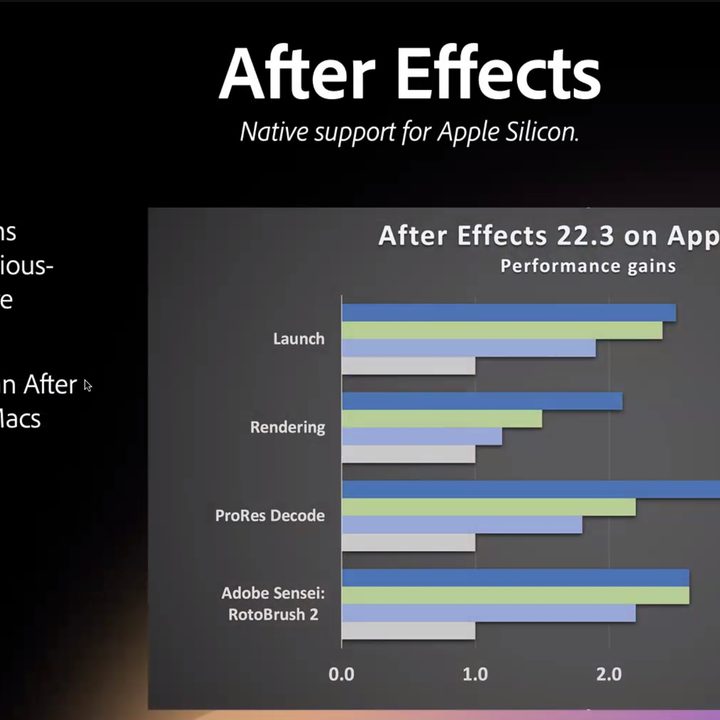
In addition to the performance uplift, Adobe claims that in its testing, decoding is improved on M1 systems, with ProRes format decoding performing up to 3x faster on a system with an M1 Ultra processor compared to previous high-end Intel-based machines.
“We are pleased to announce that with our April release, After Effects will ship with native support for the latest Apple silicon hardware,” Victoria Nece, Adobe’s principal product manager for After Effects, told Digital Trends in a call ahead of the NAB Show. “After Effects 22.3 launches up to seven times faster than the previous version on M1 Macs and renders compositions twice as fast compared to an Intel 10-core iMac Pro.”
In Adobe’s benchmarks comparing M1 Ultra, M1 Max, and M1 Pro chipsets, launching After Effects, rendering inside the software, and decoding were much faster on the new machines compared to on an iMac Pro. The same benchmarks revealed that native support for M1 resulted in speed boosts of up to 2x faster on M1 systems and 3x faster on M1 Ultra systems when compared with older Apple machines running Intel processors.
To date, Apple’s M1 Ultra processor is only available on the Mac Studio, while the M1 and other variants are found across the Mac family, including the Mac mini, MacBook Air, iMac, and MacBook Pro. Apple so far has not transitioned its premium Mac Pro desktop to the ARM-based, custom M-series processors, but the company did tease that it is working on the project during its Peek Performance event earlier this year.
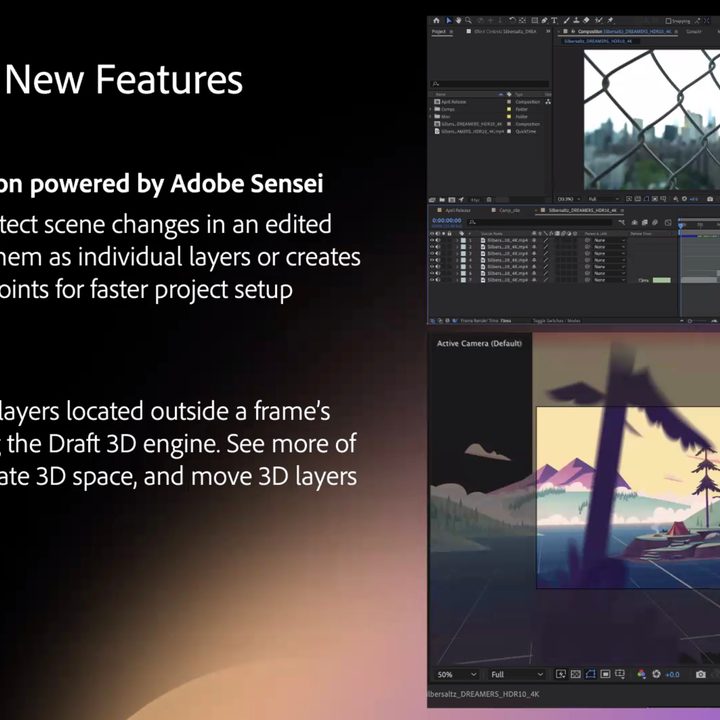
And those who rely on Adobe’s artificial intelligence tool will also see a big speed boost when Adobe Sensei is used inside After Effects, which will be good since, like on Premiere Pro, Sensei is getting an expanded job description with the After Effects update. Now, with After Effects, Sensei can be used for automatic scene edit detection, and the artificial intelligence engine can analyze a video clip to ad markers or split video into smaller clips.
“[Adobe Sensei] uses the latest A.I. and machine learning technology to automatically detect scene changes in edited clips,” Nece said in a demo of the latest feature. “Users can split them into individual layers or create markers and edit points for faster projects.”
Adobe is also making some welcome changes for those working in 2D and 3D environments inside After Effects with a new viewer.
“The new extended viewer enables graphic artists to view 2D and 3D layers located outside the frame’s edge when using the draft 3D engine,” Nece added, noting that this has been a change users have been asking the company to make for some time. “You can see more of the design, navigate 3D space, and move 3D layers around much more easily. There’s no more gray boxes.”
The new features announced at NAB 2022 will roll out to Adobe Creative Cloud subscribers starting today in a phased rollout, so Adobe After Effects users may not see the changes for a few days.


