
These days, it seems like everyone and their dog is working artificial intelligence (AI) into their tech products, from ChatGPT in your web browser to click-and-drag image editing. The latest example is Adobe Photoshop, but this isn’t just another cookie-cutter quick fix — no, it could have a profound effect on imagery and image creators.
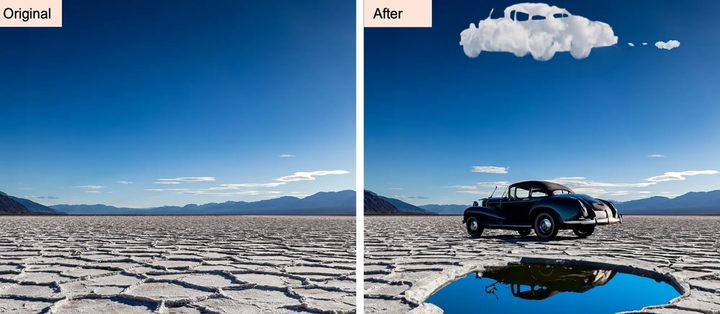
Photoshop’s newest feature is called Generative Fill, and it lets you use text prompts to automatically adjust areas of an image you are working on. This might let you add new features, adjust existing elements, or remove unwanted sections of the picture by typing your request into the app.
It appears to be pretty straightforward to use. Adobe’s demo video shows a user drawing a dotted marquee around a section of road in an image. Once the marquee box is created, a pop-up button appears titled Generative Fill. Clicking on this opens a text box where you can tell Photoshop what you want it to do. In the example, the user types “yellow road lines” and selects the Generate button. With that, Photoshop adds road markings into the scene.
Generative Fill can be used to expand an image’s proportions — for example, by converting a portrait shot into a landscape picture — and can then fill in the blank areas with new content. It can also remove people from a crowded city square, for example, or create a fantasy landscape with snowy mountains, lush forests, or mythical creatures.
Adobe says that Generative Fill “automatically matches perspective, lighting and style of images” to ensure its results feel natural and fit in with existing elements in your pictures.
Unlike Photoshop’s Content Aware Fill tool, Generative Fill allows you to specify exactly what you want to be added, removed, or tweaked, rather than simply relying on Photoshop to make the decision for you. It could mean you get much more creative control over the ways in which your images are manipulated.
Potential for misuse?
Text-based AI tools are all the rage at the moment, and Photoshop’s latest feature could be a real boon for creatives and photographers. Yet it could also make it much easier to create fake images that go viral for all the wrong reasons, much like the doctored images of the Pope in a puffer jacket or Donald Trump in handcuffs.
Adobe has announced it will automatically add a metatag (called a Content Credential) to any AI-generated image labeling it as such, which it presumably hopes will help prevent images made with Generative Fill from being posted as genuine photos. But if people can simply strip out this metadata before posting an image, it might not do much good against AI-generated fake news.
Right now, that all remains to be seen. What is certain is that AI is revolutionizing the apps we use and the ways we interact with technology, and Photoshop’s Generative Fill looks to be a pretty stunning example of that.


