  1. Home
  2. Computing
  3. Apple
  4. News

You can now buy the $5,999 Mac Pro and $4,999 Pro Display XDR

Add as a preferred source on Google

Apple has launched the new Mac Pro, meaning it’s now available to order. The company’s high-end Pro Display XDR monitor has also launched alongside the top-of-the-line desktop computer.

Apple first announced the redesigned Mac Pro at WWDC in June 2019. The company described the computer as a “breakthrough workstation for pros who push the limits of what a Mac can do,” with a focus on modularity and a return to a traditional tower design, marking a departure from the 2013 Mac Pro’s so-called “trashcan” frame.
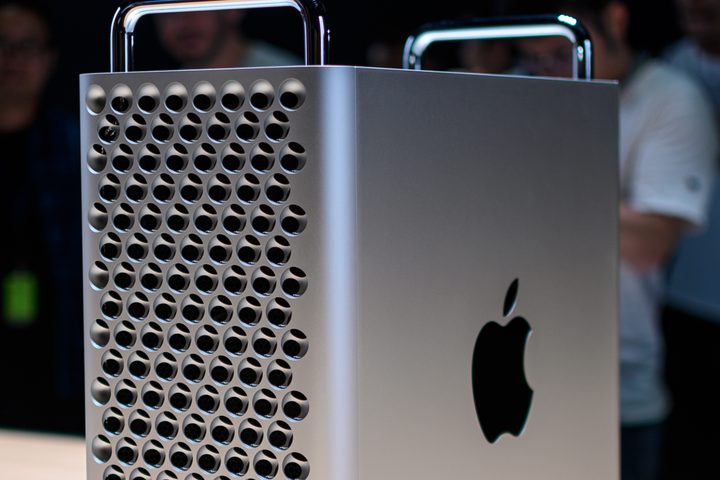
Image used with permission by copyright holder

The new Mac Pro starts at $5,999 and comes with an 8-core 3.5GHz Intel Xeon W processor, 32GB of ECC memory, a 256GB SSD and an AMD Radeon Pro 580X graphics card as standard. If you feel like going all-out and need extreme power, the Mac Pro can be equipped with up to a 28-core 2.5GHz Intel Xeon W processor, 1.5TB of ECC RAM, a 4TB SSD and up to four AMD Vega graphics cards.

Recommended Videos

Despite all that power, what really makes the Mac Pro stand out is its modularity and room for expansion. It has 12 RAM slots and eight PCIe expansion slots, giving it far more options when it comes to adding extra components than the previous generation Mac Pro ever had.

As well as that, there are a number of unique, specially developed features that you won’t find on any other computer. First up, there are the Afterburner ProRes and ProRes Raw accelerator cards. As the name suggests, these accelerate raw image codecs in Apple’s Final Cut Pro X and QuickTime Player X apps, as well as supported third-party apps. Apple says these cards enable users to “decode up to three streams of 8K ProRes RAW video and 12 streams of 4K ProRes RAW video in real time.”

Apple Pro Display XDR WWDC 2019 Hands On
Julian Chokkattu / Digital Trends

Another unique feature is the design of the tower itself. It comes with a handle on the top of the case that lets you remove the entire exterior shell in one go, giving you quick access to the computer’s internal components. And there’s a reason the front panel looks eerily like a cheese grater — all those holes help to maximize surface area, essentially acting as a massive heat sink to help cool the Mac Pro.

The Pro Display XDR, meanwhile, is a 32-inch 6K Retina display that packs in a whole heap of pro-level tech — a P3 wide color gamut, 10-bit color, a frankly huge 1,000,000:1 contrast ratio, a “nano-texture” matte coating option, up to 1,600 nits of peak brightness, as well as what Apple calls “the industry’s best polarizer technology.” It doesn’t come cheap, starting at $4,999 plus $999 for the accompanying Pro Stand, but then it is intended for extremely high-end workloads where this kind of price tag is far from uncommon.

Alex Blake
Alex Blake has been working with Digital Trends since 2019, where he spends most of his time writing about Mac computers…
This cross-device clipboard app solves the copy-paste problem I keep running into on my Mac
ClipboardAI keeps a searchable history of everything you copy
Text, Electronics, Mobile Phone

I have lost count of how many times I have copied something important, copied another thing before pasting it, and then realized the first item was gone. It is a small frustration, but it happens often enough to become annoying. I recently came across ClipboardAI, which caught my attention because it goes beyond Apple’s built-in clipboard by saving copied items into a searchable history.

Instead of replacing the last thing you copied every time, ClipboardAI keeps a searchable record of copied text, links, codes, email addresses, phone numbers, addresses, and images across iPhone, iPad, and Mac. That means an older clip does not disappear just because you copied something new.

Read more
If you miss the feel of paper in the digital age, this app gives your Mac’s screen a textured look
A paper-like screen overlay could make long work sessions feel less harsh.
Advertisement, Poster, Electronics

Most screen-comfort tools work by changing color temperature. Apple’s Night Shift makes the screen warmer, often giving everything an orange tint. Paperman is an interesting alternative because it adds a subtle paper-like texture over the display instead.

The app is available for Mac and Windows, and it is designed to make a screen look closer to paper, matte glass, or an e-ink display. It softens the harsh contrast and reduces the glossy look of modern screens during long reading or writing sessions.

Read more
I dug these last-hour Prime Day smart home, laptop, and accessory deals that are irresistible
Deals up to 60% off, a few hours left, and no reason to wait any longer.
Electronics, Phone, Speaker

Amazon's Prime Day 2026 sale is in its final hours, giving you your last chance to get your hands on the best smart home, security, tablet, laptop, and accessory deals. I've pulled together the picks that are still live, still deeply discounted, and still worth buying before the sale ends tonight or until the stock lasts.

Best Amazon Prime Day deals on smart home devices

Read more