Picking the best password manager for Windows is tricky. There is a lot of competition out there and many of the options offer unique features to try to stand out from the pack. Which one is right for you depends on what kind of password manager experience you’re looking for, but there’s one password manager we think that stands above the rest.
The best password manager for Windows is 1Password, but I’ve offered one alternative as well.
Why 1Password is the best

There are a number of great password managers for Windows, but the best is 1Password. It offers a comprehensive range of features, from the expected (like automatically filling in passwords quickly and effectively across a range of sites and services) to the more surprising (like Travel Mode, where specific credentials are stored in a separate vault when traveling to give them additional protection).
We also really like its password sharing feature, where you can easily transfer secure credentials to individuals you trust without affecting your vault’s security. You get 1GB of free secure storage for each user, and there’s the Watchtower monitoring tool that keeps an eye out for weak passwords you might be using and if any of your logins have been compromised.
Unlike some of its competitors, 1Password uses strong encryption and has never suffered a security breach. It also has SOC 2 certification from an independent audit. Finally, it has official mobile applications on both iOS and Android, while its desktop app supports Windows, macOS, and Linux.

In his review of 1Password, Digital Trends writer Alan Truly said: “It’s hard to go wrong with 1Password if the built-in solutions from Microsoft, Apple, Google, and others don’t meet your needs. 1Password works with nearly any device, supporting Windows, macOS, and Linux computers, as well as iOS, iPadOS, and Android devices. The subscription prices are affordable, and security is solid. A free version would be nice, but you get what you pay for.”
Indeed, the only downside to 1Password is that it lacks a free tier. It does have a 14-day free trial, which is a great way to play around with a new password manager to see if you like the user experience it offers. But you will have to pay for this one to get anything beyond that. But it’s the best password manager for Windows, so it’s worth paying for.
The individual subscription starts at $3 a month, with the family version letting you protect up to five people’s passwords for $5 a month.
Keepass: An offline alternative
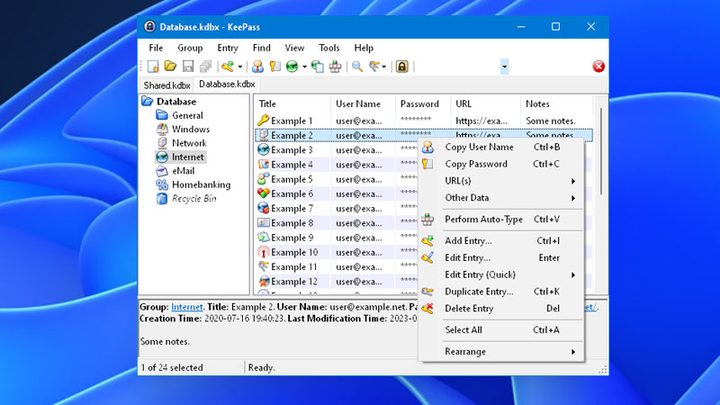
There’s an element of personal preference to password managers. While I might acknowledge that 1Password is the best password manager for Windows, objectively, my personal favorite is Keepass. It’s a free, offline password manager that is deeply customizable.
Keepass isn’t just free, though. It’s also open source, so it’s well audited by the wider security community, and it features strong AES-256 encryption for its database and user vaults. The entire contents of the database are encrypted, including user names and any notes you make on them, giving them twice the protaction.
It has a clunky interface and it’s not the most intuitive, but Keepass offers additional peace of mind against potential breaches of the password manager developer because there is no data stored in the cloud. There’s no one to hack, but you. That means the onus is on you to protect yourself and your passwords. You’ve got to be doubly sure you have your master password remembered or backed up securely, and you better not lose your password database file. You also need to take the database with you if you want your passwords while you travel.
There isn’t an official mobile app, but there are many approved iOS and Android branches of the main app that work well. That gives you less guarantee of long-term support, but there are plenty of options for a highly personal mobile password manager experience.
Even more options
These two aren’t the only great password managers out there. For a look at some of our other favorites, check out our guide to the best password managers for any OS. Like that Keepass is free, but want a more modern- take on a password manager? Here are the best free password managers.