
Most laptops today use USB Type-C as their primary (and sometimes only) ports. While USB-C has plenty of benefits, including pass-through charging and faster data transfer speeds, most people still have accessories with USB-A connections. Combine that with HDMI ports and SD cards, and USB-C still has a long way to go before it becomes a universal standard.
That’s why most people who buy a new laptop can benefit from a USB-C hub. The same goes for users who work primarily on laptop alternatives like the iPad Pro or the 2020 iPad Air. A USB-C hub allows users to connect their accessories, such as external monitors, external hard drives, and even peripherals like mice and keyboards.
USB-C hubs range from portable dongles to dedicated desk stations. We’ve combed through a range of options to find the best USB-C hubs available right now.
The best USB-C hubs at a glance:
- Best overall: CalDigit SoHo 2
- Best for iPad: Satechi Type-C Mobile Pro
- Best docking station: Anker PowerExpand Elite
- Alternative docking solution: Kensington SD5700T
- Best for USB ports: Anker 4-Port
- Best mini dock: Belkin Thunderbolt 3 Dock Mini
- Best portable hub: AUKEY 8-in1 hub
- Best budget option: Anker 7-in1 USB-C hub
- Best for photographers: Kingston Nucleum
- Best port selection: Lenovo ThinkPad Thunderbolt 3 dock
Best overall: CalDigit SoHo 2
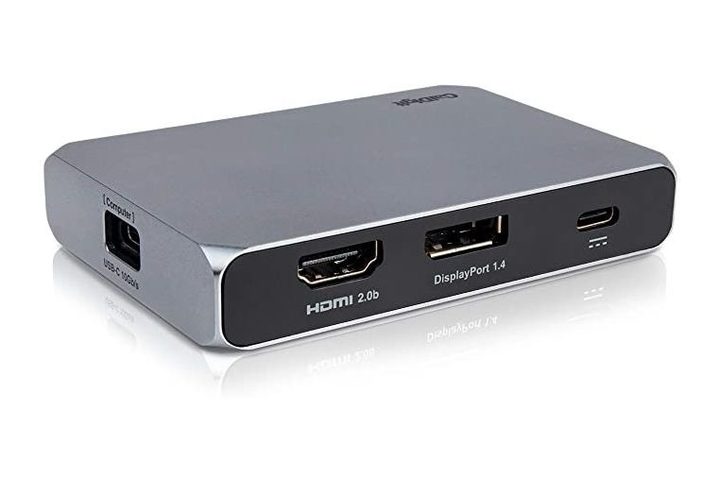
USB-C hubs range from dongles to dedicated docks, but the CalDigit SoHo 2 is somewhere in the middle. That makes it a best-of-both-worlds solution, and that’s why we recommend it as the best USB-C hub overall. It’s still compact and portable, but it doesn’t have the same trade-offs as other travel-friendly devices.
The CalDigit SoHo 2 has two USB-C connections for data and transfers, an additional USB-C that supports pass-through charging, a USB-A port, one DisplayPort, one HDMI 2.0 output, and slots for SD and microSD cards. This new model has also been updated so that recent Macs and iPads can output using the DisplayPort.
The SoHo 2 supports one 4K monitor up to 60 hertz (Hz) or two 4K monitors at 60Hz if they are mirroring.
With just the right number of connections, a compact design, and a price of around $70, this is the perfect USB-C hub for most people.
Best for iPad: Satechi Type-C Mobile Pro

If you’re one of the growing number of people who are switching to the iPad as a laptop alternative, you know it can be difficult finding a hub that is just right. Dongles hang awkwardly off the side, and docks take away from the iPad’s more portable appeal. That’s why the Mobile Pro hub from Satechi is the perfect solution for iPad users.
The Mobile Pro fits snugly along the side of the iPad Pro and provides the perfect amount of input and output (I/O) for most users. This hub gives users a USB-A connection, an HDMI port, and a headphone jack. Users also get another USB-C port that supports 18-watt (W) charging, so you can charge your iPad while still using the hub.
For iPad users, it doesn’t get much better than the Satechi Mobile Pro.
Best docking station: Anker PowerExpand Elite

If you’re looking for the absolute most you can get out of a docking station, we recommend the Anker PowerExpand Elite. It’s relatively compact and it’s packed with everything you need to turn your laptop into a real workstation. It has 13 ports in total and supports 85W charging for laptops and an additional 18W for smartphones.
In terms of ports, it has two Thunderbolt 3 connections, an additional two USB-C ports for data, four USB-A ports, an HDMI output, an Ethernet jack, SD and microSD card slots, and a headphone jack.
Several of these are located on the front of the device for convenience, with the rest in the back to hide cables and reduce clutter. The PowerExpand Elite has everything you need for expanding your laptop’s connectivity.
Alternative docking solution: Kensington SD5700T

If you want a dock but are looking for something more compact than the PowerExpand Elite, the Kensington SD5700T is another great option. It doesn’t have as many ports as the PowerExpand Elite, but it has all the essentials and some additional display outputs. It comes with SD and microSD slots, a headphone jack, an Ethernet connection, three USB-A ports, a USB-C port on the front, Thunderbolt 3 on the back, and two DisplayPorts.
The Kensington is also notably flatter than the PowerExpand Elite, so it fits nicely under monitor stands or off to the side. It’s a great solution for anyone looking for a subtle expansion device to turn their office into a dedicated setup.
Best for USB ports: Anker 4-Port

If all your accessories still use USB-A connections and you don’t plan on using Ethernet or outputting to an external monitor, there isn’t much of a point in shelling out for an all-inclusive hub. Something like this Anker 4-Port USB hub is all you need. One USB-C connection gets you four USB 3.0 ports, perfect for external hard drives, USB microphones, or keyboards. And for $20, it’s a great deal if you just need something simple for your accessories.
Best mini dock: Belkin Thunderbolt 3 Dock Mini

If you travel a lot or don’t have a lot of desk space, a dedicated USB-C dock may not be the best solution. They can be fairly large and they aren’t exactly made to carry in a bag. That’s where this mini dock from Belkin comes in handy. The Dock Mini is mainly aimed at multimedia use, so it’s great for video or photo pros who move a lot between home and the office. It’s great even if you just use multiple screens. The Mini Dock has two HDMI ports that output at 60Hz, which is great since most compact USB-C hubs cap the refresh rate at 30Hz. It also includes one USB-A 3.0 and one USB-A 2.0 as well as an Ethernet jack. Unfortunately, there are no additional USB-C ports, but this is still a sound solution if your biggest concern is outputting to external monitors.
Best portable hub: AUKEY 8-in-1 hub

If you’re a professional constantly on the go, it’s nice to have USB-C hub that fits nicely into your computer bag, and that’s where this AUKEY 8-in-1 hub excels. It has everything you need to work through the day in a compact and portable shell. This hub comes with three USB 3.0 ports, an SD and microSD card reader, an HDMI output, and a Thunderbolt 3 port. It even includes a gigabyte Ethernet jack, if you prefer working on a wired connection.
Its robust port selection, Thunderbolt port, and compact design make the AUKEY 8-in-1 an ideal travel device. It even comes with a carrying case.
Best budget option: Anker 7-in-1 USB-C hub

If you need a USB-C hub but aren’t looking to spend a lot of money, you can still get a solid device. Anker has built a reputation over the past few years for being an excellent budget option, particularly with its SoundCore line of audio products. Its USB-C hubs are no different, and this 7-in-1 hub is a great option for under $30. It has two USB-C ports, with one supporting 85W of power pass-through. It also includes two USB 3.0 ports, SD and microSD card slots, and a 4K HDMI output.
It’s everything you need from a USB-C hub in a compact and affordable package.
Best for photographers: Kingston Nucleum

If you take a lot of photos and plan on editing images and connecting multiple SD cards, the Kingston Nucleum is one of the best choices. For one, it has a rugged aluminum design that is premium and durable. It also has a dedicated port for microSD and regular SD cards. The Nucleum also has two USB-A ports, one with power pass-through to charge your smartphone. It also has two USB-C ports, one with power pass-through and one strictly a data transfer connection. Best of all, the Nucleum has an HDMI port that supports 4K, which is critical for photo editing on an external monitor.
Best port selection: Lenovo ThinkPad Thunderbolt 3 dock

If you’re looking for the absolute highest number of ports in a USB-C adapter, we recommend the Lenovo ThinkPad Thunderbolt 3 dock. The second generation of this dock has a lovely design that matches Lenovo’s other ThinkPad products, but the robust I/O is the real reason to pick this up. On the front you have a single Thunderbolt 3 and USB-A port as well as a headphone jack. The real story, though, is on the back end, where you get an additional Thunderbolt 3-compatible USB-C port, two HDMI ports, two DisplayPort connections, four USB 3.1 ports (one with always-on charging), and an Ethernet port. This is a must-have device for creative professionals who need a lot of displays in their workflow.


