3D printing has become a lot more accessible these days than it had been in the past. Back then, you’d have to shell out as much as $1,000 for one. Today, however, there are plenty of budget 3D printers out that cost less than $300, such as the Monoprice Mini Delta, Longer Orange 10, and Comgrow Creality Ender 3. These are fantastic gifts for dad and if you order today they’ll surely arrive before Father’s Day.
Monoprice Mini Delta — $160, was $176
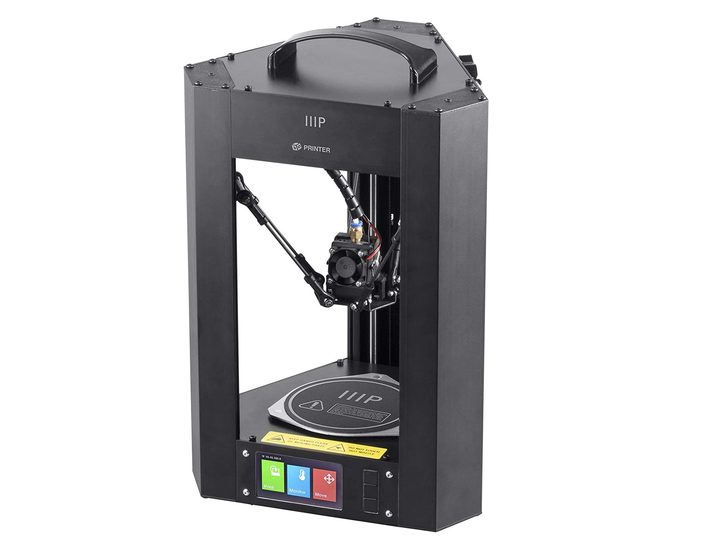
The incredible thing about the Monoprice Delta Mini, aside from the fact that it’s one of the cheapest 3D printers on the market, is that it boasts a range of advanced features you typically won’t find in a $160 3D printer. It has a sturdy, all-metal frame, a heated build plate that helps prevent warping, automatic bed leveling functionality, a maximum resolution of 50 microns, a full-color LCD screen, Wi-Fi connectivity, and compatibility with a wide range of materials. For something that costs less than a FitBit, all that stuff baked-in is pretty impressive. That’s not to say the Monoprice Mini Delta is all that great. For starters, it’s called Mini because its printing area is only 110 millimeters in diameter (4.3 inches), and 120 millimeters tall (4.7 inches), which definitely puts a limit on what objects you can print.
For such a cheap machine, the Delta Mini prints quite decently. We test printed several models, including a cat, a tugboat, and a small assortment of miscellaneous objects we randomly found on Thingiverse. Construction was pretty sturdy with minimal “noodling” and other imperfections, and it’s not quite as prone to Z-axis turbulence. Of course, you still have to deal with a little bit of post-print cleanup. The Monoprice Mini Delta is dirt-cheap but very reliable. Get it at Amazon today for just $160 instead of $176 — a cool $16 off.
Longer Orange 10 — $200, was $300

The Longer Orange 10 is a budget LCD resin printer that offers exciting opportunities in 3D printing for a lot less money. For $200, (down from $300 on Amazon), you get a touchscreen, smart support generation, and a fast proprietary slicer, which makes this machine perfect for those who are still starting to dip their toes into 3D printing. The Orange 10’s two main attractions are its smart support and fast custom slicer. These work together to automatically detect suspended parts with one button and add cross-linked grid support, which is more stable, to increase the success rate of complex models printing. Professional slicing software output 100M slicing file in one minute, three times faster than open-source solution. Another awesome feature is auto support generation. Normally, the resin printing workflow suffers from machines that require models to be transferred between different software for decent support structures. That is not the case with the Orange 10 as support generation is built into the slicer. Finally, for the price point, the Orange 10’s 2.8-inch touchscreen is a welcome and surprising addition, very responsive, and saves you significant time when starting prints, adjusting settings, or switching profiles for different materials.
We test printed a Zombie Hunter head and the result was overwhelmingly positive. The Orange 10 was able to finish the job in over three hours and we were pretty impressed with how good it looked. Granted, it took time to scrape it off the build plate because it was firmly stuck on it but after some standard post-print cleanup, we didn’t notice any noticeable defects whatsoever on the finished product. Get the Longer Orange 10 at Amazon for just $200.
Comgrow Creality Ender 3 — $250, was $300

The Creality Ender 3 comes with a slew of advanced features and qualities that you’ll be hard-pressed to find even in the most expensive printers, making it a real gem in the 3D-printing crowd. It boasts a heated bed which is crucial when printing with ABS or PLA, power outage recovery that’s not even available in most $1,000 3D printers, and has a completely open-source platform. Best of all, it’s relatively affordable at just $250 at Amazon, $50 off its normal retail price of $300.
This 3D printer has a print area of 220 x 220 x 250mm with a maximum print speed of 200mm/s, making it one of the fastest budget printers we’ve ever seen. There’s an LCD screen attached to the 3D printer’s body for easy operation, and you can either use an SD card or USB to feed the digital file into the 3D printer. Just like the Monoprice Mini Delta and Longer Orange 10, this is a very compact machine that wouldn’t take too much desk space and comes semi-assembled. Although it comes with a manual, setting it up might be very confusing especially to the 3D-printing novice since the instructions aren’t the most detailed. It took us a couple of hours to assemble it (including assembling of frames, assembling of the X-axis, installation of the belt, assembling of the entire machine, and finally wiring) and we’re not exactly new to this. We recommend checking out its YouTube videos for extra help.
The Creality Ender 3’s print quality is amazing for the price, not to mention economical. It is compatible with both PLA and ABS, and you’re probably aware that PLA comes cheap and hence, would be ideal for beginners. Our first few attempts yielded to a few failed prints due to bed leveling, but once we’ve calibrated the settings of the machine, we were gobsmacked by the exceptional result. The final Benchy that we test printed came out nearly flawlessly with outstanding quality and perfect details. The Creality Ender 3 might be the most expensive 3D printer on this list, but it’s easily the best. Get it for $250 at Amazon today.
Looking for more? Check out our Deals hub for the best 3D printers under $500, the best 3D printers under $1000, and Black Friday printer deals.