

I’ve been strictly against buying a case for my Steam Deck since I first picked up the handheld. If you haven’t held one, they’re comically big. Every time I’ve given someone my Steam Deck to check out, they have the same reaction: a chuckle, followed by “that’s bigger than I expected.” Why would you want to make it even bigger with a case?
That is, until I found a case that works perfectly for my Steam Deck: Dbrand’s Killswitch. Not only does it protect your Steam Deck thanks to a rugged exterior, but it provides several other features that make the Steam Deck much more useful for traveling, docking, and handheld play.
That wasn’t the case initially, though. Dbrand released the Killswitch a little over a year ago, but it quickly recalled the case. The included kickstand, which I’ll get to shortly, originally used magnets that interfered with the Steam Deck’s fan. Dbrand offered customers a refund for the original version, but it’s back with a new version of the Killswitch that doesn’t use any magnets.
You can’t buy the old version anymore, but I wanted to point it out for a couple of reasons. If you buy one secondhand, make sure that you’re getting the newer version. In addition, I want to clarify that I’ve been testing the fixed version of the Killswitch. That’s important to point out because I’m getting ready to gush about how great the Killswitch actually is.
Let’s start with the case itself. If you look on Amazon, you’ll find a long list of rubber cases that are form-fitted for the Steam Deck. Short of the JSAUX ModCase , these are all flimsy silicon shells that wrap around your Steam Deck. That’s not what the Killswitch is.

It wraps around your Steam Deck, but the Killswitch is bolstered by a hardened backplate that you can’t move. It’s secure. Dbrand also is careful to only let the case touch the parts of the Steam Deck you actually hold, wrapping around the back, a little bit up the sides, and across the dips on the bottom corners of the device.
These grips are textured, and the plastic on the Steam Deck is not. You don’t really realize how much you’re actively holding onto the Steam Deck until you put the Killswitch on. Instead of gripping down on each side, the Steam Deck hangs from the natural pressure you apply with your palms. It feels more comfortable to hold, and without adding a ton of bulk. Dbrand says the Killswitch is as thin as a nickel, and based on my very scientific testing, it’s actually a little thinner.
That wouldn’t have been enough to sell me on the Killswitch, but it does much more. Dbrand offers a plastic cover that snaps over the top of the case, protecting your Steam Deck’s screen, joysticks, and buttons. As someone who travels quite a bit, that’s huge. The case Valve includes with the Steam Deck is massive, easily serving the role as your personal item on a plane, and thinner aftermarket options provide a loose fit and little to no protection.
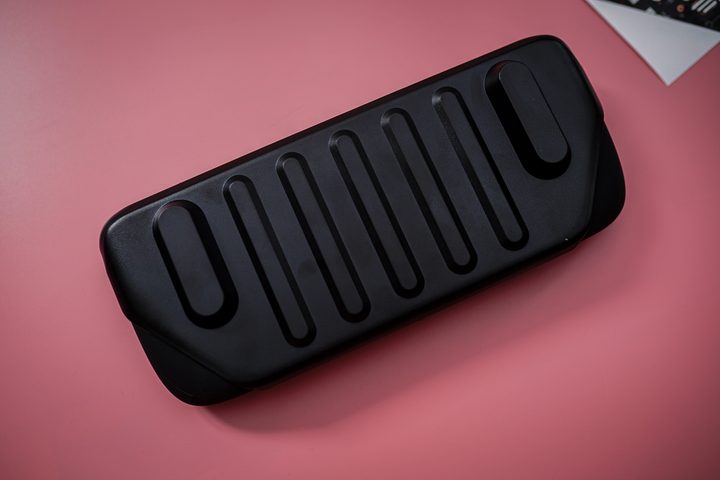
The Killswitch is not only smaller than the handful of Steam Deck cases I’ve tried — it’s also much more protective. I can throw on the plastic cover and toss my Steam Deck into a backpack without worrying about anything breaking. I’ve done exactly that probably a dozen times, and my Steam Deck has been just fine. Dbrand leaves a cutout for the USB-C port with the case on, too, so you can charge the Steam Deck even when it’s stowed.
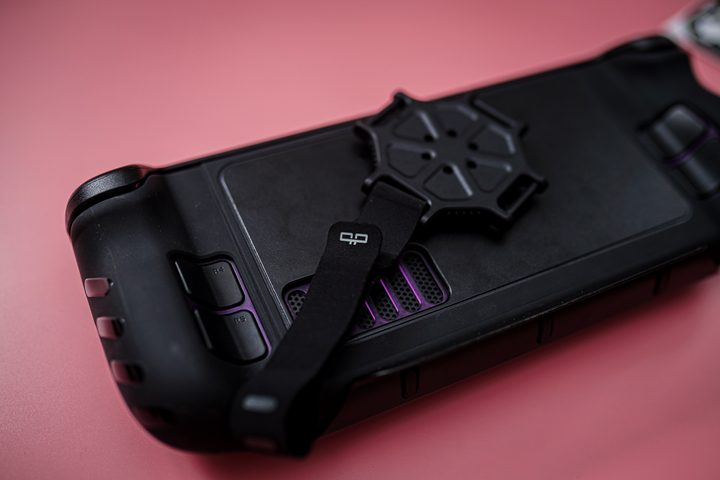
So, the Killswitch is a rugged protective skin for your Steam Deck, but it has one more trick: the backplate mount. By default, Dbrand includes a kickstand to prop up the Steam Deck, but you can remove the kickstand with a turn and attach the universal mechanical mount.
This mount is a bit of plastic that can click into the kickstand mount, and it includes a strap that allows you to connect an external battery, USB-C hub, or anything else that can fit in the strap. I still think a Steam Deck with a power bank strapped on the back looks a bit silly, but there’s no denying this is a real way a lot of Steam Deck owners use their device. The mount takes the place of the kickstand normally, but Dbrand includes a patch of 3M adhesive so you can attach the mount alongside the kickstand if you want.
The Killswitch is great, and it’s the first time I’ve used what feels like an essential accessory in the sea of options for the Steam Deck (I’ve modded my Steam Deck plenty, but that’s a different matter). It’s also very expensive at $60 for the base kit. You can get a case for half of that or less.
Dbrand definitely makes the Killswitch feel worth it. The base kit includes the case, the kickstand, and one of Dbrand’s dozens of skins for the Steam Deck. These are $20 to $30 on their own, and Dbrand allows you to pick any of its classic or premium skins for the same price. My big issue is that the Killswitch doesn’t come with the cover on its own. That’s a $15 upcharge.
There are several accessories you can bundle with your Killswitch, including the travel cover, tempered glass, stick grips, the universal mount, and a dock adaptor kit since the Killswitch’s USB-C port is recessed with the case on. Fully tricked-out, you’re looking at $118.
My only real issue with the Killswitch is how expensive it is. I’d recommend the Travel Kit for most people, which is $75 and comes with the cover and stick grips on top of the base kit. Still, it’d be easier to recommend the Killswitch to everyone if you could mix and match all of the items available, allowing you to pick up the case and cover alone for a lower price, for example.
I still think the Killswitch is an essential Steam Deck accessory, though. I wish Dbrand sold accessories like the cover and dock adapter kit separately, but there just isn’t another Steam Deck case that comes close to it. It protects your Steam Deck in use and while traveling, and it provides several features that aren’t available on the Steam Deck alone. It’s not just a protective case — the Killswitch makes your Steam Deck more useful.


