

There’s been a long-held belief that if you own a Mac, you don’t need to use any type of antivirus software to keep your machine free of malware and other destructive code. But it turns out this may actually be more of an old wive’s tale than even the most devoted MacOS users would like to admit. Indeed, Apple has built many safeguards into its operating system, but that doesn’t always mean you’re completely safe.
We get it: Who would want to sign up for a free or paid version of another computer-adjacent thing? That being said, it never hurts to have too much protection for your Mac. This is a complex topic though, and we asked some Apple insiders to weigh in on the discourse.
Vulnerabilities in Apple’s systems
The belief that Macs are fairly resilient to malware isn’t just idle fanboy-ism. Windows PCs make up roughly 90% of the market, making them a much more attractive target to malware makers.
And Macs really do have some stellar built-in tools that protect you right off the bat. For example, when you download an app off the internet, your Mac checks it against a list of known malware apps using XProtect. It works invisibly in the background, meaning it needs no maintenance or activation and doesn’t slow down your Mac. Gatekeeper, meanwhile, will prevent the app from opening without your permission if it hasn’t been digitally signed as safe by Apple. Not to mention that Apple notarizes apps so that they can prove they are trustworthy.
On top of that, all apps are sandboxed, meaning they can only do what they’re meant to do, without being able to access critical system infrastructure and settings.
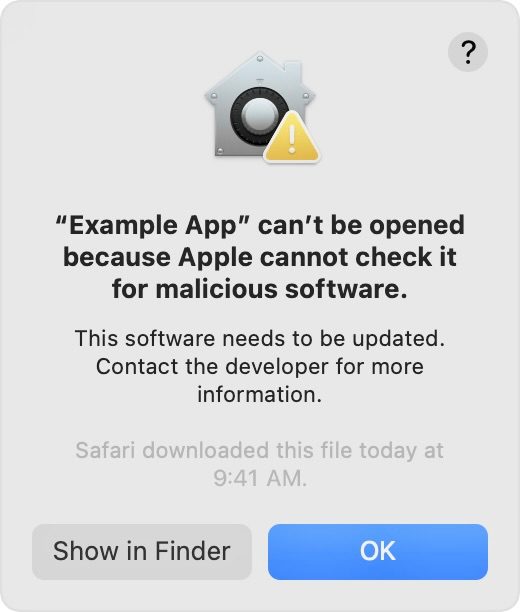
But there are gaps in the armor that protect Mac users’ systems. The MacOS layer of security relies on Apple adding quarantine tags to suspicious or outright malicious software, which in turn results in the warning dialogue you see when you try to open them. Not to mention that there are malware strains that target Macs specifically. In fact, there’s an entire site dedicated to logging all the latest MacOS malware and other harmful computer killers.
Thomas Reed, Director of Mac & Mobile at security firm Malwarebytes told us that the defenses aren’t as comprehensive as it seems. “Adding that flag is not a requirement, and not all software does [it],” he explained. “For example, torrent software often doesn’t, while at the same time being used heavily in piracy.”
“The nature of sandboxing on MacOS actually restricts antivirus software.”
In addition, XProtect’s list of malicious file signatures is hardly all-encompassing. Reed explained that it only checks files against 94 rules, “a tiny fraction of the rules found in any more powerful antivirus engine.” Kirk McElhearn, co-host of Mac security firm Intego’s podcast and a writer on malware topics, concurs that XProtect only looks out for “a handful of strains of malware.”
However, Reed still doesn’t believe these go far enough. He told us that Gatekeeper still won’t perform a signature check on non-quarantined apps on launch, meaning a malicious actor could tamper with a legitimate app and it would still be permitted to run on MacOS.
Reed also believes the nature of sandboxing on MacOS actually restricts antivirus software, at least if you download it from the App Store.
“By default, for example, [an antivirus app] cannot get access to most of the files on the hard drive. Even if you grant access to the entire hard drive, many of those files cannot be removed by an App Store app. This means App Store antivirus software is less likely to be able to detect all threats and is also less likely to be able to remove all threats.”
Where’s the weak link?
What about the common criticism that antivirus apps put an unnecessary strain on Macs, slowing them down and adding unwanted bloatware? McElhearn feels this concern is overblown.
“A decade or longer ago, the argument that antivirus software could slow down your Mac certainly may have had some merit, in some cases,” he explains. “But modern Macs generally have plenty of resources (processing power, memory, and disk speed) to allow antivirus software to protect you without any noticeable detriment to the Mac’s speed.”
Reed, however, is not so dismissive, calling antivirus apps’ performance hit a “bane” to Mac users.
“So many people still feel like Macs don’t need antivirus software that, if you convince them to install something, it’s an instant failure if performance takes a hit,” he laments. If you’re going to install an antivirus app, then, you need to find one that’s not only trustworthy but fast, too. If your Mac slows to a crawl while your antivirus app is conducting a scan, you’ll soon run out of patience — potentially putting yourself at risk.
Relying purely on Apple’s systems isn’t enough.
There are further indications that we are often the weak link. Reed argues that Apple’s in-built protection systems do a poor job of detecting adware and potentially unwanted programs (PUPs), things that he describes as “the most prevalent” threats to Mac users today.
If you fall victim to Mac malware, he argues, it’s less likely to be at the hands of a traditional virus and more likely to be due to you being tricked into installing malicious software masquerading as a trustworthy app — Mac Defender being a well-known example.
McElhearn, meanwhile, argues that relying purely on the systems that Apple has implemented isn’t enough. For example, while Gatekeeper can block apps that originate from third-party or untrusted developers, it can easily be bypassed by the user with a couple of clicks.
While Gatekeeper gives you plenty of warning that ignoring its checks is a bad idea, it still lets you do it with relative ease.
Both points cut to the heart of the biggest vulnerability in Mac security: Us. Humans are fallible creatures, open to manipulation or just plain laziness.
We may think that an app has been unnecessarily flagged by Gatekeeper (or get “dialogue fatigue” and allow it to run without thinking), thereby inadvertently opening the door to malware. Or we may see a well-made forgery of a trustworthy website, leading to us giving away our bank details to fraudsters and malcontents.
In cases like these, neither your Mac’s layers of built-in security nor third-party antivirus apps can offer you 100% protection.
A multipronged approach
It’s evident that you should install antivirus software on your Mac (we’ve already scouted out the best options for you). But as we said earlier, there are some important caveats and additional precautions you should take.
A quick and efficient antivirus app is a vital tool for keeping your Mac safe.
Antivirus software protection is a must for your device, but there are still cyber hacks that can penetrate it. To safeguard against all cyberattacks, it’ll take a concerted effort on your part to monitor your actions and the potential invasions they may cause. For example, never install downloads if you’re not sure what they are. This includes unfamiliar sites that ask you to install “safe” apps like Adobe Flash Player.
It is always advisable to exercise caution when exploring unknown sites or downloading files of any kind. Antivirus software is a more reliable filter for threats and picks up the slack where your good judgment fails by catching cyberattacks that evade your vigilance.
To sum up: You should install antivirus software on your Mac, but make sure to find one that doesn’t slow down your computer too much, and always use plenty of common sense. We’re confident that following these simple guidelines will stave off any hazardous intrusions on your Mac. We recommend perusing our thorough list of the best free antivirus software.


