

I take a lot of notes. Between scribbling down some observations while reviewing a product, organizing massive lists of performance data, going through press briefings, and putting down a reminder to buy eggs while I’m in the middle of the work day, I take a lot of notes. I need a proper note-taking app, and for years, that app was Evernote. I’m happy it no longer is.
Evernote, for most, is the default option for note taking. It’s extremely powerful, you can use it for free, and it works across Windows, macOS, iOS, and Android with syncing. Over my years of using Evernote, however, the app has slowly deteriorated into something that, at best, is frustrating to use, and at worst, is downright unusable. I haven’t touched Evernote in a few months, and instead, I’ve picked up Notion. And I haven’t even thought about going back.
A slow decline
At the beginning of the year, I noticed some problems with Evernote. Let me walk you through my typical experience using the app. I’d open the website (my work is almost exclusively done in a browser), log in with Google, and wait 10 to 15 seconds for Evernote to load. A little slow, but no big deal. Once inside, an ad asking me to upgrade would pop up the moment I tried to click anywhere. And after attempting to dismiss the ad, Evernote would graciously (read: sarcasm) check if I was sure I wanted to dismiss it.

Then, I’d open a note and go to start typing before being interrupted by yet another ad asking me to upgrade. This one is even worse, too. You may be able to notice in the screenshot below that there’s no obvious way to dismiss this ad. You can’t click away from it or hunt for the button to close the ad in the upper-right corner. It’s hidden right in the middle, in extremely small text that reads “remind me later.”
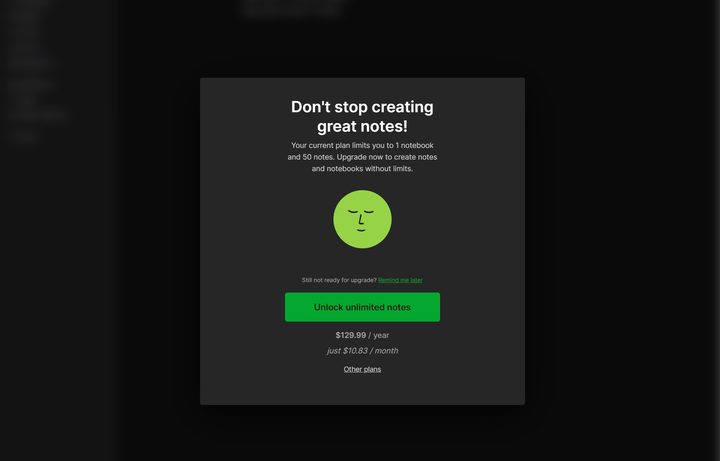
So what? It doesn’t sound like a big deal. Sure, the web app is a little slow to load, and there are some pop-ups asking you to upgrade. But this process happens every time you open Evernote. It’s a solid 30 seconds to a minute before you actually do anything, and when you’re trying to scribble down a note in the heat of the moment, that’s enough time to forget — at least, it’s enough time for my scattered brain to forget.
Nothing compares to the app simply refusing to work, though. Earlier this year at CES, I could not get Evernote to open. The local app wouldn’t work and the web client wouldn’t work. An update had broken the app on my system — I’m not alone here, either. You can search “update” on the Evernote subreddit and find dozens of threads of users with similar experiences. I’ve had several updates break various aspects of the app, too. When popping back into my account for this story, I stumbled upon an old note titled “F*** EVERNOTE” because bullet points wouldn’t work correctly during a briefing call.
My personal issues with the app are just an example of a much larger issue with Evernote overall, though. Just last year, the service limited its free plan to 50 editable notes after more than a decade of supporting unlimited notes for free. And a few months after Italian company Bending Spoons acquired Evernote in 2022, it laid off all of the 129 staff members working the U.S., stating the service is “unsustainable in the long term.” Maybe that explains all of those ads to upgrade.
The only way forward with Evernote for me is to pay $15 per month for the cheapest plan — that’s the cost of an Amazon Prime membership — and hope that an update doesn’t break my notes. I can’t justify that.
The replacement

After my fiasco with Evernote earlier this year, I’ve moved onto Notion, which made our list of the best Mac apps, and I haven’t looked back since. Notion and Evernote are different tools, and it can be difficult to wrap your head around how much Notion is truly capable of. You have notebooks and notes, as well as a calendar similar to Evernote. But you can also manage tasks through a Kanban board, create a wiki, and organize tasks across a team.
As a project management tool, Notion is great, but that’s not what I need it for. I just need it to take notes, and it handles that duty well, too. The main thing I love about Notion is that it’s fast. It’s instant. The web interface loads up immediately, as does the local app, and I don’t need to dig through ads before accessing my notes, even on the free plan. I can instantly jump into a note and scribble something down, which was the biggest hurdle I had with Evernote.
That speed goes beyond just loading up a new note, though. The search is also remarkably fast, even when digging through the hundreds of notes I’ve already made. Once I find a note, I can easily reorganize it, too. Although it takes up more screen space, Notion displays a few dozen of your notes on a left-side menu, allowing you to quickly drag them to different notebooks.

A fast note-taking app was all I ever needed, but the new AI features of Notion have also been very helpful. When searching, you can ask the AI to search for a topic within your notes. It’ll create a summary and even provide example questions. It works shockingly well, too. You can see an example of that above, where the AI is able to break down a complex topic like the Lunar Lake and Xe2 architectures from Intel based off my notes.
I’ve been using Notion for a few months now, and I’ve only barely scratched the surface of what it’s capable of. I’m experimenting with some other features — it automatically creates a reading list template for books, articles, and movies, which I’ve been filling out — but I can’t imagine diving into some of the more advanced project management features. For my purposes of jotting down a few notes and searching through them, though, it’s worked a treat.
Evernote has been around for years, but over the past few years, it’s slowly gone downhill. Between an increasingly restrictive free plan, high pricing, and generally poor performance, it’s not the note-taking app it once was. Notion has been a great replacement for me, but there are a ton of other options between OneNote, Google Keep, and Obsidian, among others.


