

Microsoft’s Surface Pro 11 epitomizes the detachable tablet form of 2-in-1 laptop, and it’s come a long way since the company first introduced the form factor over a decade ago. The newest model leveraged Qualcomm’s Snapdragon X chipset for strong performance and great battery life, making for the best version of the Surface Pro ever.
But the more popular 2-in-1 format is the 360-degree convertible, where the keyboard flips around from clamshell through tent and media modes into a tablet. HP’s new OmniBook Ultra Flip 14, based on Intel’s new Core Ultra Series 2 chips, is one of the best laptops in this category. But here’s the question: Which makes for the better 2-in-1 experience?
Specs and configurations
| HP OmniBook Ultra Flip 14 | Microsoft Surface Pro 11th Edition | |
| Dimensions | 12.35 x 8.51 x 0.59 inches | 11.3 inches x 8.2 inches x 0.37 inches |
| Weight | 2.97 pounds | 1.97 pounds (tablet only) |
| CPU | Intel Core Ultra 5 226V Intel Core Ultra 7 256V Intel Core Ultra 7 258V Intel Core Ultra 9 288V |
Qualcomm Snapdragon X Plus (10-core) Qualcomm Snapdragon X Elite (12-core) |
| GPU | Intel Arc 130V Intel Arc 140V |
Qualcomm Adreno |
| RAM | 16GB LPDDR5X RAM 32GB LPDDR5X RAM |
16GB 32GB |
| Display | 14.0-inch 16:10 2.8K (2880 x 1800) OLED, 120Hz | 13.o-inch 3:2 2.8K (2880 x 1920) IPS, 120Hz 13.0-inch 3:2 2.8K (2880 x 1920) OLED, 120Hz |
| Storage | 512TB SSD 1TB M SSD 2TB SSD |
256GB SSD 512GB SSD 1TB SSD |
| Ports | 2 x USB-C with Thunderbolt 4 1 x USB-C 3.2 Gen 2 1 x 3.5mm headphone jack |
2 x USB4 USB-C Surface Connect NanoSIM |
| Touch | Yes | Yes |
| Wireless | Wi-Fi 7 and Bluetooth 5.4 | Wi-Fi 7 and Bluetooth 5.4 Optional 5G |
| Webcam | 9MP with infrared camera for Windows 11 Hello | 1440p front-facing with infrared camera for Windows 11 Hello 10.5MP rear-facing |
| Battery | 64 watt-hour | IPS: 48 watt-hour OLED: 53 watt-hour |
| Operating system | Windows 11 | Windows 11 on Arm |
| Price | $ Buy at HP | Buy at Best Buy |
| Rating | 4 out of 5 stars | 4.5 out of 5 stars |
The OmniBook Ultra Flip 14 starts at $1,450 for an Intel Core Ultra 5 226V chipset, 16GB of RAM, a 512GB SSD, and a 14.0-inch 2.8K OLED display (the only option). But right now, it’s $400 off, making the base model a much more attractive $1,050. Upgrading to 1TB of storage costs $50 and 2TB is an additional $100. Fully configured, the OmniBook is $1,900 with a Core Ultra 7 258V, 32GB of RAM, and a 2TB SSD. That’s expensive, but again, it’s a lot more attractive at its sale price.
The Surface Pro 11 starts at $1,000 with a Qualcomm Snapdragon X Plus chipset, 16GB of RAM, a 256GB SSD, and a 13.0-inch 2.8K IPS display. The 5Gb configuration is $1,300, and moving to a 512GB SSD with Wi-Fi only costs $1,200. Then, you can select the Snapdragon X Elite and a 13.0-inch 2.8K OLED display starting at $1,500 with 16GB of RAM and a 512GB SSD. With 32GB and a 1TB SSD, the cost is $2,100.
The OmniBook is less expensive, especially if you can get it at its sale price.
Design

As mentioned above, the OmniBook Ultra Flip 14 is a 360-degree convertible, and so it works best as a clamshell laptop while also offering some flexibility. It’s significantly thicker and heavier as a tablet than the Surface Pro 11 without its keyboard, although the two are closer together when the Surface Pro 11’s keyboard is attached. Both are well-built machines, and they serve as perhaps two of the best examples of their types.
Aesthetically, the Surface Pro 11 is fairly simple, coming in four different colors — Platinum, Sapphire, Dune, and Black — while the front is a simple black slate. It offers Surface Pro Flex keyboards that comes in just two colors, Black and Bright Sapphire, so the colors don’t match perfectly. But it’s an attractive tablet overall. It has a flip-out keyboard that allows it to work as a decent clamshell when paired with the keyboard. The OmniBook Ultra Flip 14 is also attractive in one of two colors, dark blue and gray, and its notches on the rear of the chassis and bottom of the display add some elegance.
The OmniBook’s keyboard is excellent, with large keycaps and a full-size layout that’s extremely comfortable. The switches are light and snappy. The Surface Pro 11’s keyboard is also very good, with a slightly cramped layout, but precise switches, although it does bounce a bit when it’s propped up for typing. Both have haptic touchpads that work extremely well, but the OmniBook’s version is considerably larger. And of course, both have touch- and pen-enabled displays, which the Surface Pro 11 maximizes for writing and drawing with haptic feedback that helps mimic writing on a sheet of paper.
Connectivity is surprisingly similar, with both having dual high-speed ports, but the OmniBook adds in a USB-A port for legacy support. The Surface Pro 11 has its Surface Connect port for charging, which frees up a port for accessories compared to the OmniBook Ultra Flip 14. Both have fully up-to-date wireless, while the Surface Pro 11 adds in optional 5G connectivity.
The OmniBook has a higher-resolution 9MP webcam compared to the Surface Pro 11’s 1440p version, and the Microsoft tablet also has a rear 10.5MP camera. Both have infrared cameras for Windows 11 Hello facial recognition. In addition, both have fast Neural Processing Units (NPUs) to fully support Microsoft’s Copilot+ PC AI initiative. HP offers its own AI Companion software that will bring additional AI functionality when it rolls out sometime in the near future.
Performance
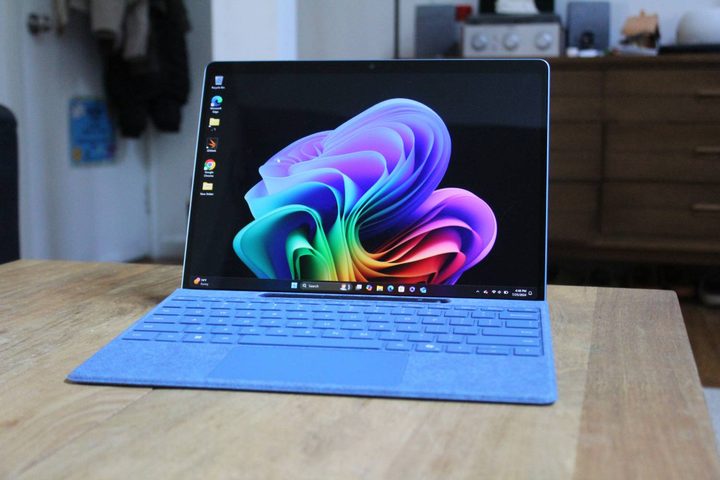
Both 2-in-1s use brand-new chipsets, both aimed at efficiency. But the Surface Pro 11’s Qualcomm Snapdragon X in either Plus or Elite versions provides faster performance than the Intel Lunar Lake chipsets in the OmniBook Ultra Flip 14. That’s apparent in our suite of benchmarks, where we reviewed the faster Qualcomm Snapdragon X Elite X1E-80-100 compared to the Intel Core Ultra 7 258V that’s near the top of Intel’s lineup.
These laptops are both more than fast enough for demanding productivity users. Neither of them have integrated graphics that are fast enough for gaming or creative applications.
| Geekbench 6 (single/multi) |
Cinebench R24 (single/multi/battery) |
3DMark Wild Life Extreme |
|
| HP OmniBook Ultra Flip 14 (Core Ultra 7 258V / Intel Arc 140V) |
2,483 / 10,725 | 116 / 598 | 7,573 |
| Surface Pro 11 (SnapDragon X Elite X1E-80-100 / Adreno) |
2,365 / 13,339 | 124 / 841 | 6,128 |
Display

The Surface Pro 11 is available with a choice between OLED and IPS displays, both 13.0-inch 2.8K (2880 x 1800) running at up to 120Hz. The OmniBook comes with just one option, a 14.0-inch 2.8K OLED panel, also running at a fast 120Hz. That makes the Surface Pro 11’s display considerably sharper.
We reviewed both 2-in-1s with OLED displays, and the Surface Pro 11’s version was considerably brighter while the OmniBook’s had wider and slightly more accurate colors. There’s a difference in the measured contrast, but both have perfect blacks. Both of these displays are excellent and will please pretty much every user.
| HP OmniBook Ultra Flip 14 (OLED) |
Surface Pro 11 (OLED) |
|
| Brightness (nits) |
385 | 532 |
| AdobeRGB gamut | 95% | 85% |
| sRGB gamut | 100% | 100% |
| DCI-P3 gamut | 100% | 97% |
| Accuracy (DeltaE, lower is better) |
0.67 | 0.74 |
| Contrast | 26,940:1 | 22,620:1 |
Portability
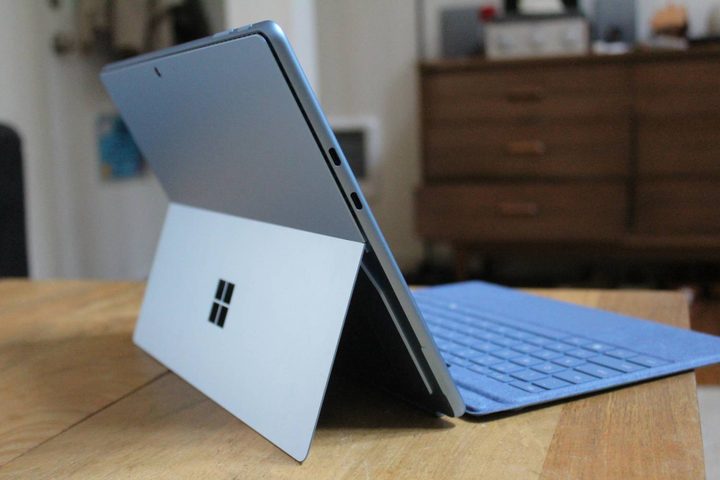
By itself, the Surface Pro 11 is lighter and thinner than the OmniBook Ultra Flip 14. Add in the keyboard, though, and they’re closer. Both are highly portable, but the Surface Pro 11 will be a lot more comfortable to use as a tablet.
Battery life is the real difference here, though. Although it has a smaller battery, the Surface Pro 11 gets much better battery life. It’s more likely to get you through a full day’s work — and then some.
| Web | Video | |
| HP OmniBook Ultra Flip 14 (Core Ultra 7 258V) |
11 hours, 5 minutes | 15 hours, 46 minutes |
| Surface Pro 11 (Snapdragon X Elite X1E-80-100) |
14 hours, 39 minutes | 16 hours, 26 minutes |
The Surface Pro 11 pulls out ahead, barely
The OmniBook Ultra Flip 14 is a great example of the convertible 2-in-1. It’s built well, looks great, has a great keyboard and touchpad, and its OLED display is awesome. It’s also less expensive if you can find it on sale, which was the case when this comparison is being written.
However, the Surface Pro 11 is faster, and it gets better battery life. That’s pretty remarkable in a tablet that can function as a clamshell laptop. It’s more expensive, but it has some features, like a haptic active pen, that give it the slightest edge in this comparison.


