
I’m a work-from-home freelancer, dad to young children, and forgetful socializer. That means that balancing meetings and work talk with my colleagues at various publications with a social life spread over its own range of chat apps can be rather difficult.
I’m not even a big social network person, but even I have to use Microsoft Teams, Slack, email, and Google chat, alongside Telegram, WhatsApp, text messages, and Twitter. Every. Single. Day. That can often feel impossible to keep up with, leaving me feeling stressed, distracted, and paranoid that I might be missing an all-important message.
Fortunately, there’s one app I’ve found that makes it all doable: the workplace organizing tool Rambox.
Work and play simplified, de-stressed

I hate notifications. The constant pings and reminders that someone else needs something from me can feel like a lot sometimes. But every chat app I use demands attention at different points throughout the day, and reaching for a different device because it’s started making a noise or flashing at me while I’m mid-flow can be incredibly disruptive.
Rambox helps me get around that by letting me put every notification in one place. It’s an amalgamating tool that brings together just about every social and communicative application you can think of. It supports a range of instant messaging apps, email clients, social media accounts, and more. Having all of them in a single place, it simplifies their management and means that when I’m at my desk working, I don’t need to stop what I’m doing just to answer a message — it’s right there. I also know I’m not missing anything if I haven’t looked at my phone in a while, and frankly, I can type a response to someone on WhatsApp far faster on my desktop keyboard than I can on a touchscreen.
It also makes adding new chat apps and services to my daily routine much more streamlined. When Digital Trends switched from Slack to Teams for our internal communications, all I had to do was add Teams to Rambox, and everything I needed was right there alongside every other app and tool I use day to day. I didn’t need to set up some entirely separate application, there was no additional window I had to have open every day, nor did I need to make sure I remembered to start the app up in the morning — lest I miss an important communication from a big boss.
The free tier is good enough
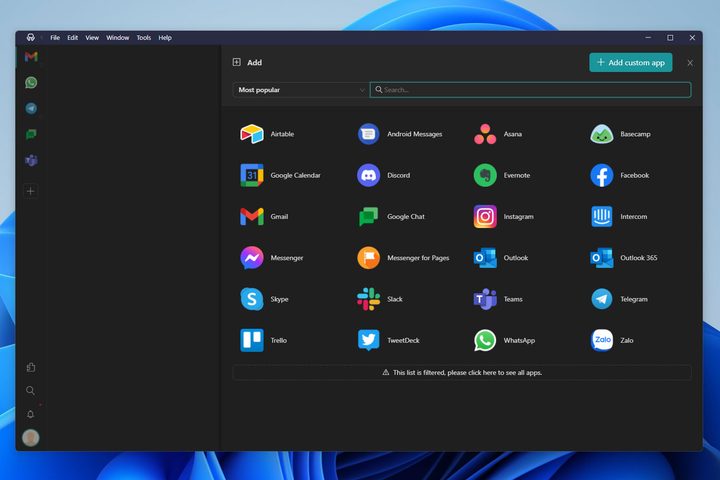
Better yet, Rambox is completely free. The basic version comes with support for over 700 applications, including all of the most popular and important ones. There’s also real-time synchronization across my devices, so if I do step away from the desk, I can use my phone or laptop and pick up where I left off. Rambox will ping you there if you don’t read a message on your desktop, so it’s easy to jump between the two. If you ever need to have everyone leave you alone for a bit, you can switch to Focus mode.
The paid versions do offer more, like a built-in spell checker and premium support, but they’re more targeted towards organizations and enterprises setting up Rambox for their workers.
For me, though, the free version of Rambox is more than enough, and it’s proved an absolute saving grace that prevents me from feeling buried under an avalanche of applications, notifications, and demands that would otherwise put my toddler’s endless cries of “daddy, daddy” to shame.
It’s not the only option
After gushing about Rambox for a few hundred words, I should confess that, until very recently, I was using an extremely outdated pre-1.0 release of Rambox. The more recent versions kept crashing on me, failing to install, and wouldn’t log in to my accounts; it was a mess. That appears to have been all fixed in the latest release, so I’m back on a secure and up-to-date version of the application, but I needn’t have been quite so stubborn. There are plenty of alternative messaging umbrella applications like it.
If you want a slightly different set of features and pricing tiers, other popular options include Franz, which has a free spellchecker included; All-in-One Messenger, which is entirely free; the versatile Apptorium Workspaces, which lets you create custom collections of apps, files, and folders for certain projects; the online-focused Station; or the entirely open source Hamsket.
I don’t know which one would be right for you, and it’s possible one of these might even be better for me. But for now, Rambox does the trick. Until it breaks or I start to feel swamped again, it’ll remain my go-to for saving time and staying in touch with people. Now, I just need to get better at actually replying.


