  1. Home
  2. Computing
  3. News

Microsoft just made Paint useful again

Add as a preferred source on Google
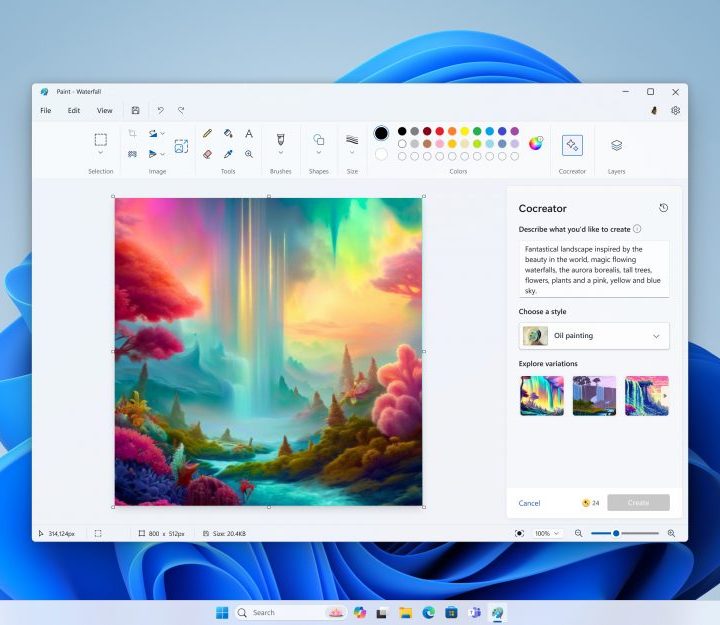
A screenshot of Paint Co-creator.
Microsoft

Microsoft Paint is taking a step into the future with the integration of DALL-E 3, better known as Cocreator. The AI-powered feature, previously featured in Bing AI, enables users to generate images based on textual descriptions and preferred art styles.

Microsoft originally announced its intentions to integrate Bing’s AI-based image-generating features with Paint during its September 26 event. According to a report by Windows Latest, Cocreator for Paint has now transitioned from the testing phase and is ready for a broader release for all Windows 11 users. While not every user may immediately experience the feature due to the gradual rollout, those eager to explore Cocreator should ensure they are running the latest version of Paint. Additionally, users may be prompted to join a waiting list within the app.

Recommended Videos

You can access the AI image creation tool by opening Paint and clicking on the Cocreator icon in the toolbar to see the Cocreator side panel. In the text box, describe the image you want to make. For instance, you can write “a dog wearing fancy clothes” or “a sunset at the beach.” Next, pick a style for your image and click on the Create button. Cocreator will create three different versions of the image you described. You can now choose any one and apply it to the Paint canvas for you to start creating.
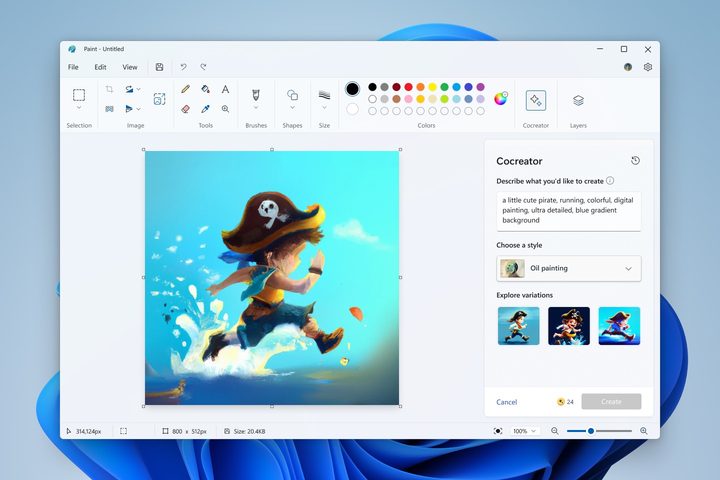
The new Cocreator AI feature on Microsoft Paint.
Microsoft

Additionally, Microsoft has also included a step-by-step tutorial within the Paint app which aims to acquaint users with the functionalities of Cocreator, making the AI-powered image creation process more accessible.

The integration of Cocreator is not the only enhancement to Paint on Windows 11 this year. Earlier this year we saw the introduction of a transparency effect, providing users with added creative flexibility. Furthermore, the much-requested functionality of layers has been incorporated, offering a more sophisticated approach to digital art creation. Paint users on Windows 11 can also make use of background removal.

As the name suggests, the feature helps in efficiently removing backgrounds with minimal user input. Notably, this update aligns with the broader trend of enhancing Microsoft’s core Windows 11 apps. The Photos app has also received an update that brings features like background removal and background blur option, adding to a more versatile user experience.

Kunal Khullar
Kunal Khullar is a computing writer at Digital Trends who contributes to various topics, including CPUs, GPUs, monitors, and…
If you miss the feel of paper in the digital age, this app gives your Mac’s screen a textured look
A paper-like screen overlay could make long work sessions feel less harsh.
Advertisement, Poster, Electronics

Most screen-comfort tools work by changing color temperature. Apple’s Night Shift makes the screen warmer, often giving everything an orange tint. Paperman is an interesting alternative because it adds a subtle paper-like texture over the display instead.

The app is available for Mac and Windows, and it is designed to make a screen look closer to paper, matte glass, or an e-ink display. It softens the harsh contrast and reduces the glossy look of modern screens during long reading or writing sessions.

Read more
I dug these last-hour Prime Day smart home, laptop, and accessory deals that are irresistible
Deals up to 60% off, a few hours left, and no reason to wait any longer.
Electronics, Phone, Speaker

Amazon's Prime Day 2026 sale is in its final hours, giving you your last chance to get your hands on the best smart home, security, tablet, laptop, and accessory deals. I've pulled together the picks that are still live, still deeply discounted, and still worth buying before the sale ends tonight or until the stock lasts.

Best Amazon Prime Day deals on smart home devices

Read more
Apple’s biggest MacBook Pro redesign in years may skip the chip everyone expected
The next MacBook Pro may bring OLED and touch support without M6 Pro silicon
MacBook Pro on Table

Apple is expected to launch a refreshed MacBook Pro later this year, but according to Bloomberg, it won't come equipped with a next-gen processor. Instead, Apple is going to equip the highly anticipated device with Pro and Max variants of the current-gen M5 silicon.

It was widely speculated that when the redesigned MacBook with an OLED display and touch-screen capability debuts, it will also mark the arrival of the M6 series processors. Well, it appears that Apple has changed its silicon strategy pretty significantly.

Read more