Microsoft’s strict hardware requirements for Windows 11 continue to confuse users in 2025, especially now that official support for Windows 10 ended in October 2025, pushing millions of PCs toward an upgrade. At the center of this confusion is the Trusted Platform Module (TPM) 2.0 requirement. TPM is a hardware-based security layer, traditionally implemented as a dedicated chip on the motherboard, that powers features like Windows Hello, BitLocker, and secure boot processes. Windows 11 relies on TPM to protect encryption keys at the hardware level, making it a mandatory security component for the OS.
Fortunately, most modern motherboards don’t rely on a physical TPM chip. Instead, they use firmware-based TPM that behaves the same way in Windows. Major motherboard makers including Asus, ASRock, Gigabyte, MSI, and Biostar have long confirmed which of their boards support this feature. Firmware TPM runs through Intel’s Platform Trust Technology (PTT) or AMD’s fTPM, offloading processing to the CPU instead of a separate module, while still meeting Microsoft’s requirements.
However, TPM support alone doesn’t guarantee Windows 11 compatibility. CPU support only goes back to Intel’s 8th-gen Core processors and AMD’s Ryzen 2000 series, meaning older systems won’t pass the upgrade check even if firmware TPM is enabled. If you’re preparing to move on from Windows 10, it’s crucial to verify both your motherboard’s TPM setting and your Intel or AMD processor’s eligibility before installing Windows 11.
Asus
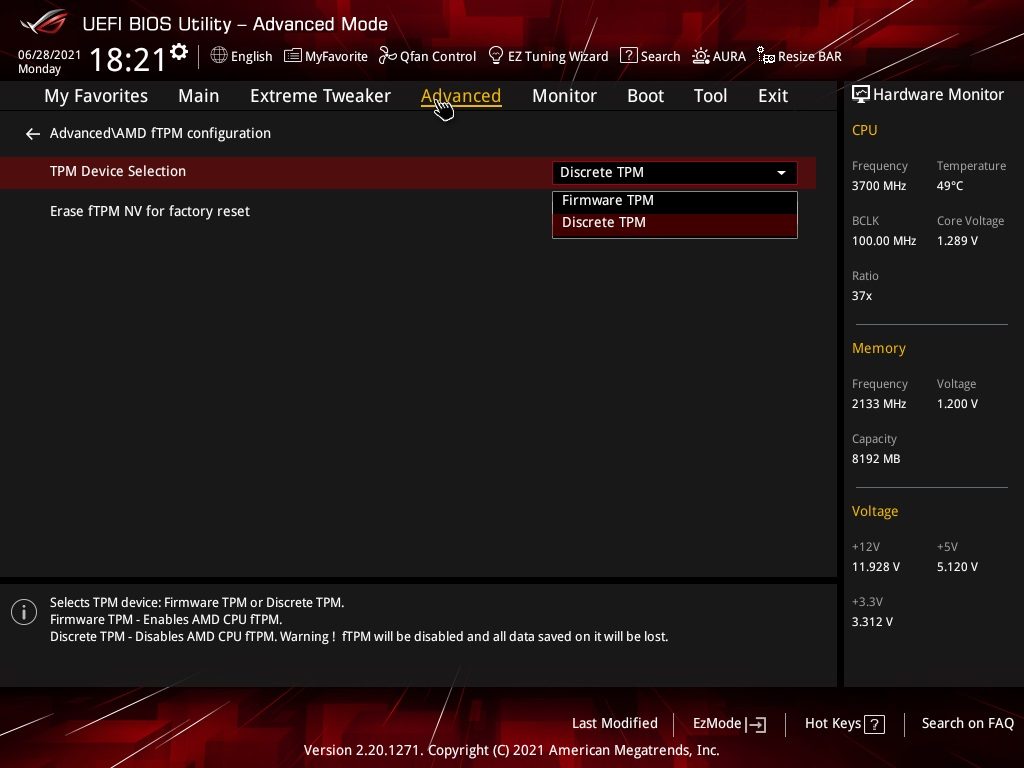
Asus includes support for firmware TPM on the most recent AMD chipsets and Intel chipsets dating back several years.
To activate it on Intel motherboards, head to the BIOS, go to the Advanced tab, select AdvancedPCH-FW Configuration and change PTT to Enable.
AMD motherboards follow the same process but with different names. Look for AdvancedAMD fTPM Configuration in the Advanced tab, and switch the TPM Device Selection setting to Firmware TPM.
| Intel | AMD |
| C621, C422, C246 | WRX80 |
| X299 | TRX40 |
| Z590, Q570, H570, B560, H510 | X570, B550, A520 |
| Z490, Q470, H470, B460, H410, W480 | X470, B450 |
| Z390, Z370, H370, B365, B360, H310, Q370 | Z370, B350, A320 |
ASRock
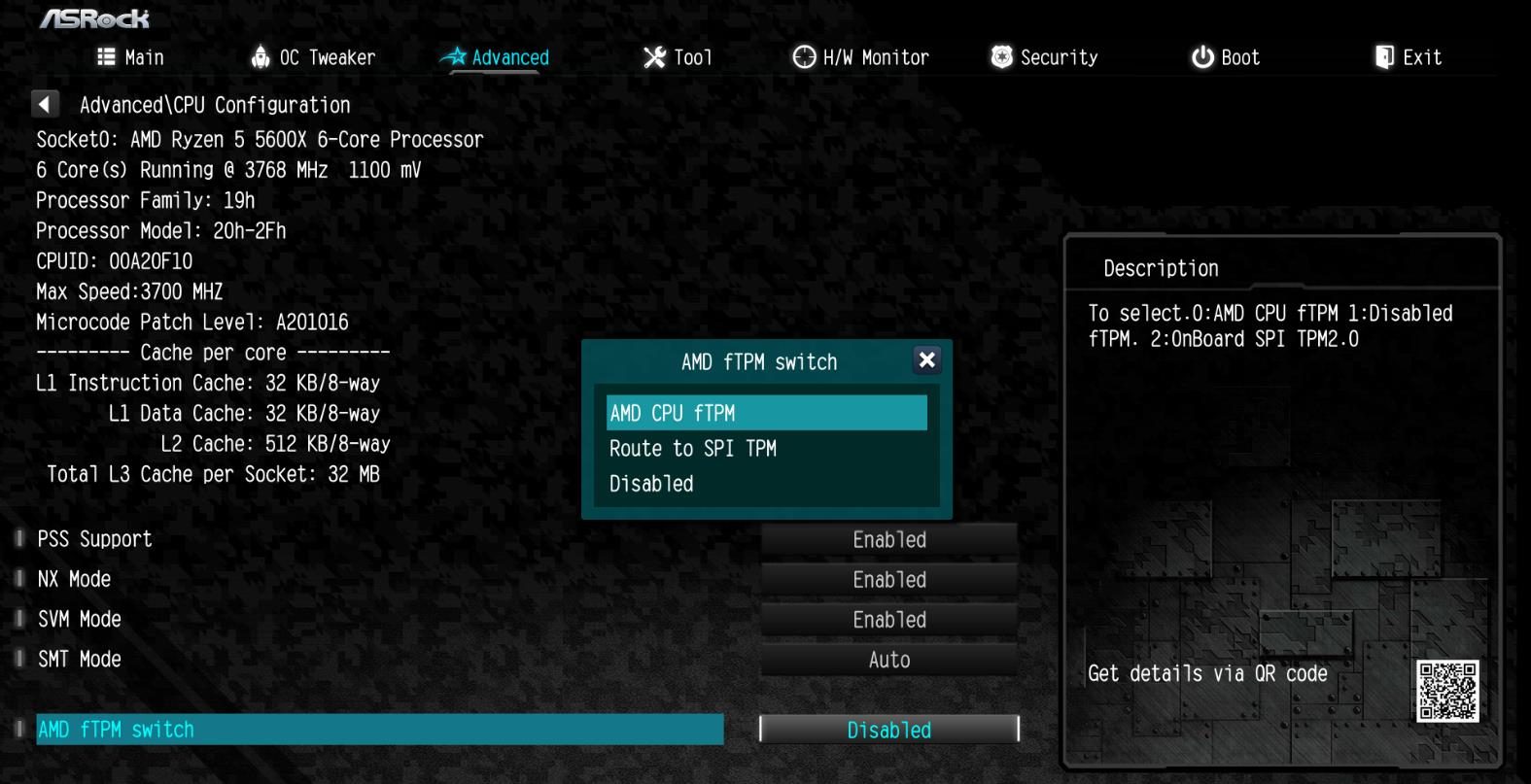
ASRock supports firmware TPM on most Intel and AMD motherboards, but it’s important to check if you have a compatible processor. Although firmware TPM may work on Intel 100-series chipsets, for example, that doesn’t mean your CPU will work with Windows 11.
On Intel boards, go to the BIOS and select the Security tab to enable TPM. Find the Intel Platform Trust Technology setting in this section and change it to Enabled.
If you have an AMD board, go to the Advanced tab and find the AMD fTPM Switch setting. Change this setting to AMD CPU fTPM.
| Intel | AMD |
| Z590, H570, B560, H510 | X570, B550, A520 |
| Z490, H470, B460, H410 | X470, B450 |
| Z390, Z370, H370, B365, B360, H310, H310C | X399, X370, B350, A320 |
| Z270, H270, H110 | TRX40 |
| Z170, H170, B150, H110 | |
| X299 |
Biostar
Biostar supports firmware TPM on a few Intel and AMD chipsets. The company hasn’t provided any guidance on how to enable TPM in the BIOS, but the process should be similar to the brands above. Look for a Security or Advanced tab, where you should find a setting for TPM or Intel PTT.
| Intel | AMD |
| Z590, B560, H510 | X570, B550, A520 |
| B460, H410 | X470, B450 |
| H310 | X370, B350, A320 |
| B250 | |
| J4105NHU |
EVGA
Outside of a single new AMD motherboard — which supports TPM 2.0 — EVGA only sells Intel boards. Once again, these are the chipsets that support TPM 2.0, not the ones that support Windows 11. The steep CPU requirements on Windows 11 mean that some of the below chipsets won’t work on the OS.
To enable TPM 2.0, enter the BIOS, select Setup, go to Advanced, and find the Trusted Computing option. There, select Intel PTT Support, save your changes, and reboot your machine.
| Intel |
| Z590 |
| Z490 |
| Z390, Z370, H370, B360 |
| Z270 |
| Z170 |
Gigabyte
Gigabyte motherboards with the latest AMD and Intel chipsets support firmware TPM. As with Biostar, Gigabyte hasn’t provided any guidance on enabling the feature, but you will likely find it in the Settings menu with a reference to TPM or Intel PTT.
| Intel | AMD |
| C621, C232, C236, C246 | TRX40 |
| X299 | AMD 500 series |
| Intel 500 series | AMD 400 series |
| Intel 400 series | AMD 300 series |
| Intel 300 series |
MSI
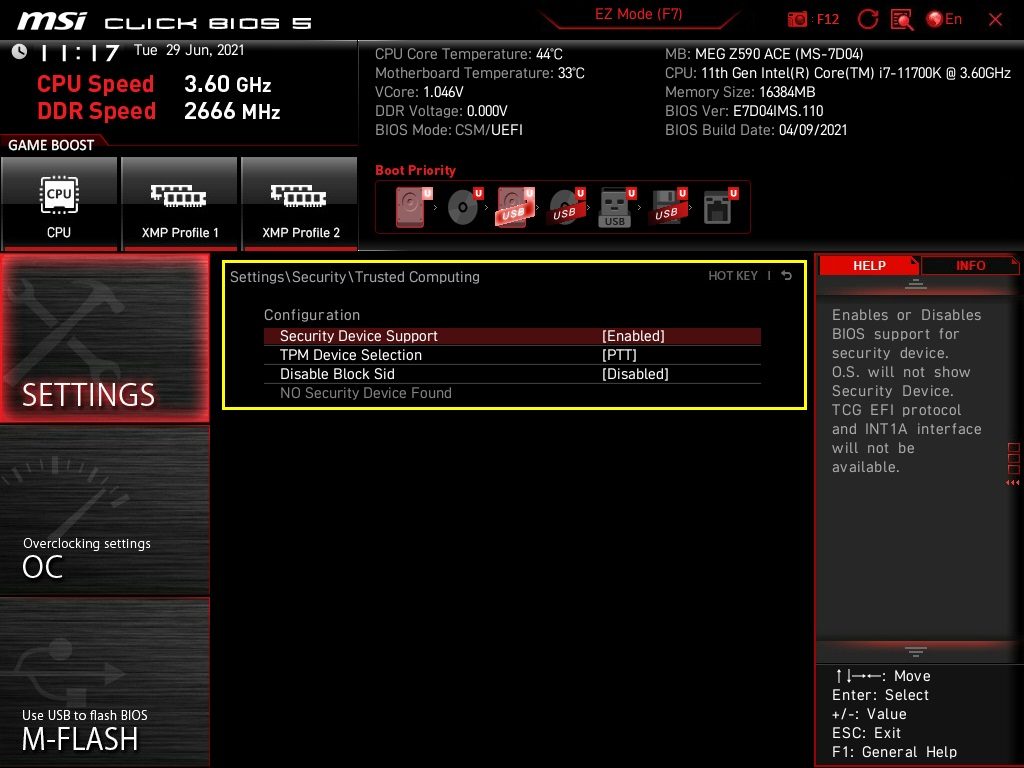
MSI supports firmware TPM on the last several AMD and Intel chipsets. Similar to ASRock, the list below compromises chipsets that support TPM 2.0, not chipsets that support Windows 11. Make sure to check your processor against the list of officially supported ones.
To enable TPM on Intel boards, go to the BIOS and select the Settings menu. Then, follow Security > Trusted Computing and change the TPM Device Selection setting to PTT.
For AMD, go to the BIOS and select the Security tab, then turn on Security Device Support and select AMD fTPM Switch.
| Intel | AMD |
| Z590, B560, H510 | X570, B550, A520 |
| Z490, B460, H410 | X470, B450 |
| Z390, Z370, B365, B360, H370, H310 | X370, B350, A320 |
| Z270, B250, H270 | TRX40, X399 |
| Z170, B150, H170, H110 | |
| X299 |
NOTE: All motherboards launched post any of the above listed, will already include firmware-based TPM support, so you won’t need a separate TPM module.
With firmware TPM built into most modern boards, you don’t really need to worry about checking for compatibility, unless your system is over 6-7 years old. While the end of Windows 10’s support marks the end of an era, it also marks the beginning of a more secure, more modern computing experience, one you can still reach with a bit of BIOS exploration and the right hardware checks. Think of this transition not as a roadblock, but as an opportunity to breathe new life into your existing PC.
If you’re ready to take the next step, don’t stop here. Explore our guides on optimizing Windows 11 performance, choosing the right SSD upgrade, or building a future-proof PC.