  1. Home
  2. Computing
  3. News

This portable touchscreen perches on your laptop’s display

Add as a preferred source on Google

A unique, portable monitor made by Nex perches on your MacBook or USB-C laptop screen to provide a second display for more workspace, to keep an eye on important news and social media feeds, or to watch a video while tweeting or clearing your inbox.

Called, the NexPad, it’s a thin, light, external monitor that’s can be positioned so it sits above your laptop’s built-in display. Priced at $249, the 12-inch, 1080p touchscreen looks like an interesting way to expand your desktop vertically.
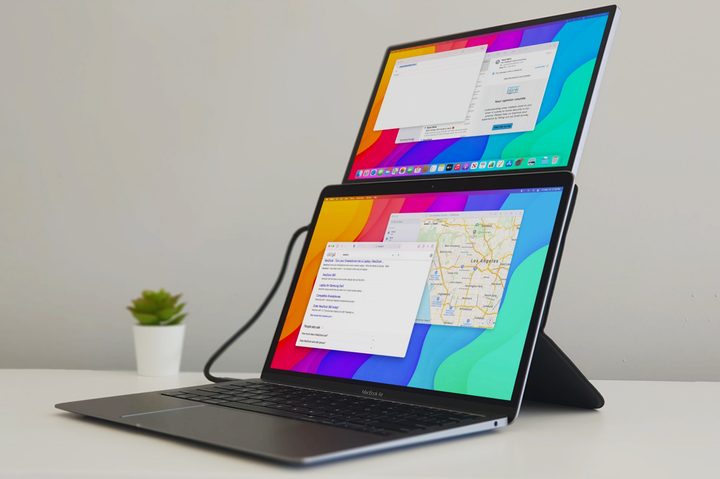
The NexPad perches on your laptop's screen.
Image used with permission by copyright holder

Beyond just adding another screen, the height provides a better ergonomic angle for using your laptop on a desk or table. Ideally, a monitor should be placed at eye level. Portable external monitors that stand even with a laptop’s screen don’t provide the same benefit.

Recommended Videos

You might be wondering how your laptop hinge will be able to support the added 1.6-pound weight. Nex designed a clever magnetic kickstand that supports your laptop’s angle while raising the NexPad display closer to eye level. In theory, this sounds like a good solution but we haven’t had hands-on experience with it yet.
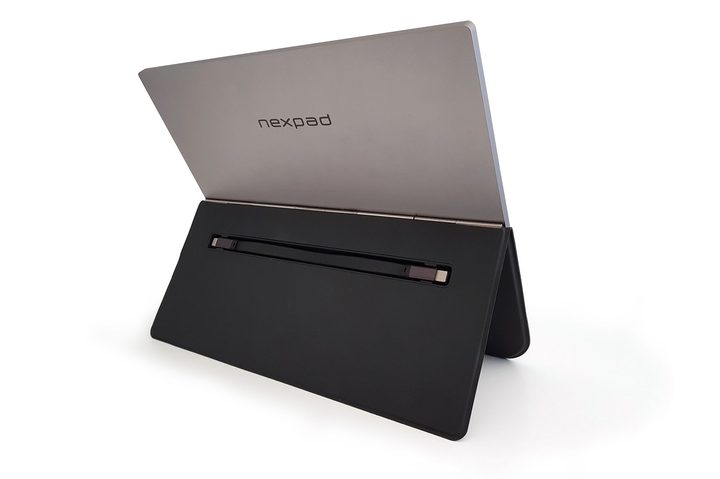
The NexPad comes with a magnetic kickstand to help support the screen.
Image used with permission by copyright holder

The NexPad is powered by your laptop’s USB-C plug so it will affect battery life. The monitor includes one mini-HDMI 2.0 port, two USB-C ports that use the USB 3.1 standard, and one USB-C port that uses the older 2.0 standard. The magnetic mount and kickstand are bundled at the $250 price, providing extra value.

The NexPad is also compatible with some smartphones that allow a desktop mode. Samsung is the most notable with its Dex software. For the full list, see Nex’s website.

Alan Truly
Alan Truly is a Writer at Digital Trends, covering computers, laptops, hardware, software, and accessories that stand out as…
Nvidia leak spoils multiple variants of its upcoming N1-series processors
Nvidia logo

NVIDIA’s upcoming N1-series processors may have been officially scheduled for a reveal, but a fresh leak appears to have spoiled the party a day early. New specifications shared by VideoCardz’s insider outline not only the flagship N1X chip but also several additional variants, suggesting Nvidia is preparing a much broader push into PC processors than previously expected.

The headline-grabber is the N1X, which reportedly mirrors the configuration of Nvidia’s GB10 chip used in the DGX Spark AI system. But it’s the smaller, more affordable N1 models that could have the biggest impact if Nvidia intends to bring Arm-based processors to mainstream laptops.

Read more
MSI’s MEG Vision X2 AI+ desktop has a holostage to keep you busy with an AI pet
MSI's MEG Vision X2 AI+ takes the gaming desktop somewhere new, a cylindrical Holostage display built into the chassis gives your AI companion a physical home.
Machine, Computer Hardware, Electronics

Gaming desktops have been getting smarter every year with better cooling, faster chips, and more RGB lights than anyone asked for. MSI has decided that none of that is interesting enough and has introduced something genuinely unexpected at Computex 2026.

The Taiwanese company has unveiled a gaming desktop, and its most interesting aspect is the built-in cylindrical display that exists purely to give your AI companion a physical avatar.

Read more
Photoshop is being eaten by the prompt box
AI image tools are making editing feel less like software and more like a conversation, but the conversation is not always cooperative.
Person, Animal, Insect

Coming back from a recent trip, I found myself sorting through a pile of photos that needed a little cleanup. Nothing dramatic. A distracting object here, an awkward background detail there. My first thought was Photoshop, but the full version requires a subscription, and I'm neither skilled enough to justify paying for it nor in need of everything it offers.

Mobile editing apps weren't much more appealing. I have fat fingers, and there's a special kind of frustration that comes from trying to make a precise adjustment on a phone screen only to tap the wrong thing three times in a row.

Read more