
With some AI trickery, Nvidia has managed to cheat the traditional rendering pipeline for games. And that makes traditionally underpowered laptops so much better.
Its latest RTX 40-series mobile GPUs are very powerful — especially if you jump up to the RTX 4090 in a machine like the Asus Strix Scar 17. But it’s the low-end options where Nvidia is really pushing ahead. That isn’t due to raw power, but instead Deep Learning Super Sampling (DLSS), Nvidia’s AI-powered upscaling and frame generation tech.
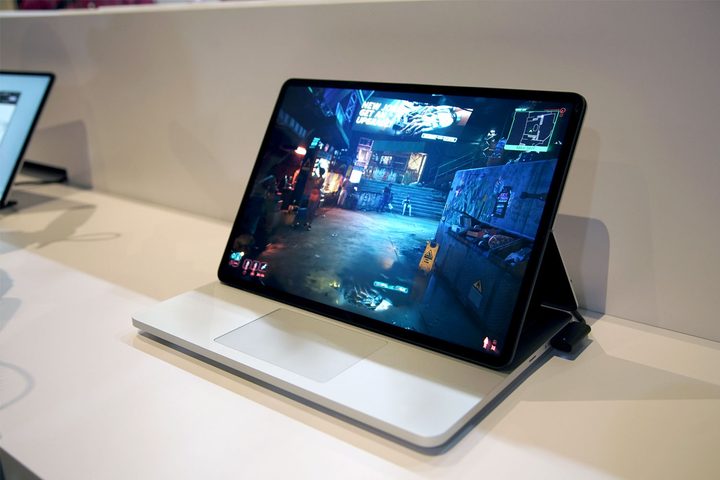
This became clear at Microsoft’s Surface event, where the company debuted its Surface Laptop Studio 2. Walking around the demo room, I spotted a Microsoft rep playing Cyberpunk 2077, and it looked great. Consistent, smooth, dare I say with ray tracing enabled? I’m not positive ray tracing was enabled, to be clear, but the game still looked stunning. Surely, I thought, this is running from the cloud. Even the RTX 4060, which is the top spec GPU for the Surface Laptop Studio 2, isn’t that powerful. “No, it’s local,” the rep told me.
Two years ago, when Microsoft announced the original Surface Laptop Studio, I wrote about why it could finally be a proper gaming laptop for Microsoft. My argument was mainly based on the fact that it even had a dedicated GPU, something that was rare to find in this type of laptop at the time, as well as the cloud ecosystem available through Xbox Game Pass.
It looks so quaint in hindsight — I was talking about how the RTX 3050 Ti might be too weak with only 4GB of VRAM. “Unusable” is the term I’d use today. The idea would be to use the underpowered GPU for some games locally, while relying on streaming for the heavy hitters like Cyberpunk 2077. Oh, how things have changed.
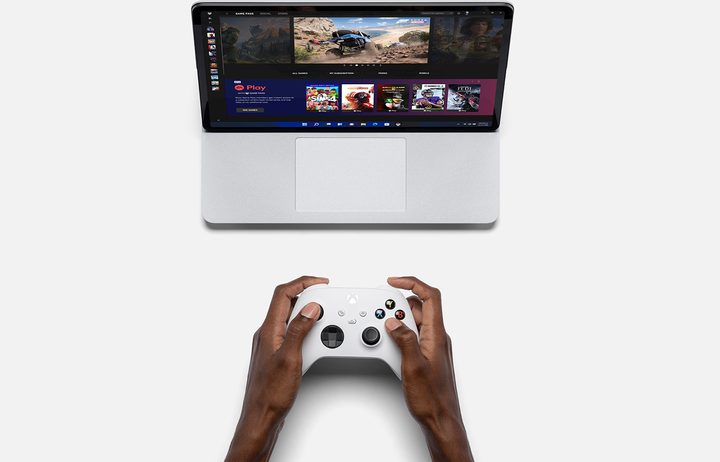
In two years — and a single generation of GPUs and laptops — look at where we are. The original Surface Laptop Studio can kind of run games, but only the type of games where you have to turn down the resolution, stick with the medium preset, and squint to get over the frame drops. Now, the Surface Laptop Studio 2 is running Cyberpunk 2077, still one of the most demanding PC games around, at what looked to be high settings and smooth frame rates.
We have Nvidia to thank for that, and its seemingly relentless dedication to shortcuts on the rendering pipeline. DLSS launched as a disaster before turning into the de facto upscaling tech. It moved on to DLSS Frame Generation, and now we even have Ray Reconstruction through DLSS 3.5. And all of these features are available on the Surface Laptop Studio 2 (or any RTX 40-series laptop).
These features are nice to have for high-end graphics cards, but they make all the difference for a device like the Surface Laptop Studio 2. In particular, Frame Generation through DLSS 3 is a literal game changer. It inserts a frame between each rendered frame in supported games, Cyberpunk 2077 being among them. This essentially doubles your frame rate, so if you were playing a game at 30 frames per second (fps), it would appear as 60 fps. There’s some overhead, but it doesn’t account for much when stacked on top of DLSS Super Resolution.

It’s cheating. It allows much weaker graphics cards to look as if they’re performing much faster than they are. To be clear, I’m not saying cheating is bad here, or that it’s somehow lazy. It probably took a massive amount of work on Nvidia’s end to get Frame Generation working properly. But it’s a way for Nvidia to shortcut the rendering pipeline, relying on clever AI tech instead of raw computing power, and traditionally underpowered laptops are the ones that benefit because of it.
I don’t want to leave here acting as if DLSS 3.5 is perfect, though. I’ve already talked about my issues with DLSS Frame Generation, and you might want to leave it off if you already have a powerful desktop PC. But when the other option is playing games from the cloud, as is the case with a lot of non-gaming laptops, DLSS Frame Generation looks a whole lot more attractive.
Laptops especially benefit from this tech, since upgrades aren’t possible (outside of machines like the Framework laptop). As the hardware inevitably ages out and more demanding games release, they’ll (hopefully) come with Frame Generation as well, giving you a little more life than the raw hardware is capable of.
I’ve started seeing more low-end gaming laptops, as well as creator-focused machines, packing an RTX 4050 or RTX 4060. This class of GPUs was traditionally designed to accelerate some professional tasks and allow you to pick up a game of Civilization VI when you had a free minute. With DLSS Frame Generation, they’re capable GPUs offering playable frame rates in the most demanding games.
Nvidia is cheating with DLSS Frame Generation, but that makes laptops that otherwise wouldn’t be suitable for gaming much more powerful.


