
I’m not going to lie: There are a lot of great gaming laptops out there. There are so many options, in fact, that it’s hard to narrow it down to a couple that truly stand out from the pack.
Even recognizing that, there are two main laptops I recommend when someone asks me directly which gaming laptop they should buy. That doesn’t mean other gaming laptops are bad, but these two hit the budget and performance requirements that most people are looking for in a way few other laptops can match.
Lenovo Legion Pro 5

Without fail, if someone asks me which gaming laptop they should buy, I point them toward the Lenovo Legion Pro 5. It earned near-perfect marks in our Lenovo Legion Pro 5 review, and that mainly comes down to its performance and price.
The base configuration is $1,250, which sets the standard for what you should expect to spend on a current-gen laptop with solid performance. For that price, you’re getting an RTX 4060 mobile graphics card, 1TB of storage, 16GB of DDR5 memory, and an AMD Ryzen 7 7745HX.
It’s hard beating the value given those specs. There are cheaper gaming laptops you can buy, such as the Dell G15, but few can touch the balance of performance and price that the Legion Pro 5 offers.
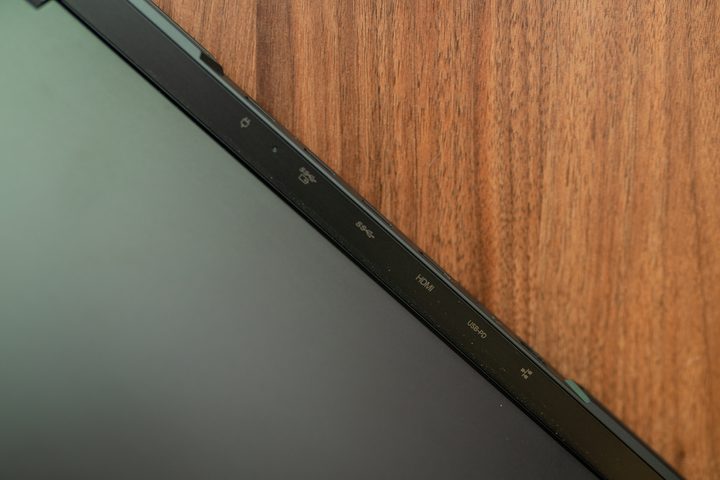
Performance is only part of the reason the Lenovo Legion Pro 5 stands out so much, though. For starters, the port selection is excellent. It may seem small, but the number and placement of ports can make a huge difference on gaming laptops. The Legion Pro 5 comes with two USB 3.2 Gen 1 Type A ports, afull-size Ethernet, a USB-C that supports up to 140 watts of power, and an HDMI 2.1 port in the back of the machine, negating a lot of cable mess. Lenovo includes another pair of USB-A ports (one on each side), along with a USB-C port for the left side.
It’s a great selection, and it’s split up in a way that keeps the most bulky cables out of your way. The ports are joined by a spacious trackpad, along with a fantastic keyboard. Lenovo makes some of the best laptop keyboards, and it’s been clear for years that it takes ideas from its ThinkPad range and brings them down to its Legion line. The keyboard has a decent amount of travel, and although I like some other keyboards more for long typing sessions, the Legion Pro 5 is still plenty comfortable to use.

There are some minor issues, still. The laptop is fairly bulky, and it’s weighed down by a large power brick. Franky, those issues are hard to avoid on any gaming laptop. The 2,560 x 1,600 screen isn’t great, either. It’s not bad, offering a solid 165Hz refresh rate and good color accuracy, but it’s not as impressive as the local dimming and 240Hz refresh rate featured on the display of the ROG Zephyrus M16.
Those minor quirks are easy to look past considering how much else the Legion Pro 5 has to offer. It offers a great value for the performance, and the build quality shoots past most other laptops in this class.
Asus ROG Strix Scar 17

You want peak performance, and you’re willing to spend up to achieve it. Let me introduce you to the Asus Strix Scar 17, which is about as high-end as gaming laptops come. The base price is $2,900 for an AMD Ryzen 9 7945HX and an RTX 4080, and that combination delivers flagship performance. If you spend up for an RTX 4090 configuration like the one we tested in our Asus ROG Strix Scar 17 review, you’ll have a laptop that beats most high-end desktops.
It can deliver above 100 frames per second (fps) at its native 1440p resolution in the most demanding games, including Cyberpunk 2077 and Red Dead Redemption 2. It has enough grunt for ray tracing, too, especially when you factor in Nvidia’s Deep Learning Super Sampling 3 (DLSS 3).
With DLSS 3 and GPUs as powerful as the RTX 4080 and RTX 4090, you can even power through things like path tracing in Cyberpunk 2077 with the Scar 17. And as if flagship hardware wasn’t enough, the Scar 17 is the only laptop that currently has AMD’s Ryzen 9 7945HX3D mobile processor available as an option.

Raw power definitely takes center stage for the Scar 17. Everything else is OK, but it nothing else stands out as much as performance. Starting with the screen, it’s a bog standard IPS panel, but it still boasts Nvidia G-Sync, a 240Hz refresh rate, and a 1440p resolution. A proper HDR display would be better, but considering the hardware and price, it’s a fair trade-off.

The keyboard is a highlight, offering impressive travel and per-key RGB lighting. I also appreciate that Asus includes dedicated media keys, so you can quickly adjust your volume without reaching for the Function key. Port selection is solid as well, with dual USB-C and USB-A ports, along with a 2.5 Gigabit Ethernet port and full-size HDMI 2.1.
What’s great about the Scar 17 is that it offers desktop-replacement levels of performance without going overboard like the MSI GT77 Titan. It’s a monster of a gaming laptop, and unlike most machines in this class, the price feels fair for the level of performance it offers.
What about everything else?

I wanted to specifically highlight two gaming laptops here that I believe are truly special after spending some time with them. That doesn’t mean every other gaming laptop is bad, or you shouldn’t consider other options. There are some excellent gaming laptops you should keep in mind, particularly if you have a certain use case.
For gamers on the go, I can’t recommend anything other than the Alienware x14 R2. It’s portable, rugged, and comes with great battery life. Performance isn’t off the charts, but it still packs plenty of gaming grunt with its Intel Core i7-13620H processor and RTX 4060 GPU. The Alienware x16 is worth a shout-out here, too, especially if you’re looking for a portable desktop replacement.

I need to mention the Razer Blade 1, as well. It would be the perfect gaming laptop if it wasn’t for its high base price. The RTX 4070 configuration is a showstopper, and the laptop is built like a tank. But at $2,700, you’re definitely spending a lot of money on a premium fit and finish.
I still recommend the Lenovo Legion Pro 5 and Asus ROG Strix Scar 17 the most, though. If you need a few more options, make sure to check out our other gaming laptop roundups:


