
When on the hunt for a new PC or external hard drive, you’ll likely see two different storage options: Traditional hard disk drive (HDD) and solid-state drive (SSD). Deciding on the best one for your needs can be a massive obstacle if you don’t know the difference. Should you go with the old-school HDD or the newer, faster, and better SSD? Here, we’ll help you make the best choice based on crucial factors such as storage size, speed, and price.
If you decide an SSD is right for you, we’ve also rounded the best SSD deals available now.
Storage capacity

It isn’t difficult to find hard drives with several terabytes worth of storage — and they are getting bigger all the time — without too much of an increase in cost to the consumer.
In contrast, SSDs have lower capacity and become prohibitively expensive when you go beyond 4TB capacity in the 2.5-inch SATA model or 2TB in the M.2 NVMe model.
However, when it comes to storage space, hard drives will maintain their advantage for the foreseeable future although the conversation will change over the next few years when SATA SSDs appear with 16TB of capacity, and thereafter as prices fall to affordable levels. If you want to store something long-term or store large files and folders, hard drives are the way to go, but that is one of the only areas where hard drives still hold sway.
Speed, design, and durability

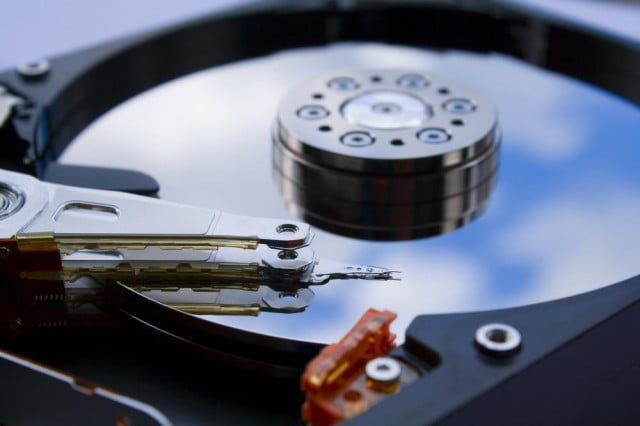
Drive “speed” is predominantly focused on how fast they can read and write data. For HDDs, the speed at which the platters spin helps determine the read/write times. When accessing a file, the “read” part of the read/write head notes the magnetic section’s positioning as it flies over the spinning platters. As long as the file being read was written sequentially, the HDD will skim it. However, as the disc becomes crowded with data, it’s easy for a file to be written across multiple sections. This phenomenon is called “fragmenting” and leads to files taking longer to read.
With SSDs, fragmentation is not an issue. Files can be written sporadically across the cells — and are designed to do so — with little impact on read times, as each cell is accessed simultaneously. This easy, simultaneous access to each cell means files are read at incredibly fast speeds — far faster than an HDD can achieve, regardless of fragmentation. That’s why SSDs can make a system feel snappy — because their ability to access data across the entire drive, known as random access, is so much faster.
This faster read speed comes with a catch. SSD cells can wear out over time. They push electrons through a gate to set its state, which wears on the cell and, over time, reduces its performance until eventually the SSD wears out. That said, the time it would take for this to happen for most users is quite long; one would likely upgrade their SSD due to either obsolescence or a desire for more storage space before a standard SSD would fail. There are also technologies like TRIM, which help keep SSDs from degrading too quickly.
Getting the balance right
There is a balancing act between durability, capacity, and speed as NAND storage technology has moved from the original SLC with 1 bit of data per cell to MLC with 2 bits, then TLC (the T is for Triple), and now QLC for Quad, i.e. 4 bits of data per cell. The Samsung 860 QVO earns that QVO suffix through its use of QLC flash storage.
Cramming more bits of data into each cell allows the manufacturers to increase storage capacity and reduce costs. Unfortunately, there is a problem with hardware longevity, as it becomes more complicated to determine the state of each of the bits in a given cell as the silicon ages. Furthermore, the process of reading and writing takes longer than it did previously, so we see a distinct split in the characteristics of new SSDs. Some models, such as WD Black or Samsung 980 Pro, feature a PCI Express 4.0 interface with TLC NAND and are blazing fast, while other SSDs deliver higher capacity at a lower price but with lower performance and a shorter life span.
The single biggest problem with hard drives is that they are much more vulnerable to physical damage due to their use of mechanical parts. If one were to drop a laptop with an HDD, there is a high likelihood that all those moving parts would collide, resulting in potential data loss and even destructive physical damage that could kill the HDD outright. SSDs have no moving parts, so they can better survive the rigors we impose upon our portable devices and laptops.
Another thing to be mindful of is the design of these devices. HDDs are almost always a 3.5-inch or 2.5-inch disk, while SSDs come in various shapes and sizes. The most common is still the 2.5-inch drive, but smaller SSDs with the M.2 form are becoming increasingly common. If you are considering an upgrade to your PC or laptop with an M.2 SSD, you will need to do some research into NVMe, M.2, and SATA SSDs. This will help you determine whether the M.2 supports the NVMe protocol and whether it is PCI Express Gen 3 or Gen 4. It would be a shame to install a slow SSD in a fast system, and equally upsetting to buy a fast SSD for a system that is unable to reap the benefits of the technology. We love M.2 SSDs, despite their higher price over their SATA III counterparts, as they are much smaller and increasingly offer the fastest storage speeds.
For further information on SATA, you can check out our guide that explains what SATA is.
Pricing

Although prices have been coming down for years, SSDs are still more expensive per gigabyte than hard drives. For similar amounts of storage, you could end up paying nearly twice as much for an SSD than an HDD — and even more at higher capacities.
While you’re paying higher prices for less space with an SSD, you’re investing in faster, more efficient, and far more durable data storage overall. If you’re building a system with speed, power needs, or portability in mind, then an SSD is going to be the better choice. Adding another hard drive is easy and cheap on most desktops, so it’s a good upgrade down the road if you need more storage space. Having a separate data drive also allows you to update or reinstall your operating system with minimal effort.
In the past year, we have suffered a shortage of PC hardware, and that has stalled the steady reduction in SSD prices. Even so, we are finding fewer reasons to opt for HDDs in most systems. For as little as $60, there are brand-name 500GB SSDs available, which is almost the same price as the average 1TB HDD. At those prices, even casual users will notice a drastic improvement in terms of boot-up time, data access, and general system snappiness. We expect new systems to include an SSD — or at least a hybrid drive.
External drives and the final word

You do have the choice of using a drive as an external storage device for your system. A number of manufacturers create drives like this with the sole intention of using them as an external storage source. They also tend to manufacture external housing kits that fit a range of SSDs and HDDs. External drives deliver the features and benefits of an internal drive, but with added portability.
They are the alternative in a market that has moved away from things like solid-state hybrid drives (SSHD) and SSD caching software. External SSD drives are unsurprisingly superior to external HDDs.
SSDs are now the default option over older, mechanical HDDs. As you look for a new storage setup for your device, consider options that feature an SSD. Those drives tend to run faster and create a noticeable difference in your performance levels. The price tends to be higher for these products, but it will pay off in the long run, thanks to the increased speed you’ll experience from the SSD tech.


