Animal Crossing: New Horizons has slightly changed the way we use the fruit on our islands. Originally, the ability to eat fruit was a strange, wasteful feature that didn’t do anything helpful for the player. Rather, eating fruit was just a way to throw out resources and money-makers. However, New Horizons has given eating fruit a new life and ability.
Eating fruit adds gameplay to an already-expanded and ever-growing game. But initially, it’s not entirely clear what eating fruit can really do, which can lead to some problems later on. Here is everything you need to know about eating fruit.
What does eating fruit do?
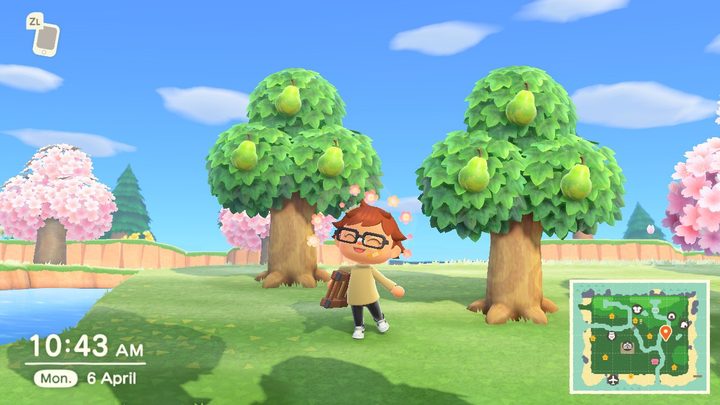
There are two abilities fruit grants you: Picking up trees and breaking rocks. It doesn’t matter what type of fruit you eat, and you can store the power of 10 fruits at a time. You can see how much fruit is in your system in the upper left-hand corner. A number out of 10 will appear after you’ve eaten some fruit, and each time you use one of the abilities, the number will go down.
With an apple, orange, peach, pear, cherry, or coconut in your virtual stomach, you can take a shovel to a tree and pick it right up. Your villager will pocket the tree and you can plant it, without the need of a shovel, in a new spot.
Also using your shovel, you can hit a rock. Rather than doling out money or resources like clay, stone, or iron nuggets, it’ll break. You won’t get all of the material you normally would when hitting a rock, up to eight, though. A broken rock leaves just one resource in its place.
Why should I eat fruit?
The ability to pick up trees allows you to move a tree in an awkward spot without losing it. This is especially useful when crafting your ideal island layout. I moved the most trees when I first began laying down paths. I didn’t want to lose the island greenery, especially if it was growing valuable foreign fruit. Moving it even just one space over is an easy fix.
You can also visit the island of a friend that has a different native fruit. Pick up the tree and leave one behind with your native fruit. Pocketing fruit trees rather than shaking them and planting the fruit in the ground means skirting the three-day waiting period before anything grows. This is also useful when gathering coconut trees from mystery islands or if you land on one of the rare spots bearing foreign fruit.
Breaking rocks can solve the same issue when you find they get in the way. Breaking a rock forces the rock to respawn in a different place. This is a technique a lot of players who want to create rock gardens use to move their rocks from one place to another. If you find a rock in an inconvenient spot, mine those resources or Bell bags and break it.
Still, it’s imperative to remember that your island will respawn only one rock each day. So, if you have more than one rock that needs to be relocated, it’s most beneficial to break only one of them per day. The new geodes will show up in a random place, so you might still have some work to do until you can achieve your preferred design. Nevertheless, as with most things in Animal Crossing, it requires some time before you can begin to see a profit.
How do I remove the fruit buff?
Maybe you accidentally ate too much fruit; it happens. Instead of forgetting and unintentionally demolishing your precious rocks, get that fruit out. The simplest thing you can do is pick up a tree and replant it. We promise you that it won’t hurt or alter the tree, whether it bears fruit or not.
For a more practical method, we suggest popping a squat on a toilet. Animal Crossing has always featured toilets as furniture pieces. New Horizons made them valuable. Resting on one eliminates the fruit buff and immediately flushes as you remove yourself from the porcelain throne.