

The Xbox Series X is a delightful console, but can ironically be a headache to get a suitable monitor for. Why? It can’t necessarily take advantage of all of the stats the best gaming monitors are going to be able to give it. It’s rated to run 4K at 120Hz max. This means the usual high definition, high refresh rate lists of monitors — what gamers typically go for — is thrown out the window. However, with lower requirements, there are actually also lower quantities of monitor for you to choose from without, essentially, paying for extra. No matter what your situation, however, here are the best monitors for the Xbox Series X that you can buy right now.
The best monitors for the Xbox Series X in 2024
- Buy the 28-inch Samsung Odyssey G7 for a monitor that is the right price and tuned to the needs of the Xbox Series X.
- Buy the 48-inch LG UltraGear OLED for a larger monitor with some fun extra features.
- Buy the Samsung Odyssey Neo G8 for one of the best gaming monitors out there that will also work great with the Xbox Series X.
- Buy the Asus TUF Gaming VG289Q for a serviceable budget gaming monitor for Xbox Series X gaming.
28-inch Samsung Odyssey G7
Best Xbox Series X monitor for most people

| Pros | Cons |
| Right price | Not so great for other gaming systems |
| Good size for most | |
| G-sync and FreeSync support |
To get the best gaming monitor for the Xbox Series X, go with the 28-inch version of the Odyssey G7. It hits all of the right specs without going too far over (you won’t really need 144Hz, but having just over 120Hz isn’t bad), which keeps costs about right. At the same time, it also comes with G-sync and FreeSync to ensure you get an optimized view into the gaming world of your choice. It has a gorgeous IPS panel and the size of this version, 28-inches, is going to feel just about right for a majority of gamers.
Again, this monitor represents what is best for the average Xbox Series X gamer. It simply checks all of the right boxes and is at the sweet spot in terms of price. If you want something larger, great for all of your gaming (including computer gaming), or even just a budget Xbox Series X monitor, there are other choices available.
| Key specifications | |
| Resolution | 4K |
| Refresh rate | 144Hz |
| Response time | 1ms |
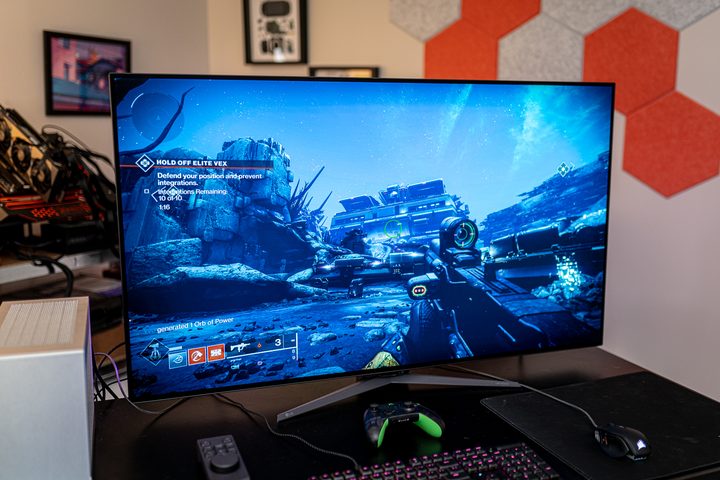
48-inch LG UltraGear OLED
Best large monitor for Xbox Series X
| Pros | Cons |
| Large, gorgeous OLED screen | Expensive |
| G-Sync and FreeSync support | |
| Lots of small, thoughtful conveniences |
For a larger experience, you can go with the 48-inch LG UltraGear OLED. It has delightful OLED panel that features anti-glare and low reflection tech. While the important thing is that it supports 4K at 120Hz, it also supports 8K at 30Hz should your gaming support it. Finally, get great picture quality with HDR 10 and an intensive contrast ratio that will make hiding in the shadows all the more tense.
When we zoom out from the screen for a moment, we can easily see that the 48-inch LG UltraGear OLED has a lot of fun, built-in features. You’ll have to read our in-depth LG UltraGear 48-inch OLED review to get a feel for everything, but it is the tiny details (on a big monitor) that make this one so much fun. It has good speakers built-in, there’s an RGB strip on both sides of the monitor, and you even get a headset rack to the side, among other things. All small features, of course, but each contribute to the overall greatness of the monitor.
| Key specifications | |
| Resolution | 4K |
| Refresh rate | 120Hz |
| Response time | 0.1ms GtG |
Samsung Odyssey Neo G8
Best for multi-platform gamers

| Pros | Cons |
| Gorgeous colors | Cable management |
| Curved, matte display | |
| FreeSync Premium plus (unofficial) G-Sync support |
If you’re going to game on multiple systems, including your PC, why not get a higher quality monitor. That’s our thinking with the 32-inch Samsung Odyssey Neo G8, a 1,000R curved monitor with a delightful matte finish that makes it easy to game without glare. Our Odyssey Neo G8 review points out the pair of HDMI 2.1 ports for PS5 and Xbos Series X play. In other words, you’ll want one of the best HDMI cables for console play, but a DisplayPort for your PC. When used for gaming, our reviewer found a popping contrast with the deep black levels and saw worlds that felt vibrant.
The crutch, of course, here is that you’re paying for specs like a 240Hz refresh rate that you’re Xbox Series X isn’t going to fully support. But, if you game on your PC, too, then go ahead and grab this monitor, killing two angry birds with the same stone. This is an advanced monitor, moreso than you really need for the Xbox Series X, but not so much so that you should feel silly for desiring it to also work well with your PC. Furthermore, the price isn’t so considerably higher than other suitable monitors — especially when on sale — that you should discount it completely even if you aren’t doing much PC gaming at the moment.
| Key specifications | |
| Resolution | 4K |
| Refresh rate | 240Hz |
| Response time | 1ms GtG |
28-inch Asus TUF Gaming VG289Q
Best budget gaming monitor for Xbox Series X

| Pros | Cons |
| Great colors | Mediocre HDR and contrast ratio |
| Affordability | |
| Value for the dollar |
A great budget option among the best 4K gaming monitors, this Asus TUF monitor will get you through basic gaming without breaking the bank. Unless you’re a highly competitive gamer, the 60Hz refresh rate and 5ms response time will probably be alright for you. At any rate, the Asus TUF’s solid build construction and sturdy adjustable stand will feel comfortable as you play your Xbox Series X. While the monitor comes with mediocre HDR and contrast ratios compared to more expensive competitors, a couple of interesting features work to negate this. For one, it has a special ‘Gaming HDR’ mode to emphasize common gaming colors and a ‘Shadow Boost’ mode that allows you to see in more details when creeping through the darker parts of today’s gritty games.
| Key specifications | |
| Resolution | 4K |
| Refresh rate | 60Hz |
| Response time | 5ms GtG |
How we chose these monitors for the Xbox Series X
In general, it came down to getting the best gaming monitors that were (at least mostly) within the 4K at 120Hz parameters that makes sense for the Xbox Series X. And while we can technically get 8K resolution on the Xbox Series X, there aren’t many games supporting it and 2023 was not the year of 8K gaming monitors. While you can always get a better monitor than what is needed, we prioritized monitors that were the right price.
Size was another consideration that heavily weighed on our decision making. For most gamers selecting a gaming monitor, monitors around 27 inches to the low 30s will feel most comfortable, though some gamers prefer larger monitors. Our choices reflected this decision making process and the wishes of most gamers.
The response time of the monitor is a key statistic that anyone interested in picking out a monitor should know about. The shorter the response time, the quicker the image changes on your screen. Admittedly, however, this statistic can be dubiously reported. Trusting your own eyes and the instincts of other gamers is best.
Finally, in a world obsessed with back-to-back headshot, don’t forget about the beauty of gaming. Getting a monitor that looks good and has a wide color range can be just as important for your enjoyment of the game.
This article is managed and created separately from the Digital Trends Editorial team.


