The Nintendo Switch and Switch Lite offer a classic take on a modern console, allowing users to simply pop in a cartridge in order to play. While you can opt to buy games in only physical format, the Switch does provide the ability to download digital games from the eShop. With the system’s emphasis on portability, carrying around an abundance of cartridges can be cumbersome, which is where the appeal of downloading your games comes into play. Though games are typically the same price, retail or digital, there are always great eShop sales you can take advantage of to help offset the cost.
If you are planning on grabbing your games digitally, you’ll need to invest in a microSD card for the Nintendo Switch. The system features 32GB of onboard memory but does not include a microSD card when you buy one new. With that in mind, we’ve got some tips for you to use when choosing which microSD card to purchase.
See more
- Best Nintendo Switch controllers
- Best Nintendo Switch and Switch Lite cases
- Best Nintendo Switch games
MicroSDXC vs. microSDHC
The Switch supports microSDHC cards, as well as microSDXC cards. What’s the difference? Storage limits.
SDHC stands for Secure Digital High Capacity, but these cards top out at 32GB. SDXC stands for Secure Digital Extended Capacity, and these cards store anywhere between 64GB and 1TB. Depending on your gaming habits, 32GB of additional storage via microSDHC may be enough for you, but for those who plan to use the eShop more frequently, microSDHC probably won’t cut it for very long.
How much storage space do you need?

So you’ve decided to pick up a microSDXC card with your Switch, but you’re unsure which size to purchase? It’s hard to predict, but here are some general guidelines:
- If you tend to buy AAA releases physically, and only purchase eShop titles occasionally, a 64GB card should absolutely do the trick.
- For those who download eShop games regularly and the occasional AAA game digitally, it’s probably best to jump up to at least a 128GB card, if not more.
If you expect to download a good portion of AAA games, you may want to consider at least 200GB. For instance, Dragon Quest Heroes 1 and 2 will eat up 32GB of memory each, individually, while The Witcher 3: Wild Hunt — Complete Edition sits at around 31GB.
Currently, the largest microSDXC cards available at retail are 1TB, but keep in mind the Switch supports up to 2TB microSDXC cards. Purchasing microSD cards with that much storage will cost you a pretty penny, but the prices will continue to drop as time goes on.
Speed class

Besides storage, another important factor in choosing the right microSD card is speed. Speed classes are assigned a grade — 2, 4, 6, or 10 — to note a card’s minimum baseline speed. A grade of 2 means a baseline speed of 2MB/s, a 4 means 4MB/s, and so on. For the Switch, however, you will want to only buy cards graded with a class 10 speed. Since the console will read games stored on the card, a class 10 speed card will likely mitigate lag and slowdowns.
Now, just because a card is graded class 10, it doesn’t mean it’s only capable of reading and writing data at 10MB/s. Each microSD card also has a rated speed, which notes the maximum transfer rate, which is usually significantly higher than 10MB/s. Since we cannot predict how microSD cards will perform in the Switch — and they may vary game to game — your concern should mainly be the class 10 speed.
Also, if you find a microSDXC card with a UHS class grade, you’re in the clear. The grades range from UHS-1 (10MB/s) to UHS-3, sometimes with a 1, 2, or 3 printed on the front of the card instead of a 10. Nintendo recommends cards that are UHS-1-compatible and that have a transfer speed between 60 and 95 MB/sec.
Brand name matters
Another vital consideration when purchasing a microSD card should be the manufacturer. As with all tech, you can sometimes save money by going with lesser-known brands, but you sacrifice quality in the process. With external storage, whether that be hard drives, flash drives, or SD cards, vigorous testing and warranty considerations are important. The same logic extends to microSD cards, as you don’t want a card to fail on you, especially one with a short warranty period or none at all.
 Samsung and SanDisk are the most well-known microSD cardmakers for a reason. Each card from Samsung and SanDisk goes through rigorous testing, and the cards are often temperature-proof, waterproof, shockproof, and X-ray-proof. The temperature-proof design may be the biggest positive for Switch owners, as you never know where you will end up bringing your new console-handheld hybrid.
Besides SanDisk and Samsung, another major brand is Lexar, which produces microSD cards that receive mostly favorable reviews. Its cards go through similarly thorough testing.
Most importantly, however, all three companies offer lengthy warranties for microSD cards, which signals that they are built to last. Samsung offers 5- to 10-year warranties depending on the card, which covers manufacturer defects and failures. SanDisk also has five- to 10-year warranties on its cards, but some even come with a lifetime warranty. Lexar offers limited lifetime warranties on nearly all of its microSD cards.
You may save a few bucks by opting for a different brand, but we suggest sticking with SanDisk, Samsung, and Lexar. Anything else might not work, from our experience. We tried to save a few bucks by going with a less expensive, lesser-known brand, and it wouldn’t work on Nintendo Switch.
Extended recommendations
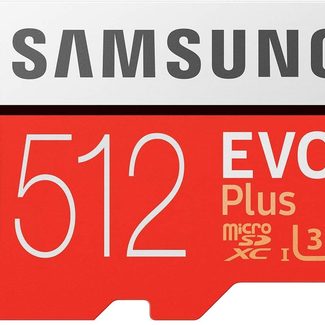
As long as you pick up a class 10 card from a quality manufacturer, it’s hard to go wrong. Brand names do matter when it comes to microSD cards, and reading labels is always smart. Choosing a capacity that reflects your purchasing habits is the first step, of course. It might help to check out the storage sizes necessary for your favorite games (or ones you plan to purchase). As far as specifics, here are our top recommendations for each level.
Keep in mind that it used to be hard to find a reasonably priced card above 200GB. However, in recent months, even 256GB card options have become more affordable. Because of that, you may want to think ahead by purchasing a larger card. After all, there’s no such thing as “too much” space when it comes to gaming. If you’re ready to enhance your Switch’s onboard memory, consider these options for expansion.
You’ll want to look at how you use your switch to determine the best choice of microSD card for you. Consider the type and volume of titles you’ll be likely to purchase, then choose a card that is sufficient to handle your needs.
We’re constantly searching for top deals on the best products and services available to our readers, and we always choose the products we cover independent of promotional considerations. While we strive to publish timely data, keep in mind that prices and availability change constantly, especially if you’re looking at online outlets running highly publicized sales. We recommend that you always look over the terms and conditions before finalizing your purchase.
| Capacity | SanDisk | Samsung | Lexar |
| 32GB | |||
| 64GB | |||
| 128GB | |||
| 256GB | |||
| 512GB |
Digital Trends uses affiliate links in our posts, which helps us keep this site running by kicking back a small commission if you buy the linked product.
We strive to help our readers find the best deals on quality products and services, and we choose what we cover carefully and independently. The prices, details, and availability of the products and deals in this post may be subject to change at any time. If a product catches your eye, be sure to do your research to make sure that the specific model is still available at the advertised price before you commit to buying it.
Digital Trends will benefit when you click through our links to purchase items, and we appreciate you helping keep the site running in this way.