
When you hear the term “Spring Cleaning,” you probably think about the old mail you could throw away or that bathroom that needs scrubbing. Usually, it’s a physical process that involves tidying your space. But for gamers, their digital space can often become much more cluttered than their physical one. Case in point: The dreaded backlog.
“Backlog” is a common term players use to describe their piles of untouched games. Bought Horizon Forbidden West, but have been too busy with Elden Ring to start it? It’s in the backlog now. Do you grab free games from services like PS Plus every month, but never download them? They’re stuck in backlog purgatory. Picked up itch.io’s latest indie bundle, which is raising money for Ukraine by offering donors 1,000 products? Your backlog will never recover (but at least that one was for a good cause).
The backlog isn’t a physical thing; it’s more of an anxious mindset. It’s not the thought of playing every game you own that can seem overwhelming, but simply keeping track of it all. As you start to tidy up your living space, it’s a good time to organize that backlog too. Here are some ways you can tame gaming’s most fearsome beast.
Get Grouvee
The most important step is simply getting organized. It’s easy to pick up tons of free games on dozens of platforms and completely forget what you own anymore. How many times have you bought a game only to realize you already own it on Steam thanks to some Humble Bundle you’ve forgotten about?
There are plenty of tools out there that let players keep track of what games they own, but my personal pick is Grouvee. The free website is essentially the Letterboxd of gaming. It allows players to rate and review games, as well as add them to shelves and lists. I use it extensively to track my own backlog as well as my favorite games I play in any given year.
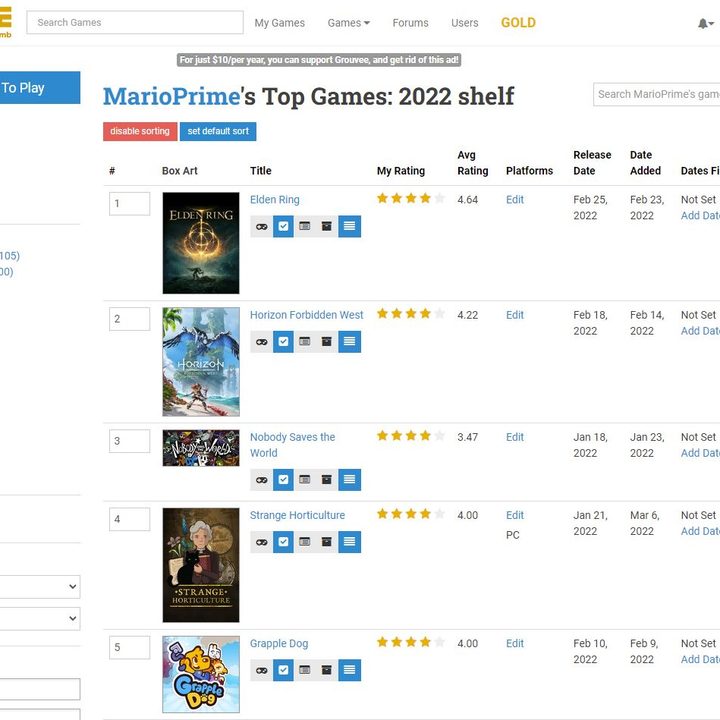
What’s great about Grouvee is that it uses Giant Bomb’s API, which means that it pulls data on just about any game you can imagine. It’s an incredibly easy-to-use tool too, letting you create your own shelves. Want to make one for each platform you have games on? You can easily set that up and start adding games to the list.
Those who want to support the project can also upgrade to Grouvee Gold to remove all banner ads from the site and get early access to new features. Grouvee is just one of many tools you can use. Heck, even a good Excel spreadsheet can keep you organized. As soon as you start writing games down, the less daunting it’ll seem when trying to wrangle your backlog.
Create a Steam Collection
If you’re specifically trying to organize your PC games, you might want to dive into some of Steam’s deep features. The launcher is lacking when it comes to filtering, but Collections help fill that gap.
Steam Collections essentially work the same way as a Grouvee shelf. Create a new Collection, name it, and start dragging games in. It’s that simple. Using that feature, you could put every unplayed Steam game you own into a backlog Collection and remove them as you finally get around to playing them. That’ll keep all of your tracking centralized in one place, which is convenient.
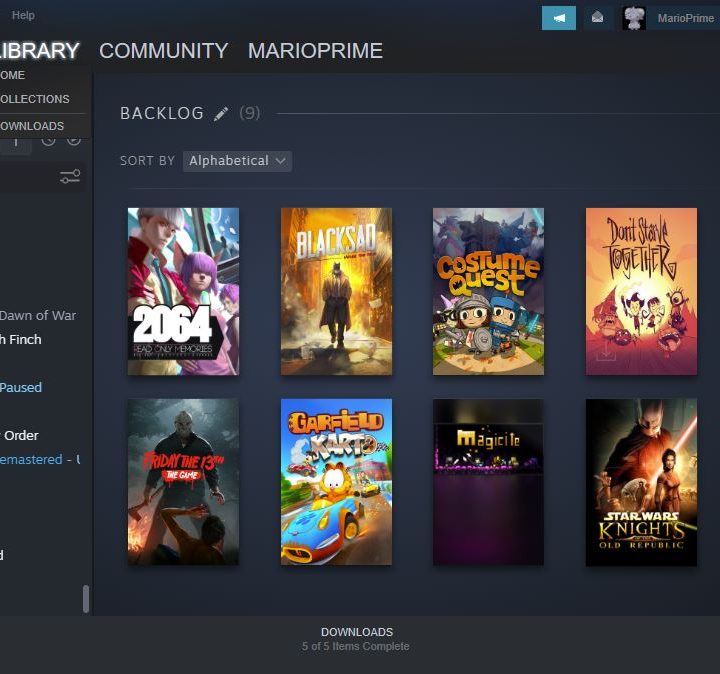
You won’t have quite the same luck with every other platform, though there are little workarounds you can use to see what games you haven’t touched. For example, the Epic Games Store lets you see how much time you’ve spent in each game. If you haven’t touched a game at all, you’ll see a dash in the Time Played column. Use app and platform tools like that to build a visual system for your backlog.
Organize by playtime
Once you have your backlog organized, the next overwhelming task is figuring out how to start checking games off your list. When you have dozens of games to play, trying to figure out what to start with can be as paralyzing as scrolling through Netflix.
There’s no perfect method here, but if you’re trying to check a lot of games off your list, I recommend knocking out the shortest games on your list and working up. With that method, you can knock out several games in a matter of days, trimming the list to a manageable size.

To do that, you might want to bookmark How Long To Beat. The website lets players upload data on how long it took them to complete any game and creates an average playtime. It’s a tool I tend to use before starting any game. If I only have a weekend of free time, I don’t want to start a 60-hour game. It’s been a life-saver for me on countless occasions, especially when it comes to keeping my backlog tidy.
What’s especially helpful about How Long to Beat is that it will let you know how long a game will take if you mainline it, do a fair share of extra content, or aim to 100% it. If you’re just trying to rush through games, that first stat will be especially helpful in managing your time. I find that the averages tend to be spot on with my own play habits, so it’s a reliable tool.
Let games go
Even with these tips, sometimes you need to face reality: You’re not going to get to all 1,000 games collecting dust on your computer. And that’s okay. In fact, you should get comfortable with the idea that you don’t actually need to play every game you own.
I’ve been there. When you get a game, it feels like you have to play it. Why let something you bought go to waste? It’s fair anxiety, but the truth is that games should be entertaining. If the idea of playing one is stressing you out, there’s no reason to play it. If you have no problem throwing out old clothing, you should have no remorse about deleting games or resolving to never play them.
If you still insist on trying everything you own, don’t be afraid to bounce off a game when it’s not clicking with you. There’s very little reason to keep playing something you just don’t like. I played two levels of Sifu before deciding it wasn’t for me and have never looked back since. It’s checked off my backlog permanently, even if I didn’t see the ending.
There’s an art to tackling a backlog, and sometimes that just means building healthier habits. Take a long hard look through all your games this spring and ask yourself how many you actually want to play. Trust me, your giant list will shrink in a matter of minutes.


