

Google has buried what may be one of the most intriguing options offered by Google TV. And I get why it has done so. But the “Apps only mode” option has completely changed the way I feel about Google TV.
First, some context. This isn’t a new thing. But it is new to me. And I now present it to you. Fairly deep within the account options in Google TV — that is, the section that controls the Google account that’s active on Google TV at any given time — is an option called “Apps only mode” that kills all the recommendations off the home screen. I always knew there were a lot of recommendations on the Google TV launcher home screen. But it wasn’t until I flipped that switch that I realized just how bloated it was.
And that’s just the start of things. Google’s tooltip says”: “When on, this will hide Google’s recommendations from your home screen, along with your ability to give feedback on movies or shows, or add them to your watchlist. You can access all the apps installed on the device.”
That, along with having already killed recommendations in the YouTube app, is exactly what I want.
Here’s how to get to it. Use the remote to select your account image in the top-left corner. Now choose Manage Accounts. Scroll down, and choose Apps only mode. Click to toggle, and click through the warning. Google really doesn’t want you to do this, as evidenced by the lengthy warning that starts with “This will hide Google’s recommendations for your home screen, along with your ability to give feedback on movies or shows, or add them to your watchlist. Previously purchased titles from Google Play will not be accessible, but can be cast from your phone from the Google TV or YouTube mobile app.” OK, so that last part is a bit of a bummer. It continues: “You can access all the apps installed on the device, and non-personalized, featured content will still be shown on your home screen.”
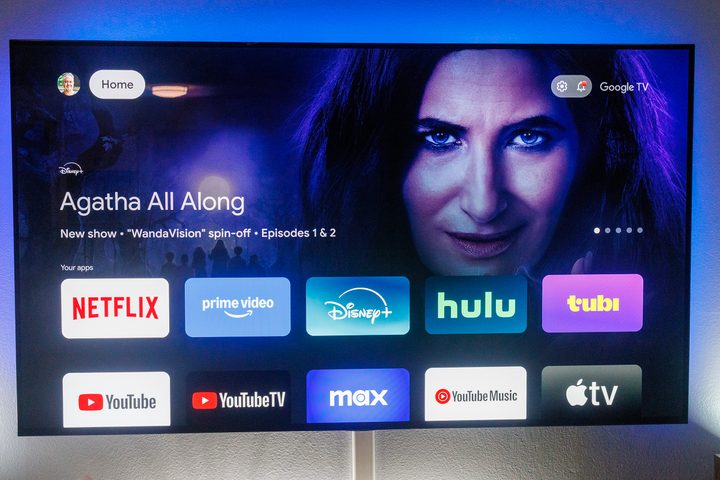
Confirm with the toggle, then hit the Home button to go back to the home screen. You don’t even have to scroll down to see what a difference it’s made.
The navigation bar is simplified, stripping away the For You, Live, Apps, and Library tabs, leaving only a blissfully simple “Home.” The Search tool also is removed up top, leaving only the Settings gear.
There’s still the content carousel in the top half of the screen, and I’m fine with that because it’s minimal, and it looks great with the art Google TV uses.
Things have drastically changed beneath it. The single row of small app icons is replaced by two rows of larger icons. You don’t actually gain all that much here — 10 icons instead of nine. And Google’s “Freeplay” icon is gone, too, so you actually get one more substantive app than you had before. All you get is your installed apps.
One other problem, though: Because there’s no Google Assistant — and no Google Play app icon — you don’t have a way to install new apps. That’s obviously not ideal. So don’t do this unless you know you have everything you want installed, or you’ll be flipping back and forth between modes a lot.
But after that? This is as close to an Apple TV-simplified experience as you can get.


