
Google TV is one of the best streaming platforms out there, running on everything from smart TVs to the best streaming devices, and Google TV Streamer. This web-connected OS is built to make streaming content easier than ever, letting you access all of the most popular streaming services from one hub.
Google TV isn’t just for streaming though. You can use it to cast content from your phone, play games, control smart home devices in the Google ecosystem with Google Assistant, and even keep tabs on your viewing history to suggest new programs on the home page. There’s plenty here to fall in love with, so let’s take a look.
What is Google TV?
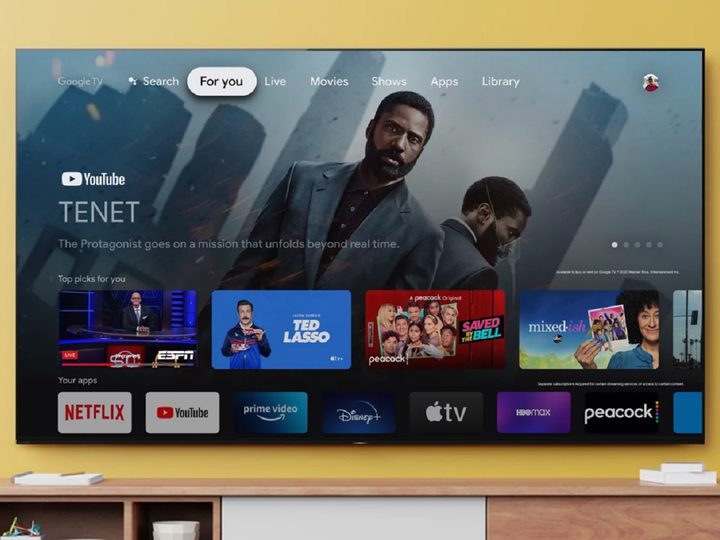
At its core, Google TV is a user interface running on top of Android TV, but with a different look and feel than the original platform. It is preinstalled on many different smart TVs from brands like Sony, TCL, and Hisense, as well as on the Google TV Streamer and the O.G. Chromecast.
Google TV’s focus is to ensure users can access their most-viewed and recommended content directly from the home screen. Like other streaming device platforms, Google TV features Netflix, Apple TV Plus, Hulu, and more. However, Google TV lets you access what you want to watch without diving directly into the specific streaming app as long as you are logged in to your Google account.

An algorithmic wunderkind, Google TV also keeps tabs on the apps you’re subscribed to and the movies and shows you like watching. This allows the platform to recommend content for you to enjoy, which is housed under an awesome Home Screen tab called “For You.”
Thanks to Google Assistant integrations, you’ll also be able to use your smart TV (and Assistant-enabled remote control) to search for apps, movies, shows, and games using voice commands. Google TV can also be linked to your Google Home account, allowing you to control certain smart home devices with Google Assistant through your TV. Google Nest cameras will also connect to the interface so that Nest camera owners can view their camera feeds via their TVs.
How does Google TV work?
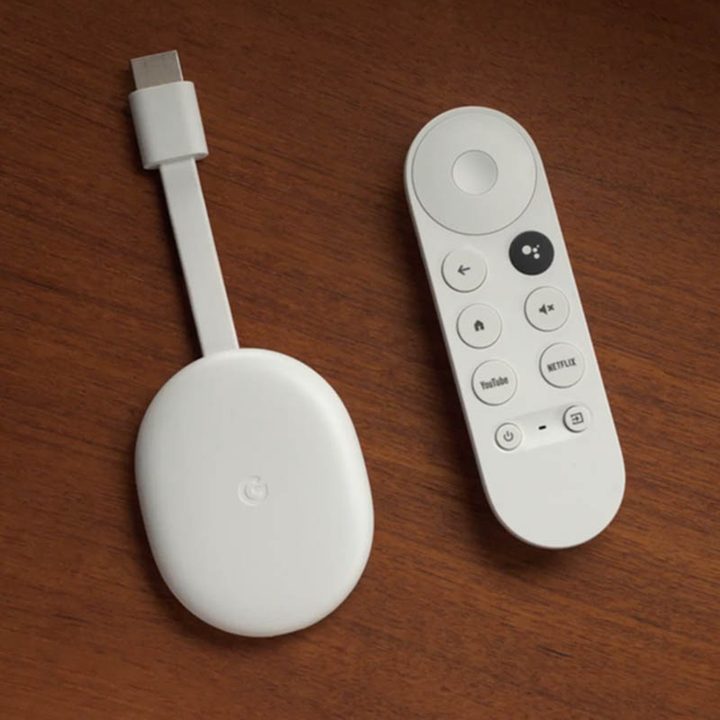
Whether you purchase a Google TV Streamer, or you’ve downloaded the Google TV app for your iPhone or Android device, the experience is pretty similar.
All Google TV-enabled devices need an internet connection. Some devices will give the option of using an Ethernet cable for a hard-wired connection, but they all work with Wi-Fi, too. Setting up Google TV is pretty simple. You can download the Google Home app on your mobile device for the fastest experience, but you can also do it directly from the TV or streaming device. Furthermore, having a Gmail account makes this experience seamless.
After the initial setup, you will be presented with the Google TV home screen. The home screen features a slide show of various movies and TV shows that are recommended based on viewing preferences (that For You tab). It may also include advertisements for the latest movie releases. Below that is the Top Picks for You column, which is another recommended list of content, followed by Your Apps. The platform includes a Highlights tab as well to collect a personalized hub of entertainment info; generally news and reviews about important or upcoming titles that Google thinks you will like.
Google TV uses Knowledge Graph and machine learning to boost the discoverability of content aimed at the viewer. Google’s Knowledge Graph is the company’s collection of facts about people, places, and things. This allows Google to answer or present users with accurate information about movies, TV shows, historical facts, and more. The interface is divided into multiple tabs allowing users to browse movies, shows, apps, and purchased content.
Parental controls are also built into the interface, allowing parents to create separate profiles for their kids. Kid profiles are tied to the parent’s account, so they do not have their email and password to worry about. There is also a Google Family Link app to set guidelines for their kids’ experience with Google apps and devices. For example, Google TV’s parental controls let parents set screen time, lock and unlock profiles, and set rating limits.
What devices can I use with Google TV?

Google TV is an operating system, or OS, available on a number of Smart TVs, and as an app in both the Google Play Store, and Apple App Store. This makes it fairly robust, allowing you to access Google TV from a variety of devices. Depending on the type of TV there are up to 90 options available, which means there are options at a variety of price points. The good news with Smart TVs is that each of these companies allows you to filter down to just Google TVs, making it easy to ensure you find what you’re looking for.
If you don’t want to spring for a new TV, you can also snag a Google TV Streamer for $100. This plug and play device will turn your TV into a home entertainment hub, allowing you to access everything available from Google TV without any additional equipment. Since Google TV is also available as an app, you can even stream content right from your phone to the TV, making it easy to access even if you’re staying away from home while on vacation.
Games on Google TV
There are a lot of games available for Google TV. You will find titles like Grand Theft Auto: Liberty City Stories, Final Fantasy, Oceanhorn, and more. Unlike Android TV, Google TV has so deeply integrated the Play Store that you don’t just go to an app — searching for some games has to be done through voice or word search.
Here’s another gaming pro, specifically for Google TV-powered smart TVs. Many of these sets include a number of today’s best gaming features for a TV, including support for things like NVIDIA GeForce, AMD FreeSync, and VRR. While these features have less of an impact on Google TV’s internal gaming, those of us rocking next-gen consoles like the PlayStation 5 and Xbox Series X/S will be the real beneficiaries of these gaming optimizations.
Features and user experience
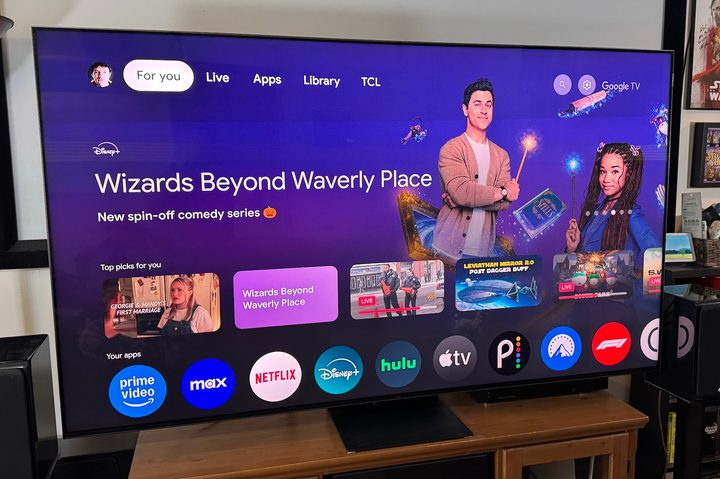
Google TV’s basic interface will be familiar with anyone who has used a Roku device, or Amazon Fire TV. At the top of the screen you’ll find navigation between options like the For You page, Apps, Live programming and your library. If you’re using a Google TV, this is also where the TV options are available. To the far right is search, as well as the settings options.
The best part of the For You page is that its a mix of your go-to subscriptions, shows, movies, and even your general watch history. You’ll find rows of recommendations that Google TV thinks you like, all of them grouped by genre or niche. They’re pulled from the apps you uploaded during setup, which means you shouldn’t be seeing anything that isn’t available to watch.
Google TV has access to more than 8,000 streaming apps, including the big names like Netflix, Max, and Hulu. You can add the apps you want by heading over to the Apps section and scrolling through for new options, or by searching for the specific app you want to add.
What are some Google TV voice commands?
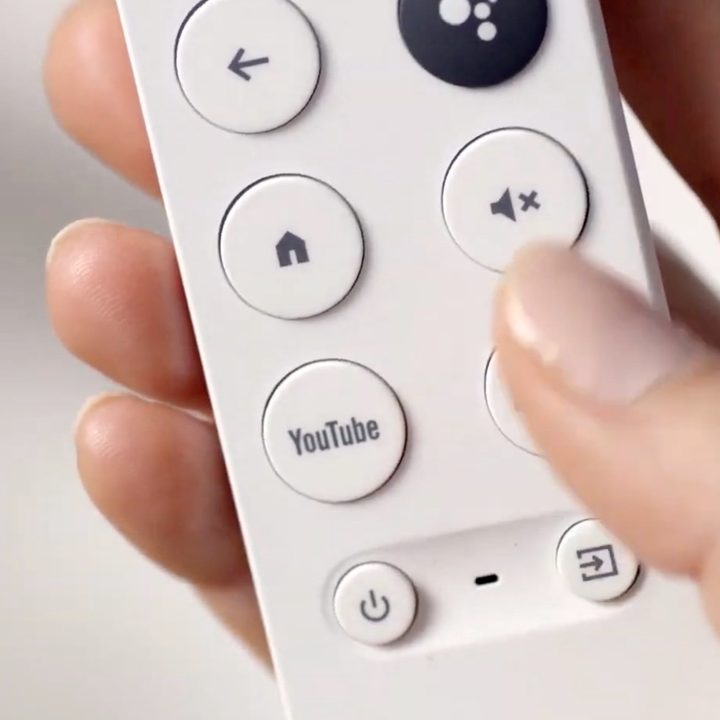
What you ask the Google Assistant is predicated on the apps that you are logged in to. For instance, “Play Master Chef on Hulu,” will only work if you have a Hulu subscription. However, Google TV does offer universal commands, such as:
- “Play some R&B music.”
- “Open [app name].”
- “Tell me about Chef Ramsay” gives a detailed description of the person as well as content from various streaming services that they appear in.
Is Google TV right for me?
Google TV is an excellent alternative to Fire TV, tvOS and Roku OS. And if you’re already intertwined with the Google ecosystem, using Google TV interface will feel right at home. In addition, having a Google Assistant on your smart TV helps make your TV browsing experience more seamless and intuitive.


