

You’ve read our Onn 4K Pro review. You’ve watched our Onn 4K Pro video. You’ve seen how we have a new Google TV leader on our list of the best streaming devices. And you still want to see them head-to-head.
We get it. This is the Onn 4K Pro versus Chromecast with Google TV (4K version). Two very similar devices with identical prices (both retail for $50), very similar features, and mostly the same experience when it comes to actually using them.
But midway through 2024, there’s only one we think you should buy. And here’s our reasoning.
Age is more than just a number
Walmart’s Onn 4K Pro was released in May 2024. The original 4K model of Chromecast with Google TV was released in September 2020.
That’s it. The math is simple.
OK, so there’s maybe a little more to consider here. Generally speaking, you want to buy the newest tech you can. Newer hardware almost always means updated specs (true in this case) and software (not quite the case here). Newer hardware also increases the likelihood that the software can support it farther into the future.
There’s a pretty big “but …” coming here, though. Because Chromecast with Google TV is a Google product, that means it likely will be supported longer than if it weren’t. So, yes, a new product is still “better” to have than an older one. But the delta in this case isn’t necessarily as huge as it might be if we were comparing two other devices.
Winner: Tie.
The hardware
Let’s stipulate one thing: Neither the four-year-old Chromecast with Google TV, nor the new Onn 4K Pro is what we’d consider to be a powerhouse. Neither holds a candle to the (even older) Nvidia Shield TV, or the Apple TV 4K, which are the two most powerful options out there, with higher prices to match.
In other words, both devices are pretty much what you’d expect in a $50 product.
| Onn 4K Pro | Chromecast with GTV 4K | |
| Processor | Amlogic S905X4 | Amlogic S905X3 |
| RAM | 3GB | 2GB |
| GPU | Mali-G31 MP2 | Mali-G31 MP2 |
| On-board storage | 32GB | 8GB |
| External storage | Via USB-3.0 port | Requires dongle |
| Wi-Fi standard | Wi-Fi 5 (802.11ac) | Wi-Fi 6 (802.11ax) |
| Ethernet | Built in | Requires dongle |
| Remote finder | Built in | n/a |
| Hands-free voice | Built in/remote | Remote only |
| Software | Android 12 | Android 12 |
Again, none of that’s going to blow anything out of the water. But while the processors are relatively close (and going “one louder” on the model number doesn’t really mean anything), it’s everything below that line that really makes a difference.
I still don’t know if it’s the extra gigabyte of RAM or just a difference in code base (or some other sorcery) that makes the Onn 4K Pro so much faster than the Chromecast with Google TV 4K, but I also don’t care. It’s faster. You press a button on the remote, and the home screen changes appropriately, without any stuttering or hesitation. It’s a vastly better experience.
And there’s no denying the difference in onboard storage. You end up with about 23GB available on the Onn 4K Pro after first boot, which already is several times more than Chromecast. More storage is always better.

And then there’s the stuff on the back of the box. Onn 4K Pro has ports for Ethernet and USB. You can get that with the Chromecast, but it requires an adapter.
Winner: Onn 4K Pro
The software
This one’s mostly a wash, and that’s a very good thing. Both devices are (as of this writing) running Android 12. One slight difference, though, is that the Onn 4K Pro was on the March 2024 security update, and the Chromecast with Google TV on the April 2024 update. This is another one of those times in which newer is almost certainly better.

That said, I wouldn’t ding the Onn 4K Pro too much for a discrepancy of a single month given that the device was just released. The thing to watch out for is how frequently it receives security updates, and basically how close to the current month those updates are. It likely won’t ever be 1:1, but you want it closer than not.
The biggest thing here is that aside from the aforementioned smoothness in the UI, there basically isn’t a difference in what you get from the software. Onn 4K Pro has what you’d call a stock experience, same as Chromecast.
Winner: Tie
The remote control
You’re going to use the remote control of either of these devices a lot. Again, you’ll want to set your expectations for a $50 device, but the Onn 4K Pro remote control is decidedly better than Chromecast’s, and in several ways.
The biggest differentiator probably is the remote control finder feature. Onn 4K Pro has it, Chromecast doesn’t. You can press a button on the front of the Onn Box — or use your voice or navigate to it in settings — to cause the remote to play a little chirping sound to help you locate it. Chromecast can’t do that.
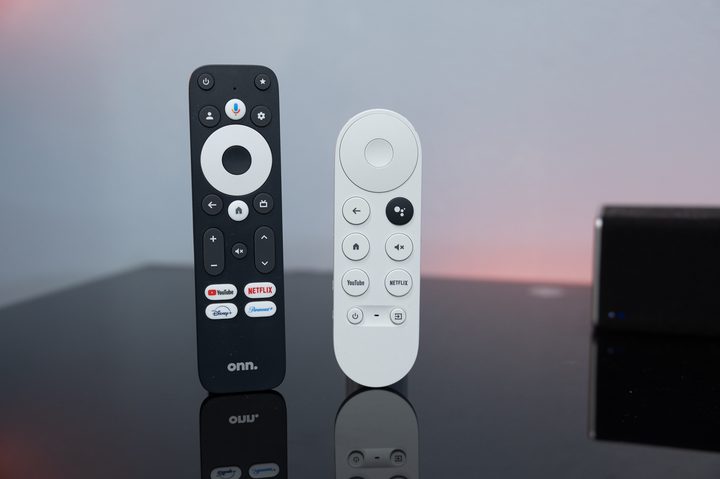
Then there are the buttons. Onn 4K Pro has more, and I prefer the way they’re spaced. (That’s subjective, of course.) Onn also has a custom button that can either be assigned to any installed app, or to change inputs on your TV. Both remotes have a YouTube button that can be assigned to either YouTube proper, YouTube TV, or YouTube Music. (A long-press gets that setup option.)
The Onn remote also has a button for Google TV’s live TV guide, channel buttons, and a few extra branded buttons for Netflix, Disney+, and Paramount+.
For what it’s worth, I prefer the Onn 4K Pro remote control more just for feel. But also note that the Onn 4K Pro remote I have might not be the one you get. (Yes, that’s an odd situation.) So if you get the one that has backlit buttons, congratulations. You’ve now one-upped the Chromecast remote.
Winner: Onn 4K Pro
The voice control
I’m not a huge proponent of using your voice to control your television. But there’s no denying that Onn 4K Pro has more options than Chromecast.
Both remotes have buttons to trigger voice commands. (Onn’s looks like a microphone, Chromecast’s is the amorphous Google Assistant logo.)
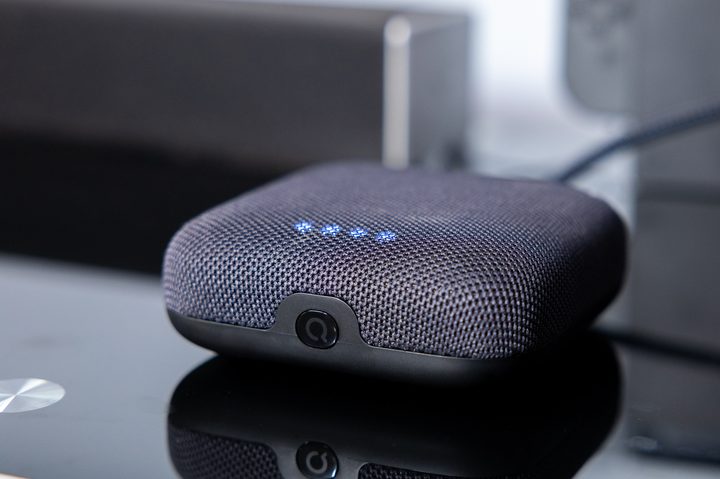
But Onn 4K Pro has microphones and a speaker built into the body of the device. While that means you have to leave it relatively unhidden, so that it’s able to hear you, it also adds a good deal of functionality that the Chromecast doesn’t have. It also means you can ask it questions and engage other voice commands without the television actually being turned on. (Though if you do ask it something that returns a visible element, it’ll turn on the TV to show you, and switch the speaker from the device to your TV setup.)
For me, none of that would really be a reason to buy one device over the other. But it’s still a good option to have.
Winner: Onn 4K Pro
Portability
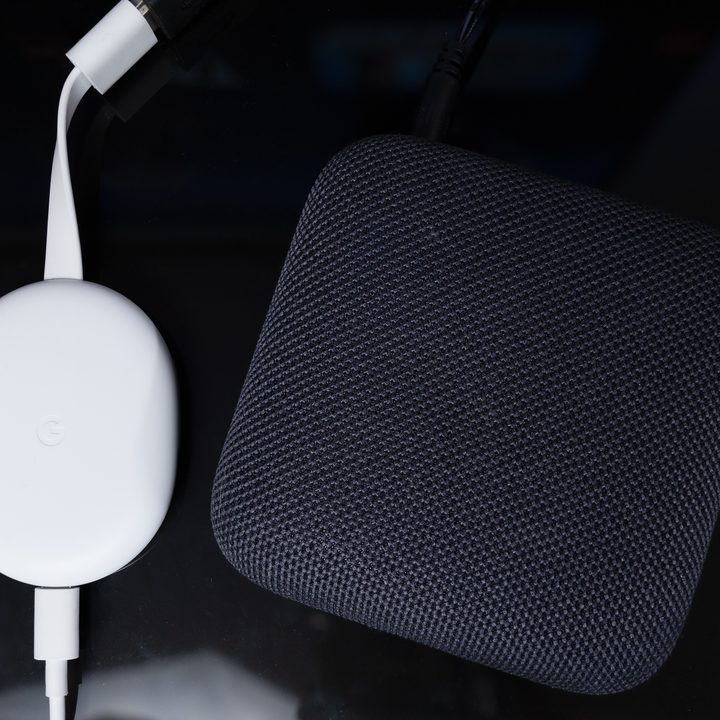
Just because Onn 4K Pro is a better device doesn’t mean I’m going to throw out a perfectly good Chromecast with Google TV. In fact, I’m going to leave my Chromecast 4K in my travel bag for the foreseeable future, for one simple reason: It’s smaller and therefore takes up far less space when traveling. I’m willing to put up with the sluggishness and UI lag in exchange for the smaller size.
And, well, that’s it. It’s smaller. Easier to carry around. So I’ll continue to carry Chromecast on the road.
Winner: Chromecast with Google TV
The winner (for now?)
There mostly are no two ways about it. The Onn 4K Pro was a surprising win for me. I didn’t expect much from a $50 device, but getting rid of the lag of Chromecast made a huge difference. Then toss in the extras like Ethernet, proper external storage, and the hands-free voice control, and it’s basically a no-brainer.
The only reason I’d maybe wait to buy one is the idea that Google may come out with an updated Chromecast with Google TV at its annual fall hardware event. That’s not a certainty, though, even with it nearing its fourth birthday.
Not to say that $50 isn’t a lot of money — it’s not nothing. But if you need something right now, I’d get Onn 4K Pro. If Google releases something new in the fall, fine. Chances are it’ll be around the same price, and likely in the same sort of specs ballpark, and it shouldn’t take the shine off the Onn 4K Pro.


