Streaming video from providers like Netflix and Disney+ is generally what you’ll be doing on a platform like Roku or Amazon Fire TV. Or maybe a little bit of YouTube, or something live on YouTube TV.
That’s just scratching the surface of what devices from Google, Apple, Roku, and Amazon can do, however. In fact, there’s a lot to be said for what they can show on your television — whether it’s the centerpiece of your living room or off in a spare room somewhere — when you’re not actively watching a show or movie. In fact, you can get some spectacular imagery to play in the background.
So let’s take a look at the major platforms: Amazon Fire TV, Apple TV, Google TV, and Roku.
To be clear, these are not the only options. Samsung and LG, among other manufacturers, have their own screensaver options that basically turn a television into an electronic work of art. (Particularly in the case of Samsung’s “The Frame” TV, which is mounted nearly flush and has optional frames meant to look like a painting.) But in this piece, we’re focusing on devices that you plug into your TV, and which are less expensive than buying an entire television.
Amazon Fire TV
Amazon Fire TV is a massive platform. It’s estimated to be on the most devices worldwide, and No. 2 in the U.S. And with the advent of the new “Ambient Experience,” it has what probably is the most useful screensaver system of any of the platforms.

The Ambient Experience is made up of two parts. There’s the background, which is your sort of typical screensaver, with images — some with motion — that cycle through after a certain amount of time. And Amazon has a generous number of options, all of which have a great deal of creativity. They’re really well done, save for one little complaint. You can use your own images to populate things — but you’ll probably quickly find that candid snaps not shot at a television’s aspect ratio just aren’t as good as purposely designed art. And you’ll have to use Amazon Photos to get them into the Ambient Experience. That’s simple enough, though, and Amazon is generous with its storage.
The Ambient Experience also has 10 widgets from which you can choose, all tied to the Amazon ecosystem. They include Alexa Weather, Calendar and Reminders, Cookpad Recipe of the Day, Live TV, Music and Audio, Smart Home Favorites, Sticky Notes, What Should I Watch, What to Eat, and Your Deliveries. How useful the widgets are depends on how dependent you are on Amazon. The more you use, the better the widgets are. Or you can choose not to use them at all and just have the background images.


Overall, the Ambient Experience is very good. But there is some room for improvement. The backgrounds that contain motion too often just aren’t as crisp or clean as what you’ll find on other platforms. It’s maybe the sort of thing you might not even notice unless you’re often hopping from one system to another. But we do. And we notice. Widgets also can, on occasion, be a little laggy. But that feels more like an Android-based user interface issue than anything.
Then there’s the fact that the Ambient Experience is, for now, only available on the Omni QLED series of Amazon Fire TVs, or on the second-generation Amazon Fire TV Stick 4K Max. That limits its reach, though the latter is only $60 before sales prices. And we’d expect the Ambient Experience to hit more devices either through software updates, or as new hardware is released.
The verdict: Amazon has a really cool feature on its hands here, with plenty of possibilities to come.
Apple TV 4K
Let’s not mince words here: Apple TV has what may well be the best set of built-in screensavers you can get, provided that you’re using an Apple TV 4K box. (Which, by the way, is still our go-to for the best streaming hardware you can get for your money.)
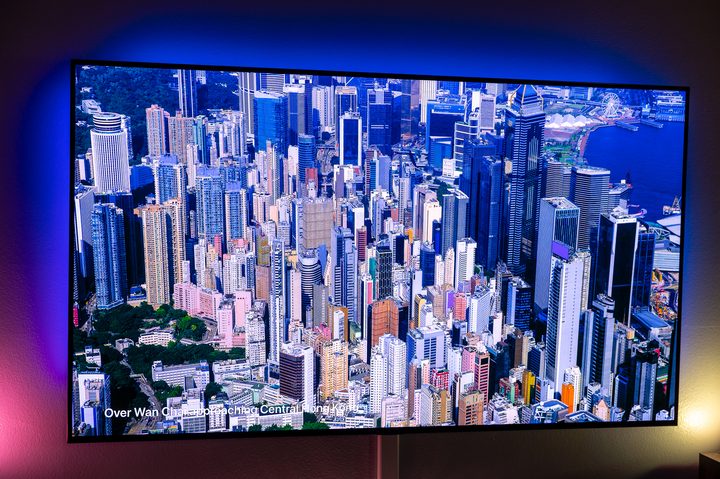
By default, you’ll be presented with the Aerial screensaver, which is Apple’s high-resolution flyover (or underwater, or in orbit) look at all sorts of parts of Earth. You have options of four major categories — Landscape, Earth, Underwater, and Cityscape. You’ll recognize major landmarks like Times Square in New York City, downtown San Francisco, and Sheikh Zayed Road in Dubai, to name but a few. Or you’ll find yourself trying to figure out what land mass you’re flying over in space.
It’s all done with exactly the sort of execution you’d expect in an Apple product, particularly one that’s meant to be attached to a large television. You can choose to download new Aerials on a daily, weekly, or monthly basis. (Or never.)
If none of that tickles your fancy, you have a few more options. There’s also the “Photography from Apple” section, which includes subcategories of Animals, Flowers, Landscapes, Nature, and Shot on iPhone. They also are extremely dynamic and in high resolution and likely are better than anything you’ve got on your phone.


But if you just have to have your own pictures on your Apple TV screensaver, you can do so. Like with Amazon, you’ll have to have albums made within Apple Photos. But that’s easy enough to do.
And, yes, Apple TV Aerial screensavers are real.
The verdict: No real complaints here. The content is excellent. If we had to find a minor point to pick it, it might be that we’d love to see even more of the high-res Aerials. But between the Aerials, Apple’s still images, and your own images — plus all the ways by which you can display the latter — Apple easily has the best all-around screensaver experience, even if it doesn’t have widgets.
Google TV
Whereas Apple has pushed hard at excellent video, and Amazon is more about static imagery with some motion added in for good measure, Google has long been about photographs. That’s been true since the early days of Android TV and has extended into the various smart displays, and now onto Google TV.

And that actually gets to the heart of what helps make the “Ambient display” on Google TV so great. Like the other options above, you’ll need to be within Google’s ecosystem if you intend to use your own photos. But Google Photos remains one of the best Google products since Gmail. It’s on most Android phones by default, and it’s not uncommon for folks to run it in parallel with Apple Photos on an iPhone.
Once you create an album in Google Photos, you’re able to view that album on things like the Nest Hub and Nest Hub Max, or on Google TV and Android TV. It’s super simple.
Or you can go with Google’s own albums of curated photos and artwork. These are excellent options and are worth exploring, too. You might also see some widgets, but they’re not really as deep or useful as Amazon’s.


And the ambient experience isn’t just limited to Google’s own hardware. If you have a television or some other streaming device that’s running Android TV or Google TV, you’ll have these same options at the ready. For our money, Chromecast With Google TV is hard to beat at $50. (It’s basically in the same class as the Amazon Fire TV Stick 4K.)
The verdict: If there are any nits to pick here, it’s that you have to use a phone and the Google Home app to control which albums you see on Google TV. And the Google Home interface is still the sort of thing only an engineer can love.
Roku
Last but certainly not least — given that it’s the most popular platform in the U.S., No. 2 in the rest of the world, and remains super affordable everywhere — is Roku.

If there’s one thing Roku has going for it besides price, it’s consistency. The platform mostly looks and acts like it has for years.
And for years that meant the default screensaver was Roku’s built-in, which, while fun, was definitely not anywhere near as sophisticated as what Google, Apple and now Amazon had at the ready. Screensavers were more cartoonish than realistic. It definitely fit with the overall Roku aesthetic and would match the theme you selected for your greater Roku experience.
And to be clear, there are numerous other options now that include nature and architecture and whatnot. You’ll have to go fairly deep in the screensaver options to find them, but they’re there.
And with Roku OS 11 in March 2022 came Photo Streams. It’s basically a Roku-run photo service not necessarily unlike what Amazon, Apple, and Google all provide. It’s just that it sort of sits apart from the Roku user experience and very much seems like a third-party option, at least on the TV side of things.


In any event, the way it works is that you use the Roku app to create Photo Streams, and you upload images from your phone or computer to populate said Photo Stream. The cool part is that you can invite friends and family to join a stream to view and add pics. (The other platforms can do that, too.) It’s not the most elegant system, and like Amazon, because it’s not native to a phone you’ve got a few extra steps to hurdle. But it’s not insurmountable.
Images look just fine on the screen, but it’s also a very basic slideshow, not accounting for aspect ratio or offering designs other than a single image at a time.
The verdict: Roku has more screensaver options than you might realize. Photos Streams is a pretty minimal product, but it does work.
The bottom line
For the most part, there are no wrong answers here. They’re all different, but mostly excellent across the board.
Like so much about this space, it really has more to do with what ecosystem you’re already using. All in on Apple? You’ll get the best experience with Apple TV 4K and its excellent Aerials. Google TV goes big with photos and makes them more useful across more devices. Amazon’s Ambient Experience is excellent and will likely continue to improve, and become available on more devices over time. Roku — well, it’s got an option to show photos. And it’s not awful. But it also has an uphill battle in that it’s not known as a photo service.