Are you still relying on terrestrial radio for your music and entertainment? You may be missing out on a world of possibilities with SiriusXM. This satellite (and internet) service has evolved far beyond traditional radio, offering an incredible selection of music stations, talk shows, podcasts, news, sports, and even video content. With human curators lining up the tunes, you get a personalized, algorithm-free experience that streaming services can’t match.
And the best part? SiriusXM now has flexible plans and pricing to suit every need — from a $10/month streaming-only option to the full $29/month Platinum package with over 425 ad-free channels.
Want to learn more about SiriusXM’s revamped offerings, including new features and innovations? Let’s go.
Tunes, talk, and more
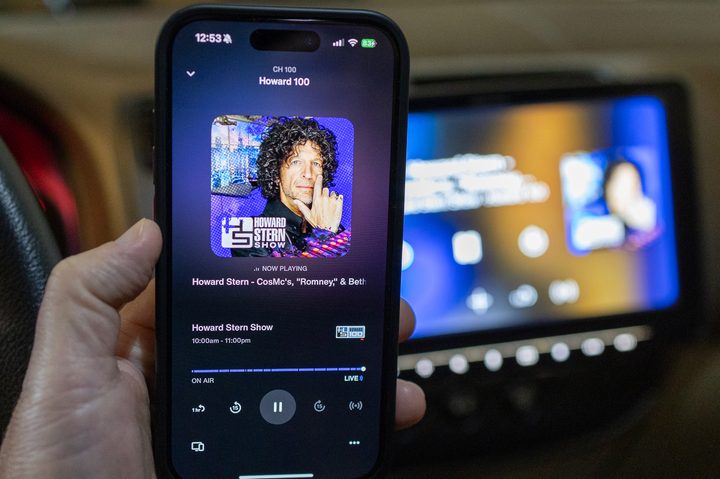
In a blend of past meets the present, SiriusXM delivers an amazing selection of music stations, talk-radio programs, podcasts, news, sports, and even video content. All these listening options are laid out in easy-to-navigate mobile apps for iOS and Android devices and a browser-based web player. You can also enjoy offline downloads, recommended stations based on your listening habits, and the ability to beam your tunes to nearby Bluetooth devices and Wi-Fi speakers.
That’s all the “present” part. The “past” descriptor refers to the fact that whatever artist or genre you choose, you’re at the whim of SiriusXM’s programming. This is, of course, how “radio” has always worked. It’s a linear medium, not on-demand like Spotify or Apple Music. (SiriusXM has podcasts, though, which work, well, like on-demand podcasts.)
But you know what? That’s one of the best parts of the SiriusXM experience, and zero algorithms are involved. Just like the old days, all of the tracks are lined up by human beings with a serious (pun intended) love of music, which really shows. In fact, that’s one of the major tentpoles of this new era of SiriusXM.
SiriusXM plans and pricing

SiriusXM now has four main plans from which to choose. Three include satellite service for car radios and streaming devices; one is streaming-only. As you see in the image above, not every plan has the same content and features. However, all the plans offer the first three months for just $1.
Here’s how everything shakes out:
- Platinum ($29.12 a month): More than 425 channels included, with ad-free music, and all the available categories of channels, including exclusive podcasts and in-studio video.
- Music & Entertainment ($23.05 a month): More than 400 channels, with some ad-free music and some channels from the News & Issues, Comedy, and Sports categories. You also get all the podcasts but only some of the in-studio videos.
- Music Showcase ($16.98 a month): More than 100 channels, some ad-free music, some channels from News & Issues and Talk & Entertainment, and some exclusive in-studio videos.
- All Access ($9.99 a month): This one’s new as of the changes implemented in late 2023, and it’s only for streaming devices. (As in, everywhere but your car.) But you get the full breadth of content and features available on those devices.
And that’s not all! Beyond these four main subscription options, SiriusXM offers many other a la carte and station bundles.
Using SiriusXM over the internet
Not unlike competitive music-streaming apps like Spotify, Apple Music, and Tidal, the SiriusXM mobile app and web player share several cosmetic traits and interface elements. And like other platforms, the more you use and listen to SiriusXM, the better your artist and genre recommendations will be.
When you launch the iOS app and web player, you’ll automatically be on the Discover/For You page. A rotating banner at the top of the screen spotlights recently listened to stations and popular music, talk, news, and other stations of note. Scrolling down, you’ll find categories like Your Recent Channels, Channels for You, Live News, Politics & Issues, Shows & Podcasts For You, and From the SiriusXM Studios, which is where you’ll find HD video content.


Above, from left: The Music, Library, Search, Talk & Podcasts tabs and expanded playback controls as seen on the SiriusXM app for iOS devices.
Everything is divided into rows of colorized tiles that are simple to navigate and easy to find. This same design crosses over to the Music, Talk & Podcasts, and Sports tabs, which you can tap or click at the top of the app and web player. Under Music, you’ll find categories like Essential New Music, Exclusive Artists and Channel Shows, and curated playlist stations that blend multiple tracks and artists, including Take it Easy, Party On, and Find Your Focus.
Talk and Podcasts is broken down into its own bevy of scrollable categories, as is the Sports page, which also calls attention to upcoming pass-me-the-ball events with labels like Live & Upcoming NFL and NBA Games. You’ll also find numerous sports talk channels, and you can even break the content down by teams and leagues.
When you fire up a station, playback controls will appear at the bottom of the screen. You can tap the ribbon to make it fullscreen in the app or click the Enter Fullscreen button on the desktop web player. Commands include play/pause, track skipping, and options to add stations to your personal library. There’s also a button that will let you cast stations to compatible external speakers.


Above, from left: The Discover / For You, Search and Library screens as seen on the SiriusXM desktop web player.
Conveniently, SiriusXM lets you skip up to six times between stream-ready tracks, thanks to an impressive one-hour listening buffer.
All of your favorite stations, artists, podcasts, and sports programs are housed under the Library tab. On mobile, you’ll also be able to download certain podcast episodes and other programs for offline listening. To initiate a download, just select the episode and tap the Download button (an arrow pointing down to a horizontal line). All finished downloads are stored under the Downloads tab (the final Library category).
You can also use the iPhone’s built-in Siri to control some parts of our SiriusXM listening experience. This amounted to play and pause commands, as the assistant couldn’t do any track-skipping.
Audio quality
If you happen to use both the satellite option for SiriusXM as well as app-based streams on whatever connected device you want, you might well have noticed a bit of a disparity between the audio qualities. Some of that, of course, will depend on what you’re listening through. Basic car stereo speakers will always sound like basic car stereo speakers and not something from a high-end automobile. Cheap headphones will always sound like cheap headphones.
But the bottom line is that the satellite stream has a different bitrate than the internet-based stream. SiriusXM doesn’t publish what those bitrates are, but the difference is stark enough that you don’t have to be an audiophile to notice. It’s probably not a deal-breaker for most folks, but we wanted to mention it. But considering that we’re talking about beaming all that data to space and back, it’s still pretty good. (And kind of remarkable, if you think about it, even in this day and age.)
The Sirius XM app and web player have options for streaming quality. But unless you have very limited bandwidth, we’d leave it at maximum.
If you’re all about hi-res listening, we have some bad news: SiriusXM has no hi-res tracks. Discerning audiophiles and 24-bit fans may be better served by streamers like Tidal and Qobuz. But, again, that’s comparing apples to oranges a bit because SiriusXM isn’t an on-demand music service.
How to cancel SiriusXM
We don’t generally include sections on how to cancel a service because canceling services online is generally relatively easy. You might have to click a couple of buttons, but it’s usually pretty easy. And if you’ve subscribed to the $10-a-month devices-only plan via your phone, it is pretty easy to cancel through the normal app store mechanisms.
But if you’ve signed up via a free trial through your car, you will almost certainly have to call SiriusXM to cancel, and not just do it through your account portal online. That’s a bit of a headache and has led the State of New York to file a lawsuit against SiriusXM for making it more difficult than its attorney general believes it should be.
It’s not insurmountable, but it is something to be aware of.