These days, we have tons of gadgets and multiple services that we use on a regular basis. But what if there was a way to have all these services play nice with one another? There is, and it’s called IFTTT. IFTTT stands for “If This Then That,” and is an easy way to automate tasks. Users can make simple scripts — called “recipes” — where some type of event in one device or service automatically triggers an action in another. It’s completely free, and pretty easy to use once you get the hang of how it works. Whether you’re just starting out with IFTTT or you’re a long-time user with dozens of active recipes, check out our list of the best IFTTT recipes you should be using.
Share your Instagram photos as native Twitter photos

Managing multiple social networks is a pain. While getting Instagram photos onto Facebook is a straightforward process — you just need connect your accounts — there’s no native solution for Instagram to Twitter. Use this recipe to post your Instagram photos on Twitter in a natural way, one that allows your followers to see them without clicking.
Channels needed: Instagram, Twitter
Turn on your Philips Hue lights when you arrive home

You can use IFTTT to turn on your Hue bulbs when you get home, without having to fumble with the app. This is a real nice feature especially if you’re coming home from the supermarket and don’t have a free hand. While we’ve linked to the version for iOS, if you have an Android phone, use this recipe instead.
Channels needed: iOS Location or Android Location, Philips Hue
Automatically post your Tweets on Facebook when you include a specific hashtag

While you can link your Twitter and Facebook accounts together, every single tweet you post will also post to your Facebook profile. That might not be the best option, especially if you’re a frequent social media user (hello, oversharing). Try using this recipe, which only posts tweets to Facebook if you use the “#fb” hashtag.
Channels needed: Twitter, Facebook
Start brewing coffee when your Fitbit registers you’re awake
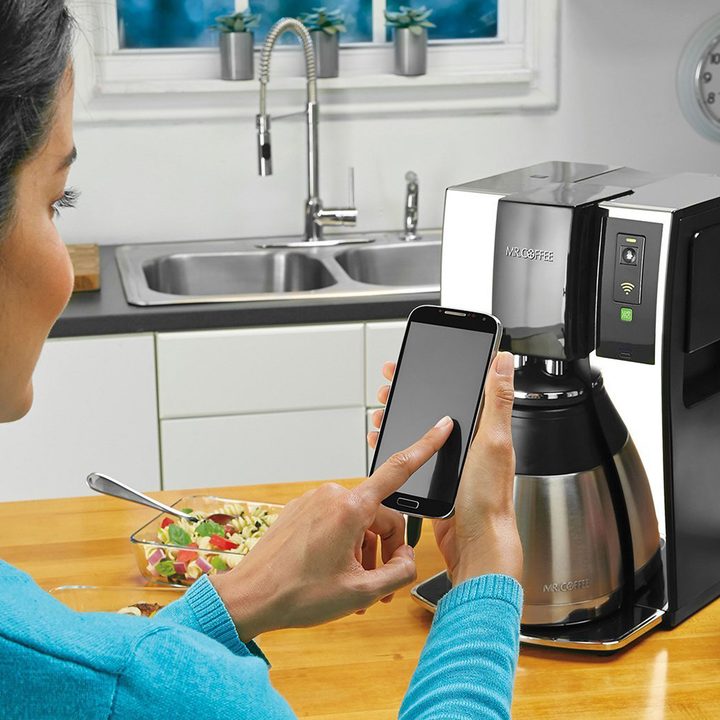
If you’re obsessed with your Fitbit and wear it while you sleep, why not tell it to tell your WeMo coffeemaker to make you coffee when you wake? That’s possible with IFTTT. You’ll need Mr. Coffee’s WeMo-enabled coffeemaker, but it’s cool to know you’ll never be without a hot cup of Joe in the morning again.
Channels needed: WeMo Coffeemaker, Fitbit
Automatically keep your Facebook and Twitter profile pictures in sync

Don’t let your profile pic on either service get too old with this recipe. It checks your Facebook profile picture, and if it changes, will automatically update your Twitter profile picture. Pretty convenient if you ask us.
Channels needed: Twitter, Facebook
Use Alexa to set the temperature on your Nest thermostat

If you have a Nest Thermostat, stop getting off the couch to change the temperature. With this recipe, you’ll be able to ask Alexa to do it.
Channels needed: Amazon Alexa, Nest Thermostat
Get notifications about your favorite sports team on your TV

Comcast has recently enabled its X1 boxes to connect to IFTTT, meaning you’re life just got a whole lot easier if you’re an Xfinity customer. Once enabled, you’ll receive a notification on your TV whenever there’s news regarding your favorite sports team. It’s perfect for the sports nut.
Channels needed: ESPN, Comcast Labs
Save your Strava activities in a Google spreadsheet

Strava, a “social network for athletes,” too has its own IFTTT channel, and if you’d like to do some cool data analysis on your activities outside of the app, have IFTTT save it to a Google spreadsheet. This recipe saves the name of the activity, the time elapsed, the time elapsed in seconds, and the distance in meters traveled. It also saves links to the actual event on Strava, as well as a link to the route map.
Channels needed: Strava, Google Drive
Get notified of new Craigslist posts

Looking for something special on Craigslist? Have IFTTT monitor the service for you. Just provide IFTTT with the URL for your search query, and every time a new result matches your query, you’ll get alerted via an email.
Channels needed: Craigslist, Email
When your Fitbit records a sleepless night, remind yourself to go to bed early the next night

Fitbit devices are great for analyzing your sleep patterns, but if you’re not getting enough rest, it’s bad for your health. This particular recipe watches for when you fall below a preset number of hours of sleep. If you do, IFTTT adds a reminder to your Google Calendar to turn in early the net night, ensuring you don’t run too much of a sleep deficit.
Channels needed: Fitbit, Google Calendar
Add songs from YouTube to a Spotify playlist

YouTube is a surprisingly popular platform for listening to music — artists often debut music videos, while fans often upload obscure tracks not found on other services. If you discover a song on YouTube and want to have it on Spotify for later listening, this recipe will do it (provided the song in question is also on Spotify).
Channels needed: YouTube, Spotify
Ask Alexa to call your phone

How many things are as routine yet panic inducing as losing your phone? If you’ve got Alexa, Amazon’s digital assistant, you need not collapse in a cold sweat when you realize your phone could be deep in a couch crevice or in the back seat of an Uber. Just employ this recipe, and you can ask Alexa to call your phone.
Channels needed: Amazon Alexa, Phone Call
Get a disease outbreak alert from the World Health Organization

Depending on where you live, you may not generally need to worry about sudden outbreaks of virulent disease, but if you live with a nagging fear of plagues, this recipe will send you a notification if the WHO publishes any such alerts.
Get a daily weather forecast at 7 a.m.

Those light gray skies outside sure seem ominous, don’t they? Will they part, letting a little sunlight in the rest of the day, or do they herald the coming of a cold, cold rain? Don’t risk the wrong outfit, with this recipe from Weather Underground.
Channels needed: Weather Underground
Quickly add a card to Trello

People in a variety of professions use Trello to manage their workflow, but if you’re often on the go, it can still be difficult to assign tasks. This recipe enables users to create a card on any board you like, quickly and easily.
Channels needs: Trello
Get free Steam games from r/GameDeals

Reddit has quite a few subcommunities for frugal shoppers, and r/GameDeals is a great place to find games cheap — or even free! With this recipe, you can get Steam keys for free games sent directly to you, without having to check the subreddit!
Channels needed: Reddit
Get a notification when the International Space Station passes overhead

ISS sightings: They’re more common than you think! According to NSA, the ISS circles the Earth every 90 minutes. If you want to know when you can look up and see the station — or not, depending on light pollution near you — this recipe will give you a head’s up.