

Google is pushing out a number of upgrades to Google Assistant on smartphones, as announced at CES 2019. From the ability to check into a flight with just your voice, to Assistant embedded inside Google Maps, follow along with us as we breakdown the new features.
The updates come alongside new Google Assistant products, such as the Anker Roav Bolt, which puts Assistant into your car, and the Lenovo Smart Clock, which is a digital alarm clock with Assistant’s smarts.
Google Assistant comes to Google Maps
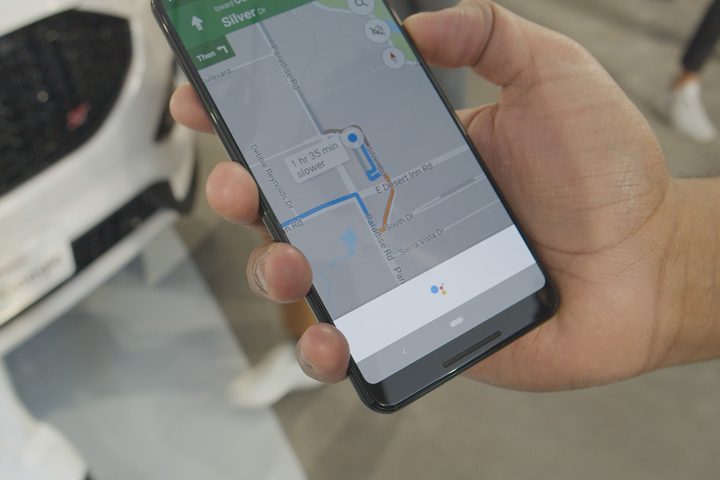
You’ve already been able to use the voice search function in the Google Maps app to search for nearby gas stations or to play music, but now Google is adding full Assistant support. If you tap on the voice icon in Google Maps or say “Hey, Google” or “OK, Google,” a small Assistant tab will pop up at the bottom showing that it’s listening to you. You won’t be able to see any text, and Google said this is to prevent drivers from spending time reading the screen, which is dangerous when on the road.
Assistant in Google Maps comes with a few new features. You can share your ETA with a friend or family member, and you can send messages either through SMS or various third-party apps including WhatsApp, Facebook Messenger, Hangouts, Viber, Telegram, Android Messages, and more. Old features like adding a gas station to your route are still available through the new interface. Naturally, everything you can do with the main Assistant app on your phone works in Google Maps’ Assistant. You can ask about your next calendar event, play podcasts, control your smart home products, and more.
Google Assistant in Google Maps is rolling out on Android and iOS beginning on Tuesday, January 8. On iOS, you’ll need to have the Google Assistant app installed to be able to access the voice assistant in the Google Maps app.
Travel upgrades into flights, retrieving boarding passes, booking hotels
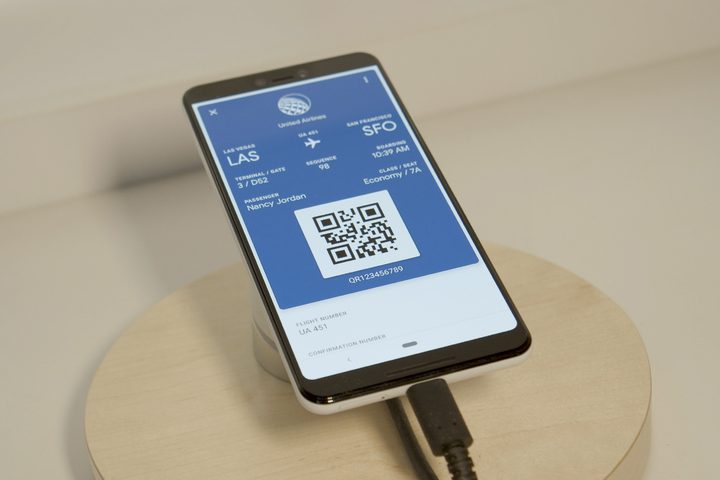
Got a flight coming up? Soon you’ll be able to just say, “Hey, Google, check into my flight,” and Assistant will do the heavy lifting. Google pulls the flight information from your email, which is how it’s able to complete the check-in process without you having to find a confirmation number. You’ll need to follow a few prompts throughout the check-in process, but you’ll be checked in and an email will be sent to verify your status. Checking in with Google Assistant will work on any airline, and it’s coming soon.
Once you’ve checked in, it would be handy to also use Google Assistant to retrieve your boarding pass. At the moment, you’ll only be able to do this on United’s domestic flights, but more airlines will be supported in the future. Funny enough, Google Now — now known as the “Discover” page on the left side of the home screen on many Android phones — used to pull boarding pass QR codes for easy access.
Since we’re on the topic of travel, Google Assistant is also now able to book hotels on your behalf. There’s a sizable list of partners at the moment — Priceline, Expedia, Choice Hotels, AccorHotels, InterContinental Hotels Group, Mirai, and Travelclick — and all you need to do is ask Google Assistant to “book a hotel.”
Support for notes and lists
Got a list in Google Keep, Any.do, Bring, or Todoist? You can now ask Assistant to add something to any of your lists, eliminating the need to open the specific app, find the right list, and type it in. For example, if you have a shopping list in Todoist, you can just ask Assistant to “add eggs to my shopping list.”
Using Assistant on the lock screen
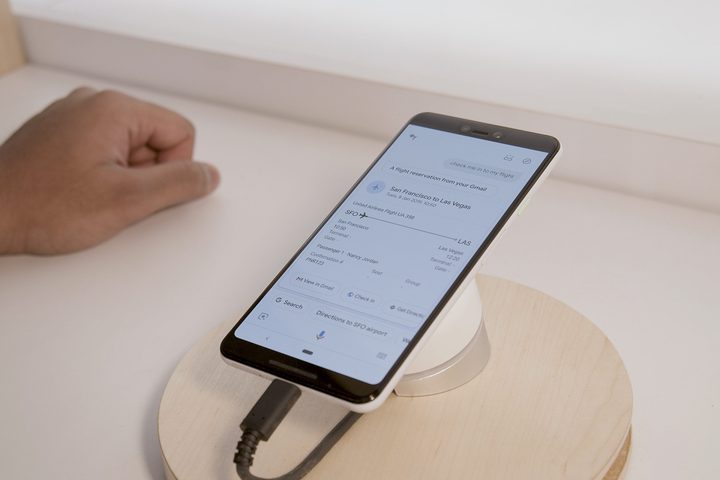
Google Assistant now works even better on your Android phone’s lock screen. Until now, the phone needed to be unlocked for Assistant to complete personal queries such as “Show me my emails.” Google has added an opt-in toggle in the Assistant’s settings that lets the A.I. bypass the passcode or pattern to give you answers. This feature is already available for Pixel phone owners, but it’s now coming to all Android devices in the coming weeks.
To access it, open Google Assistant, tap on the compass symbol on the top right, then on the triple-dot settings button on the top right, and tap Settings. Next, go to the Assistant tab, scroll to Assistant devices, and tap on Phone. Tap the toggle next to Lock screen personal results.
General improvements
There are a few other quality of life improvements to Assistant. One of our favorites is improved replies when you respond to messages with your voice. You no longer need to say “period” or “comma,” as Assistant will just detect pauses automatically, and insert the right punctuation. You can also say emojis out loud, and Assistant will insert them into messages (i.e., smiley face).
More CES 2019 coverage
- North Face’s new waterproof fabric makes Gore-Tex look downright primitive
- The best and most interesting mobile accessories at CES 2019
- Here’s the oddest and weirdest wearable tech we saw at CES 2019
- Lenovo’s new Smart Tab makes Android tablets useful again
We’ve mentioned this in the Google Maps Assistant update section already, but you’re now able to send messages to more messaging apps than ever before, including Facebook Messenger, WhatsApp, Viber, Telegram, Android Messages, Hangouts, and SMS.
Google also said it has improved Assistant’s ability to understand context even further. For example, if you ask, “How far is the airport from my hotel,” Assistant will learn to pull from your travel plans to find the answer. This also applies to understanding more complex questions. If you ask Assistant for “Steve Carrell’s age, and his wife’s,” Assistant will know to find Carrell’s wife (Nancy Carrell), as well as her age (52) to deliver all of this information to you.
Finally, Google has made improvements to Assistant’s ability to detect your voice in incredibly loud environments. At a demo at CES, a Google employee asked everyone to make noise while he asked Assistant a query, and in an incredibly noisy environment, Assistant managed to understand. It’s impressive.
Some of these features are available now, as we’ve indicated, but several are rolling in the coming weeks.


