
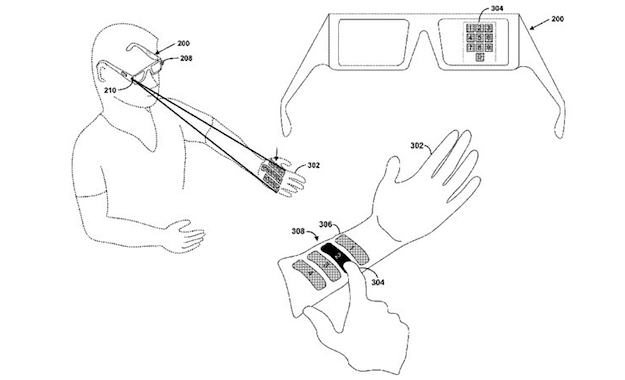
 Just in case you didn’t think Project Glass was sci-fi enough, Google has come up with a virtual user interface which will be projected onto a surface using a laser. Engadget has unearthed a Google patent describing the technology, and it’s a wonderfully simple solution to the problem of how to control something attached to your face. Of course, when we say simple, we mean it as in simple to use and definitely not simple to design and execute.
Here’s how it could work: A miniature projector is mounted on the arm of Project Glass, which uses a laser to project a pattern on to a surface, be it your arm, hand or the table in front of you. A camera mounted alongside the projector, or on the other arm of the glasses, then maps where you touch and obeys the command. Google sees this being used not only for virtual keyboards, but for big, bold buttons relating to a certain function or service too. In the accompanying picture, Google provides an example of a virtual keypad being projected on to the user’s hand or arm.
In the patent, Google describes how the keyboard would be generated by a laser projector, while a second infrared beam would track the spots where the beam was broken to interpret which characters were being tapped out. Project Glass is currently controlled using a little touchpad on its side, but according to project leader Babak Parviz, the team has also tried out voice commands and head gestures. The virtual input patent could be linked with Google’s plans to eventually turn Project Glass into a fully-fledged smartphone, something which Parviz said his team was already working on.
The developer edition of Project Glass, known as the Explorer Edition, will soon be winging its way to the lucky few who purchased a pair for $1,500 at last year’s Google I/O event, but Project Glass isn’t expected to be made available to the public until 2014.



