
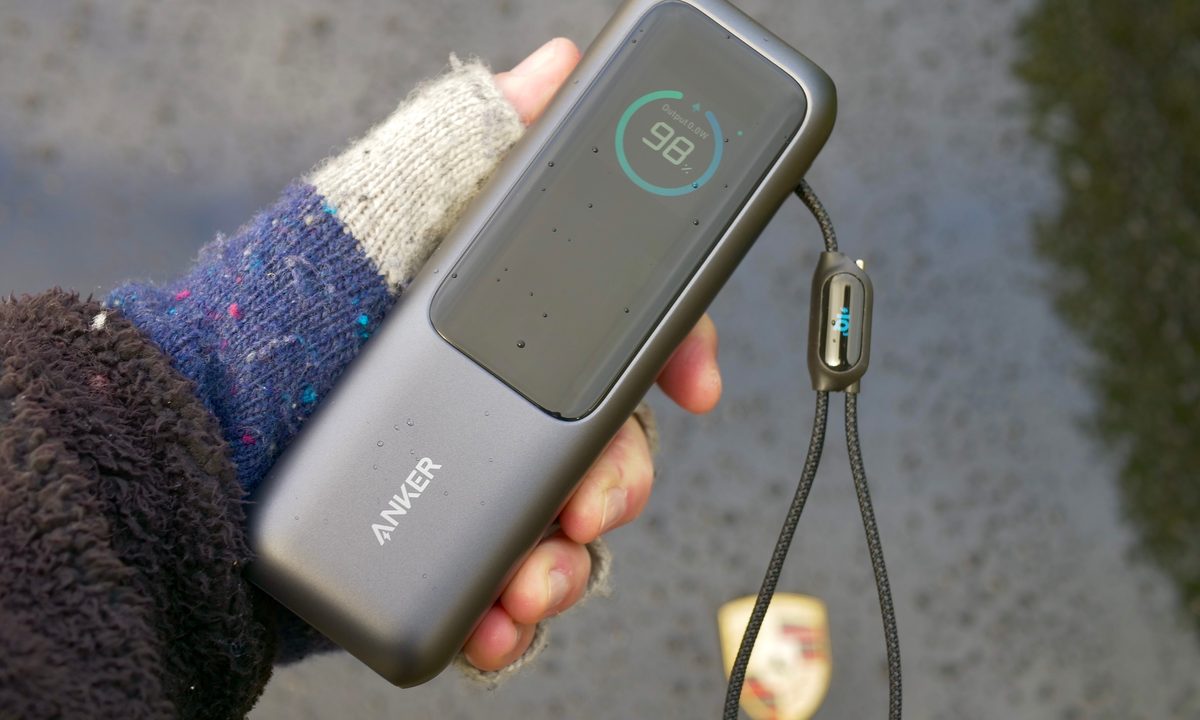

Anker has come to CES 2025 with one of the craziest power banks we’ve seen in a while. It’s as big as it is feature-packed, but the really unusual design aspect is how a built-in USB-C cable doubles up as a handy strap. It arrives alongside a new wall charger with multiple ports and even a display, which is powerful enough to rapidly recharge the new power bank. I’ve had a look at them both.
Anker 165W Power Bank

There’s a lot to take in with the latest Anker Power Bank, and it’s hard to know exactly where to start. Likely, the first thing you’ll notice is its considerable size and weight. It’s about as long as an iPhone 16 Pro Max, and the rectangular shape makes it look more like a compact Bluetooth speaker than a power bank. It’s not a pocket-friendly shape, and neither is the 592-gram weight.
The reason for its bulk is the whopping 25,000mAh cell inside, which is enough to fully recharge an iPhone 14 more than four times over. It also has enough strength to fully charge a 13-inch Apple MacBook Air. This makes it incredibly versatile, provided you’ve got somewhere to keep it when you’re out and about. On the technical side, the Power Bank has a total of 165W at your disposal, and it supports Power Delivery and PD-PPS, Quick Charge, and UFCS quick charging.


What about the cables? It has two USB-C cables built into the casing, a third USB-C port on the side, and a USB-A port. Take a quick glance, and it appears there’s a carry strap attached to the side, but the end unclips to become a super-strong 15cm charging cable. At the top of the charger, another USB-C connector is magnetically clipped to it, and when you give it a tug, you’ll find it’s attached to a 70cm automatically retractable cable. If you only intend to charge two devices using the Power Bank, you won’t need to carry any more cables with you.
On the front of the Power Bank is a TFT color screen controlled by a single button on the side of the case. It shows the amount of power remaining in the power bank, which connections are in use, the charging speeds, the internal temperature, and the overall health of the battery itself — including the number of charging cycles. For a power bank, it’s probably overkill for a lot of people, but it’s also likely the only power bank most people will need to buy.
Anker 140W Wall Charger with Display

When it comes to recharging the Anker Power Bank, the new 140W Anker Wall Charger does a great job. It pushed more than 90W into the Power Bank’s battery when I plugged it in and would fully recharge it from zero in less than two hours. There are four available ports, all on the underside of the wall charger, with two USB-C connections capable of delivering the full 140W, the third USB-C puts out 40W, and the USB-A connection a maximum of 33W. It supports Power Delivery 3.1 and UFCS fast charging.
The GaN wall charger is surprisingly compact, especially with its prongs folded flat, and the multiple connection options make it versatile enough that you likely won’t need another charger very often. There’s a color screen on the front showing charging data, temperatures, and an overview of the amount of time it has spent charging. You swipe across the section under the screen to change views, and it’s really responsive.


Putting the connections on the underside of the charger does make some sense, as it stops cables dragging the charger’s body out of the wall socket, and it works well when the charger is plugged into an upward-facing socket, too. However, it’s a bit awkward to plug another cable in when it’s horizontal without taking it out of the socket first. I like the bright screen and its reasonable 275-gram weight, plus it comes with a USB-C cable in the box.
Prices and availability

Both new charging products are up to Anker’s usual high build quality standards and feel really sturdy, and there are plenty of internal temperature checks to make sure they’re safe. The 140W Anker Wall Charger with the display — the first charger of its kind to feature one — will be released on January 7 for $90. The massive, innovative, and versatile Anker 165W Power Bank also comes out on January 7 and costs $100.
It’s great to see a company experimenting and innovating with charger design and functionality, and these two new chargers follow Anker’s excellent six-port 200W Prime Charging Station and its Wi-Fi-equipped 250W Charging Station, which have continued to be both useful and powerful since I started testing them.



