
As millions of people around the world work to develop their perfect at-home workout routine, Yoga has definitely come back into the fold. This timeless workout takes up very little space, and works as both a cardio and muscular workout. If you’re looking to get into this ancient practice on the go, at the office, or in your living room, any of these apps can help guide your way toward enlightenment.
Go deeper into your fitness routine and take a look at our picks for the best fitness trackers and the best fitness apps for the iPhone and Android.
Down Dog


This is a really nicely designed yoga app for practicing at home, whatever your level. Practices are broken down by type, level, and length, and the interface is easy to get to grips with. The best thing here is the mix of vocal instruction and background music. We like the fact you get a different session every time, but you can subscribe for $8 per month or $50 for a year and set up targeted sessions to focus where you want. You may want to pick up a yoga mat and yoga towel before you start though.
Yoga — Poses & Classes


Here’s a good yoga app for beginners. This workout app offers easy-to-follow instructions for more than 100 different poses. Each one is a downloadable video, so you can pick and choose what you want to try. There are also free classes to help you improve your balance, strength, and flexibility. You can unlock more content with a subscription, but it’s way overpriced at $4 per week or $13 per month. If you subscribe for a year, then it works out at $3 per month, which is a bit more reasonable.
Glo


Glo is a comprehensive at-home workout app featuring yoga, Pilates, and meditation classes all in one app. With over 3,000 yoga classes and personalized class recommendations, this app full of guided classes will help make your sessions more productive, focused, and help you reach results.
Simply Yoga


Simply Yoga guides you through a series of videos lasting between 20 minutes and an hour that cover more than 30 poses that you can do in the privacy of your own home. There’s some decent free content, but be prepared to put up with adverts. When you’re ready to move to the next level, you can opt to purchase the full version of the app, which includes the second level of workouts, the ability to create custom routines, landscape mode, and no more ads.
Pocket Yoga ($3)
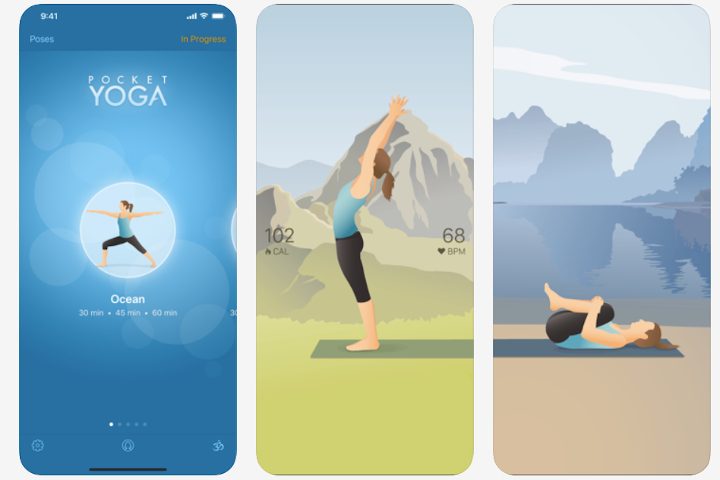
As the name implies, Pocket Yoga is something you can carry with you at any time so that you can do it wherever you go. It includes over 200 demonstrated poses and thorough voice guidance. Pocket Yoga is a comprehensive guide to yoga workouts. You can preview different moves and even play your own songs. The app will track your growth every step of the way. Pocket Yoga is also supported by Apple TV so that you can stream workouts using AirPlay. If you wear the Apple Watch, Pocket Yoga will use that to show the current pose, amount of time left, your heart rate, calories burned, and so much more.
Yoga Studio


With more than 80 yoga and meditation sessions, ranging from 10 to 60 minutes at any challenge level, Yoga Studio walks you through poses with HD video lessons. It has a broad catalog of over 280 poses, which should be enough for most people. This app can assist amateurs as well as experts. It’s also compatible with Apple TV so that you can play the videos via AirPlay. The app lets you pick from a variety of background sounds or music, or you can build a playlist from your own song library. If you want to access all the features, you can pay a subscription fee of $2 per month or $20 for the whole year.
5 Minute Yoga


If you don’t have sufficient time for a long yoga workout throughout the day, this app can help by giving you yoga activities lasting only five minutes. The barebones app is suitable for beginners, as it provides easy poses with a timer to ensure you’re doing them for five minutes. There is a voluntary premium subscription that you can pay on a monthly or annual basis. The costs range from $2 to $10 for the complete upgrade.


