1. Home
  2. Phones
  3. Android
  4. Mobile
  5. News

BlackBerry unveils the DTEK50, the ‘world’s most secure’ Android smartphone

Add as a preferred source on Google

Embattled phonemaker BlackBerry promised at least three new Android smartphones this year, and leaks suggested as much. Now, though, the Waterloo, Ontario-based company has officially confirmed one of them: On Tuesday, it announced the DTEK50, a handset it calls the “world’s most secure.” Another factoid for the Guinness books? It’s BlackBerry’s first touchscreen-only Android phone.

The utilitarian-sounding DTEK50 isn’t new, per se — it bears more than a passing resemblance to Alcatel’s Idol 4, which aligns with rumors that Alcatel partner TCL Communications will be handling BlackBerry’s short-term manufacturing duties. And perhaps unsurprisingly, the DTEK shares characteristics in common with its likely muse. It packs a 5.2-inch, 1080p display, and under the hood an octa-core Snapdragon 617 processor, 3GB of RAM, 16GB of storage, a non-removeable 2,610 mAh battery, and and a microSD card reader — just like the Idol 4. On the front is a 8MP front-facing shooter with a flash, also like the Idol 4, and around back is a nondescript 13MP camera above a soft-coated plastic BlackBerry logo.

phpfiucxe
Image used with permission by copyright holder

What the DTEK50 lacks in hardware originality, though, it makes up for in software. It ships with BlackBerry’s now-signature software features, many of which debuted alongside the Priv last November. One is the Hub, an aggregator of unread emails, instant messages, calendar notifications, frequent contacts, app notifications, and scheduled tasks. Another is DTEK, BlackBerry’s proprietary security solution that acts as a sort of firewall against malware and “other security problems.” If your network settings are configured insecurely, or if you have an app installed that’s a known bad actor, DTEK will suggest appropriate courses of action.

Recommended Videos

The DTEK50 runs Android 6.0 Marshmallow modified with encryption technology “originally developed for the BB10” platform, said BlackBerry, which includes a hardware Root of Trust, full disk encryption, and a secure bootloader, plus the promise of “rapid” updates and security fixes. “DTEK50 merges unique security and connectivity features … with the rich Android ecosystem,” Ralph Pini, head of BlackBerry’s device division, said in a press release.

The DTEK50 is available for pre-order in the U.S., Canada, the U.K., and several other European countries starting at $300 unlocked, and it’ll begin shipping from BlackBerry’s online store, Amazon, Best Buy, and B&H Photo during the week of August 8. It’s compatible with T-Mobile and AT&T on the U.S., and it comes bundled with an external battery pack.

blackberry-neon
Image used with permission by copyright holder

BlakBerry’s hoping the midrange DTEK50 will prove a hit among corporate types. The company’s first-ever Android phone, the Priv, launched in November, and contributed to the company’s disappointing 500,000 in device sales in the first quarter of this year — down significantly from the 2.1 million it sold in the same period in 2014. Analysts blamed the Priv’s substantial price tag — $700 — for the dip, a pressure point which BlackBerry’s obviously taken pains to remove with the affordable-by-comparison DTEK50.

BlackBerry chief John Chen has expressed a willingness to “cut loose” the company’s handset division if it can’t turn a profit — it needs to sell at least 3 million units a year at an average price of $300 to break even, he said in April. Last fiscal quarter, BlackBerry’s device division suffered a loss of $21 million, and its hardware accounted for less than 1 percent of the smartphone market.

Kyle Wiggers
Kyle Wiggers is a writer, Web designer, and podcaster with an acute interest in all things tech. When not reviewing gadgets…
I let this Galaxy S26 feature handle my battery, and it actually works
Galaxy S26 on a table

I have never been particularly good at managing my phone’s battery health. I know all the advice by now — avoid charging past 80 percent, do not let the battery drain completely, try not to leave the phone plugged in overnight. I know these habits the same way I know I should probably drink more water or sleep earlier. In theory, they make perfect sense. In practice, I rarely stick to them consistently.

So when I started using the Galaxy S26 and realized that Device Care’s optimization features were quietly handling a lot of this for me, my first reaction was skepticism. Phones have offered “smart” protection tools for years now, and most of them tend to disappear into the background after you switch them on once. Half the time, I forget those settings even exist. This felt different, though. Not because it was flashy or constantly reminding me it was there, but because I could actually feel it adapting to how I used my phone, rather than forcing me to change my habits around it.

Read more
I thought I needed an iPhone Pro until I paid attention to how I actually use it
iPhone 17 Pro

For a while, I had convinced myself that my next iPhone had to be a Pro. Not because I had genuinely thought about what I needed from a phone, but because the marketing slowly wore me down. The triple cameras, the titanium build, the ProMotion display, the idea that it could handle absolutely anything — it all created this lingering feeling that choosing the regular iPhone would somehow mean compromising. Like I would be missing out on the “real” experience. Then I stopped looking at spec sheets and started looking at my actual usage. And honestly, the entire argument for buying a Pro quietly fell apart.

Apple really knows how to make you doubt the regular iPhone

Read more
I used to dread moving files between devices — now I barely think about it
Android Quick Share with iPhone AirDrop

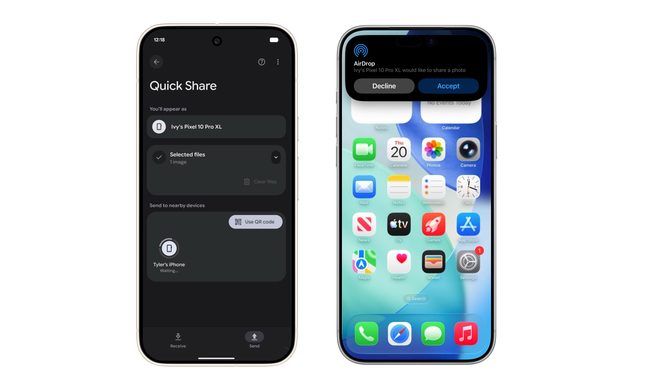
The kind of work I do involves constant file sharing, and with iPhones, Android phones, and a MacBook all part of my daily rotation, moving files between them used to be far more exhausting than it should have been. Something as simple as getting a photo or video from an Android phone onto my MacBook often turned into a mini process of its own. Most of the time, I had to upload files to Google Drive, wait for them to sync properly, and then download them again on the other device. It sounds manageable when you describe it once, but when you repeat that cycle several times a day, it starts feeling like a tax you pay with your time and patience.

This was mostly the result of ecosystems spending years building walls around themselves. Apple’s walls were obviously the tallest, but Android had its own barriers too. For the longest time, it felt like nobody was particularly interested in making these devices cooperate gracefully. But somewhere along the way, that started changing. And honestly, the difference it has made to my everyday workflow is much bigger than I expected.

Read more